Ok, I have also tested in a saber and it keeps happening.
Thanks, can you post the style information (top section of library generated code between /* and */) for the style you tested do I can recreate. I’ll try to take a look next time I get in front of my computer.
Sure. Quite a big one though. Using functions with many options.
I guess this is the interesting part:
Base Overlay Effect: Special Ability 1 Toggle
0: Glitchy Blade (Random)[Color: AltColor3Arg, Type: 1/2 Blade, Loop: Idle Random Loop, Time: 0, Delay: 5700, Mod: 0] Uses tr01.wav or tr01/
Here’s the full list of options:
/*copyright Fett263 Rotoscope (Primary Blade) OS7 Style
https://www.fett263.com/fett263-proffieOS7-style-library.html#Rotoscope
OS7.15 v3.217p
This Style Contains 259200 Unique Combinations
Style Options:
Default (0): Hyper Responsive Rotoscope (Original Trilogy)
1: Rotoscope - Single Color (Sequels)
2: Rotoscope (Subtle)
3: Rotoscope (Light)
4: Rotoscope (Subdued)


NOTE:This style includes Control Layer. Only one Control Layer should be used per preset.

--Effects Included--
Base Overlay Effect: Special Ability 1 Toggle
0: Glitchy Blade (Random)[Color: AltColor3Arg, Type: 1/2 Blade, Loop: Idle Random Loop, Time: 0, Delay: 5700, Mod: 0] Uses tr01.wav or tr01/
Preon Effect Options: Default (0): Disable, 1: Overload, 2: Faulty Ignition, 3: Erratic (Apocalypse Version), 4: Force Drain (Decay Version), 5: Emitter Heat Up [Color: PreonColorArg]
Ignition Effect Options: Default (0): Standard Ignition, 1: Wipe + Fade, 2: SparkTip Ignition, 3: Cycle Up, 4: Metal Forge (Heat Up) [Color: IgnitionColorArg]
PowerUp Effect Options: Default (0): Disable, 1: Power Flash, 2: Power Burst Forward, 3: Unstable Power Up Forward, 4: Power Surge (Stable), 5: Power Surge (Unstable V2) [Color: IgnitionColorArg]
Retraction Effect Options: Default (0): Standard Retraction, 1: Wipe In + Fade, 2: SparkTip Retraction, 3: Cycle Down, 4: Metal Forge (Cool Down), 5: Fade Out [Color: RetractionColorArg]
CoolDown Effect Options: Default (0): Disable, 1: Power Flash, 2: Power Burst Reverse, 3: Unstable Cool Down Reverse [Color: RetractionColorArg]
PostOff Effect Options: Default (0): Disable, 1: Emitter Cool Off (Emitter Size), 2: Emitter Glow (Emitter Size), 3: Emitter Spark (Emitter Size) [Color: PostOffColorArg]
Lockup Effect:
0: mainLockMulti0Shape - Begin: Real Clash - Style: Intensity AudioFlicker - End: Full Blade Absorb
[Color: LockupColorArg]
Lightning Block Effect:
0: mainLBMulti0Shape - Begin: Responsive Impact - Style: Strobing AudioFlicker - End: Full Blade Absorb
[Color: LBColorArg]
Drag Effect:
0: mainDragMulti0Shape - Begin: Wipe In - Style: Intensity Sparking Drag - End: Wipe Out
[Color: DragColorArg]
Melt Effect:
0: mainMeltMulti0Shape - Begin: Wipe In - Style: Intensity Melt - End: Wipe Out
[Color: StabColorArg]
Stab Effect: Normal Stab [Color: StabColorArg]
Blast Effect (Randomly Selected): Blast Wave (Random), Responsive Blast Fade (Random) [Color: BlastColorArg]
Clash Effect: Real Clash V1 [Color: ClashColorArg]
Swing Effect Options: Default (0): Disable, 1: Bright Swing (Scaled Cutting Edge), 2: Unstable Swing (Scaled Cutting Edge) [Color: SwingColorArg]
Special Ability 3: Toggle Rain Mode Uses trloop00.wav or trloop/000/000.wav (rain sounds looped)
Special Ability 4: Toggle Rain and Lightning Mode Uses trloop02.wav or trloop/002/000.wav (rain sounds looped) and tr02.wav or tr/002/000.wav (thunder or lightning strike)

*/
OK, this should be resolved but I had to make a bunch of changes to how these are built and didn’t have time to fully test all of the combos and option controls. If something pops up just provide the style information from the code the library generates. You’ll need to refresh the page to get the updated scripts.
One note, on the Previewer when you’re setting up styles and using the sound option the sounds won’t actually start playing until you click one of the Control buttons under the previewer; like Clash, Blast, Swing, Special, etc. This is intentional, as the previewer will keep resetting the sound on every change you make so while building the style it was really annoying. While you’re building or tweaking your Overlays (or other Enhancements) the looped sound for these will stop until you’re done building, when done click any of the Control buttons under the previewer for the sounds to begin. If you make changes the sounds stop again until you click a Control button.
I have tested it, and now the sound only plays when the overlay is activated, but there seems to be no animation anymore on the saber, although they are previewed correctly. I’ve tried two effects, glitch and electric surge.
Here are the full style informations:
copyright Fett263 Rotoscope (Primary Blade) OS7 Style
https://www.fett263.com/fett263-proffieOS7-style-library.html#Rotoscope
OS7.15 v3.218p
This Style Contains 311040 Unique Combinations
Style Options:
Default (0): Hyper Responsive Rotoscope (Original Trilogy)
1: Rotoscope - Single Color (Prequels)
2: Rotoscope (Subtle)
3: Rotoscope (Light)
4: Rotoscope (Subdued)


NOTE:This style includes Control Layer. Only one Control Layer should be used per preset.

--Effects Included--
Base Overlay Effect: Special Ability 1 Toggle
0: Electric Surge[Color: IgnitionColorArg, Type: Full Blade, Loop: Idle Random Loop, Time: 0, Delay: 5700, Mod: 0] Uses tr01.wav or tr01/
Preon Effect Options: Default (0): Disable, 1: Faulty Ignition, 2: Overload, 3: Erratic (Apocalypse Version), 4: Force Drain (Decay Version), 5: Emitter Heat Up [Color: PreonColorArg]
Ignition Effect Options: Default (0): Standard Ignition, 1: Wipe + Fade, 2: SparkTip Ignition, 3: Cycle Up, 4: Metal Forge (Heat Up), 5: Glitch On [Color: IgnitionColorArg]
PowerUp Effect Options: Default (0): Disable, 1: Power Flash, 2: Power Burst Forward, 3: Unstable Power Up Forward, 4: Power Surge (Stable), 5: Power Surge (Unstable V2) [Color: IgnitionColorArg]
Retraction Effect Options: Default (0): Standard Retraction, 1: Wipe In + Fade, 2: SparkTip Retraction, 3: Cycle Down, 4: Metal Forge (Cool Down), 5: Glitch Off [Color: RetractionColorArg]
CoolDown Effect Options: Default (0): Disable, 1: Power Flash, 2: Power Burst Reverse, 3: Unstable Cool Down Reverse [Color: RetractionColorArg]
PostOff Effect Options: Default (0): Disable, 1: Emitter Cool Off (Emitter Size), 2: Emitter Glow (Emitter Size), 3: Emitter Spark (Emitter Size) [Color: PostOffColorArg]
Lockup Effect:
0: mainLockMulti0Shape - Begin: Real Clash - Style: Intensity AudioFlicker - End: Full Blade Absorb
[Color: LockupColorArg]
Lightning Block Effect:
0: mainLBMulti0Shape - Begin: Responsive Impact - Style: Strobing AudioFlicker - End: Full Blade Absorb
[Color: LBColorArg]
Drag Effect:
0: mainDragMulti0Shape - Begin: Wipe In - Style: Intensity Sparking Drag - End: Wipe Out
[Color: DragColorArg]
Melt Effect:
0: mainMeltMulti0Shape - Begin: Wipe In - Style: Intensity Melt - End: Wipe Out
[Color: StabColorArg]
Stab Effect: Normal Stab [Color: StabColorArg]
Blast Effect (Randomly Selected): Blast Wave (Random), Responsive Blast Fade (Random) [Color: BlastColorArg]
Clash Effect: Real Clash V1 [Color: ClashColorArg]
Swing Effect Options: Default (0): Disable, 1: Bright Swing (Scaled Cutting Edge), 2: Unstable Swing (Scaled Cutting Edge) [Color: SwingColorArg]
Special Ability 3: Toggle Rain Mode Uses trloop00.wav or trloop/000/000.wav (rain sounds looped)
Special Ability 4: Toggle Rain and Lightning Mode Uses trloop02.wav or trloop/002/000.wav (rain sounds looped) and tr02.wav or tr/002/000.wav (thunder or lightning strike)
copyright Fett263 Rotoscope (Primary Blade) OS7 Style
https://www.fett263.com/fett263-proffieOS7-style-library.html#Rotoscope
OS7.15 v3.218p
This Style Contains 311040 Unique Combinations
Style Options:
Default (0): Hyper Responsive Rotoscope (Original Trilogy)
1: Rotoscope - Single Color (Prequels)
2: Rotoscope (Subtle)
3: Rotoscope (Light)
4: Rotoscope (Subdued)


NOTE:This style includes Control Layer. Only one Control Layer should be used per preset.

--Effects Included--
Base Overlay Effect: Special Ability 1 Toggle
0: Glitchy Blade (Random)[Color: IgnitionColorArg, Type: Full Blade, Loop: Idle Random Loop, Time: 0, Delay: 5700, Mod: 0] Uses tr01.wav or tr01/
Preon Effect Options: Default (0): Disable, 1: Faulty Ignition, 2: Overload, 3: Erratic (Apocalypse Version), 4: Force Drain (Decay Version), 5: Emitter Heat Up [Color: PreonColorArg]
Ignition Effect Options: Default (0): Standard Ignition, 1: Wipe + Fade, 2: SparkTip Ignition, 3: Cycle Up, 4: Metal Forge (Heat Up), 5: Glitch On [Color: IgnitionColorArg]
PowerUp Effect Options: Default (0): Disable, 1: Power Flash, 2: Power Burst Forward, 3: Unstable Power Up Forward, 4: Power Surge (Stable), 5: Power Surge (Unstable V2) [Color: IgnitionColorArg]
Retraction Effect Options: Default (0): Standard Retraction, 1: Wipe In + Fade, 2: SparkTip Retraction, 3: Cycle Down, 4: Metal Forge (Cool Down), 5: Glitch Off [Color: RetractionColorArg]
CoolDown Effect Options: Default (0): Disable, 1: Power Flash, 2: Power Burst Reverse, 3: Unstable Cool Down Reverse [Color: RetractionColorArg]
PostOff Effect Options: Default (0): Disable, 1: Emitter Cool Off (Emitter Size), 2: Emitter Glow (Emitter Size), 3: Emitter Spark (Emitter Size) [Color: PostOffColorArg]
Lockup Effect:
0: mainLockMulti0Shape - Begin: Real Clash - Style: Intensity AudioFlicker - End: Full Blade Absorb
[Color: LockupColorArg]
Lightning Block Effect:
0: mainLBMulti0Shape - Begin: Responsive Impact - Style: Strobing AudioFlicker - End: Full Blade Absorb
[Color: LBColorArg]
Drag Effect:
0: mainDragMulti0Shape - Begin: Wipe In - Style: Intensity Sparking Drag - End: Wipe Out
[Color: DragColorArg]
Melt Effect:
0: mainMeltMulti0Shape - Begin: Wipe In - Style: Intensity Melt - End: Wipe Out
[Color: StabColorArg]
Stab Effect: Normal Stab [Color: StabColorArg]
Blast Effect (Randomly Selected): Blast Wave (Random), Responsive Blast Fade (Random) [Color: BlastColorArg]
Clash Effect: Real Clash V1 [Color: ClashColorArg]
Swing Effect Options: Default (0): Disable, 1: Bright Swing (Scaled Cutting Edge), 2: Unstable Swing (Scaled Cutting Edge) [Color: SwingColorArg]
Special Ability 3: Toggle Rain Mode Uses trloop00.wav or trloop/000/000.wav (rain sounds looped)
Special Ability 4: Toggle Rain and Lightning Mode Uses trloop02.wav or trloop/002/000.wav (rain sounds looped) and tr02.wav or tr/002/000.wav (thunder or lightning strike)
Odd, out of curiosity which version of Arduino and the Proffieboard plugin are you using? I feel like there’s been some odd style results on the v4.6 plugin for some users. I still use the v3.6.0 plugin and haven’t really had time to test on the v4.6 plugin yet. If you have the v4 plugin (Arduino > Tools > Board: Proffieboard > Board Manager > search “Proffieboard”) and see if it’s the v4 plugin you’re using. If so, maybe try reverting to 3.6.0 and test just to see if its the plugin.
I’ll try to test on my end, but not sure if I’ll get time before the weekend.
I’m on Arduino 1.8.3 with plugin 4.6. I’ll try it with the older plugin version.
I’ve update Arduino to 2.3.8 and now it works. I did not change anything else - same config, same plugin (4.6.0). Weird, but problem solved.
Thanks, I’m going to check with profezzorn on this, it seems some nore complex styles have acted funny for users using 4.6.
He-Man Gesture Based Multi-Phase Power Sword Transformation for Early Access ProffieOS7/8
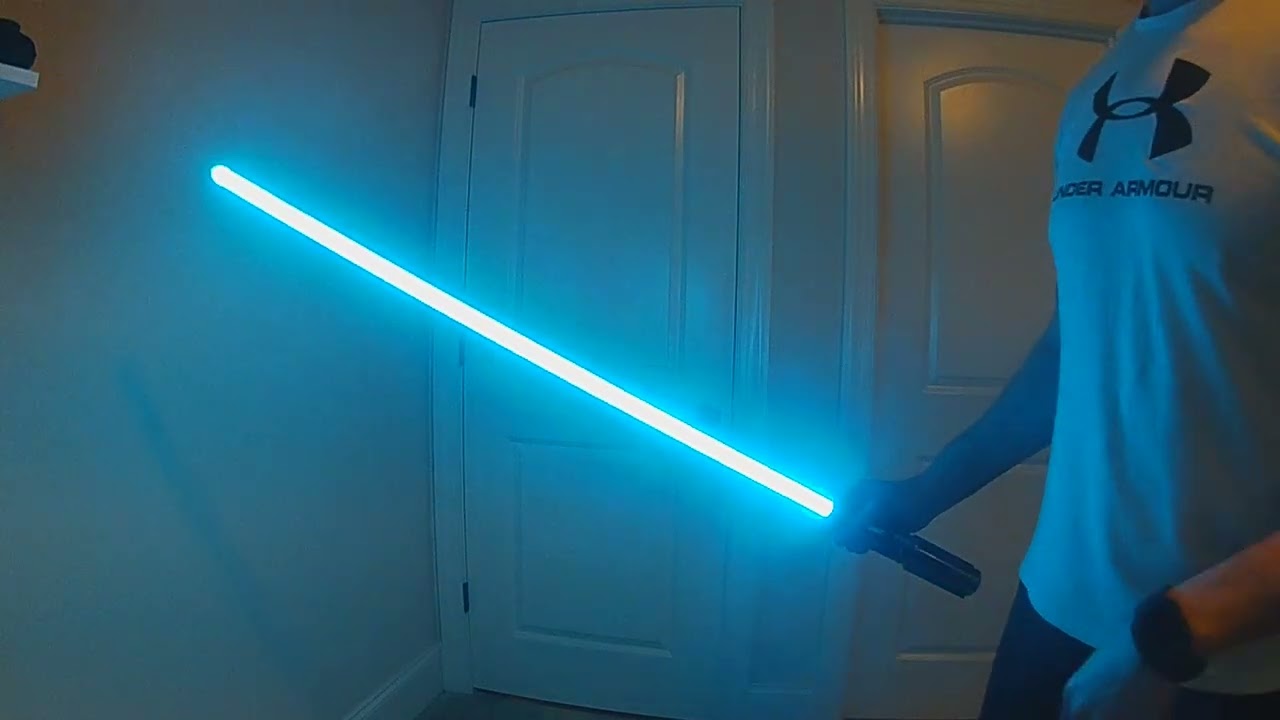
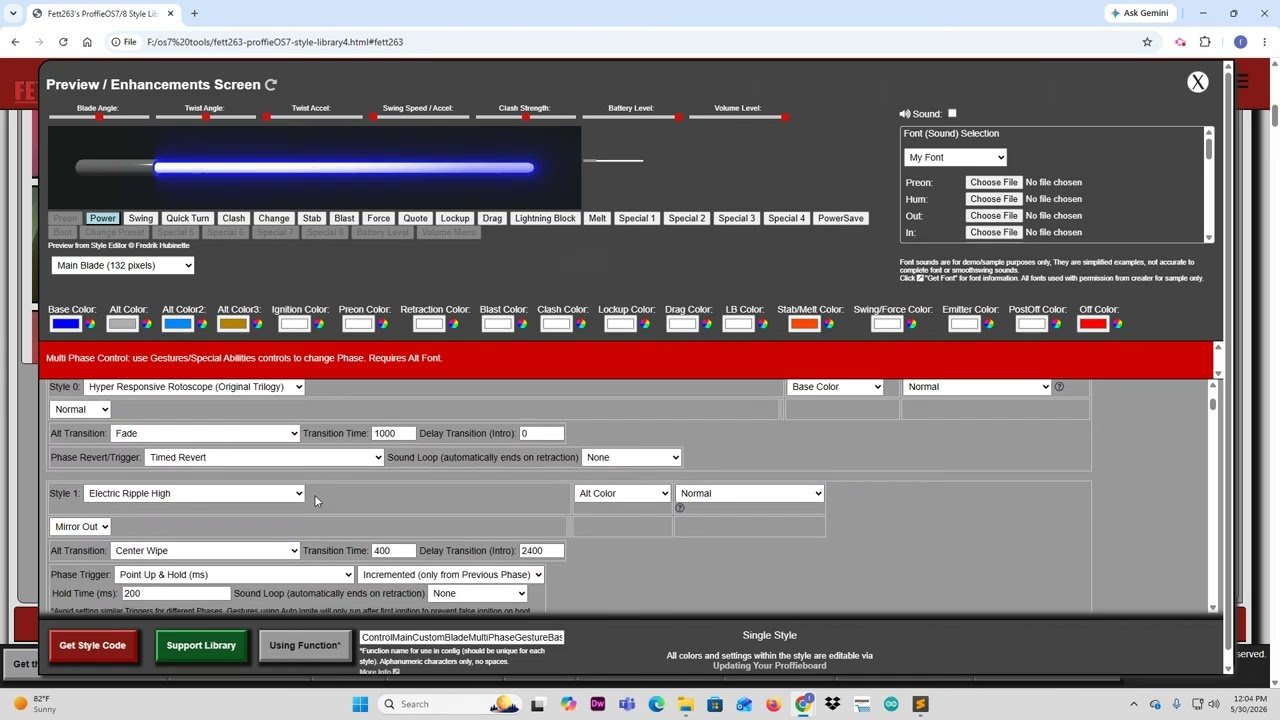
In honor of the upcoming He-Man film I’ve designed a new Gesture Based Multi-Phase blade style in my Early Access Library to honor He-Man’s iconic transformation from the 80s cartoon.
I wanted to make a fully interactive style that honors the full transformation but allows it to be completely user controlled. In addition, I wanted to tie the music into the transformation so I expanded the options in the Blade Builder to allow for a Sound Loop to be toggled on/off depending on the active “Phase”.
For this style, I set up the Gesture Based Special Abilities to use the Incremental feature, which means each step has to happen in a specific order so that you can still use the blade normally after the transformation.
- It’s set up with a default Blue Rotoscope style: When you point the blade up and hold it for a short time it will trigger the Alt change, I’ve set up the altchng sound for Phase 1 to be the iconic “By the Power of Greyskull” quote along with the music cue and sound effects from the cartoon (forgive my quick Audacity shop job). There is a new Delay feature in the blade builder to delay the animation, this is so the quote can start as it did in the cartoon before the lightning and electricity animation begins. At the same time the new Sound Loop for the music will toggle on. This allows the music to play during the entirety of the blade being powered up.
- The interim “Powered Up” phase uses a new Electricity Ripple style with a Mirror Out modification to honor the original cartoon animation. For this alt phase I used an unstable blade font, the music will keep looping via the Sound Loop as well for however long you stay in this phase.
- To finalize the transformation you’ll hold the blade parallel, this will trigger the final phase change and plays the last altchng which is the “I have the Power” quote, electricty and Battle Cat roar along with the final “He-Man” chant like in the cartoon.
- The blade’s final form is a DeepSkyBlue rotoscope. This form will remain active until you do the Gesture control to revert to the default and start over. For my style I set the Revert gesture to Point Down and Ignite, but you can set anything you want to revert.
This style is only available on my Early Access library and I have the altchng and trloop sounds I made in Audacity available. I am definitely not a Font maker so hopefully one of our talented font makers create better versions, but I have the ones I used available, you’ll just need to add them to a font of your choosing and will need to set up alt000, alt001 and alt002 in the font to support the 3 Phase steps.
ProffieOS7/8 Style Library