ProffieConfig v1.8.0 testing

Beta 2 has been released.

Found critical issues in both macOS and Win32 builds, fix in progress and will update shortly

ProffieConfig v1.8.0 is almost here, and it’s almost a complete “remaster,” shall we say, of ProffieConfig (almost every bit of code has been updated in one way or another).

Ultimately I’d like if a few people could test it, once it’s ready in probably a couple days or so. I’m starting this to have the write-up in place and for awareness.

At a high level, the main thing to ensure is that various different configs are able to be imported, and that there aren’t discrepancies between the config and what shows up after import.

More focused testing for versions I’ll have to expand on below, but in any case it’d be ideal to get a couple people to just run through using the feature (I’ll explain how in a future post) to make sure it’s not horribly broken in certain cases for whatever reason.

What’s New?

  • Massive internal rework
  • New layout on almost all pages and dialogs to accommodate logical updates
  • Updates to blades handling
    • Substantially more full subblade support
    • “SplitVisualizer” UI on blades page to view how a WS281X blade is segmented.
    • Split presets and blade arrays
  • Expanded view for bladestyles
  • Lots of parsing fixes and updates
  • Multi-OS Support
  • Multi-Prop version support (OS-mapped)
  • Preliminary per-OS Arduino core customization support
  • Update channels
  • And More :tm: (I’m just serious, I’ve written and rewritten a lot of code, I don’t remember it all… that’s what git is for!)

A Lot Of Words

The internal data handling for the configuration has been completely redone (ported from V2 systems, sans a couple of those features), and so of course with that comes the likelihood that a lot could potentially be broken, and that’s a major part to be tested, just trying things and seeing what breaks.

The logic for settings interaction was also completely redone since all the configuration data was moved over to the new internal format, so it’s possible some of that is broken too.

The main event of course is the versioning system and new os and prop stuff. Sabersense and BC have some preliminary pconfs they’ve shared with me, and those (with a little work to update them, although there shouldn’t be much) would probably be prime candidates for testing OS8 w/ props.

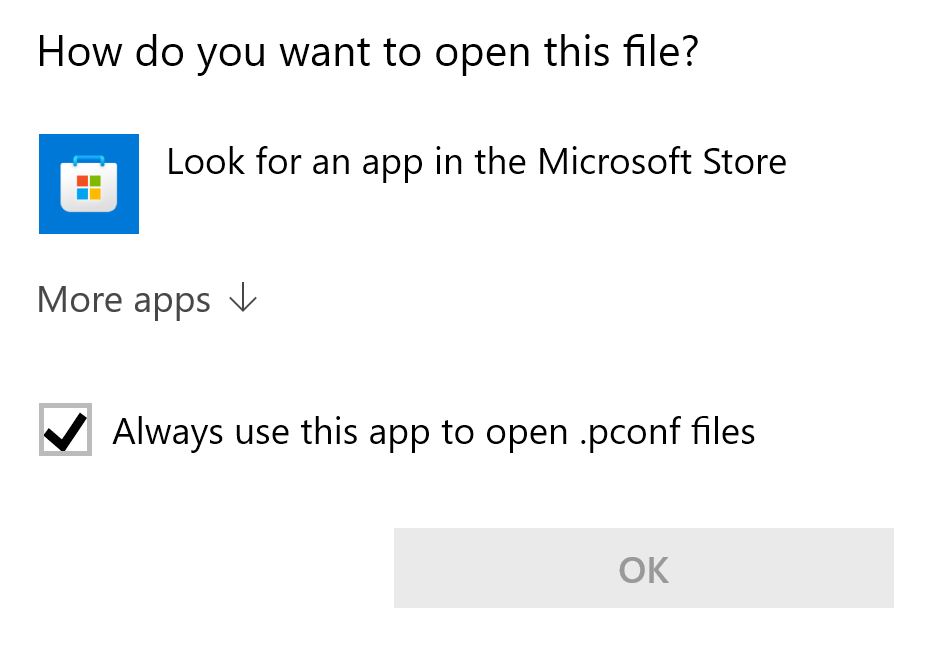
Less exciting, the PConf file format is more of a proper file format now, with properly structured rules and dedicated libpconf handling library. I plan to write an updated version of the pconf explainer. If anyone’s particularly curious though I’d be happy to expedite at least a preliminary version of that for reference.

Another interesting tidbit is that, since ProffieConfig’s build system has been updated to the V2 setup (with some updates along the way), it’s substantially easier for people besides me to build ProffieConfig for themselves if they’d be interested in contributing (or just messing about/exploring). I suspect there’s probably not anyone who’s actually interested in that, but if you’re reading this and you are, I’ve documented it here.

How does this actually work?

To “break out” of the stable/normal release channel, a new version of the launcher is going to be made available which supports changing what “channel” updates are pulled from. This allows me to, for example, have a “beta” channel for things like this.

From v1.7, it’s a little tricky though. Once you have the new launcher downloaded and installed, you’ll need to navigate to the ProffieConfig data directory to edit the .state.pconf, since there’s no UI for changing the channel in v1.7 and earlier.

On Windows that’s:
C:\Users\[you]\AppData\Roaming\ProffieConfig\
On macOS that’s:
/Users/[you]/Library/Application\ Support/ProffieConfig/
On Linux that’s:
/home/[you]/.local/share/ProffieConfig/

For backwards compatibility reasons (read: past ryan was dumb), .state.pconf starts with a ., and so may be hidden unless you show hidden files in your file manager.

Inside of the state file, just add a new line with a PConf entry whose name is UPDATE_MANIFEST, and whose value is beta:

UPDATE_MANIFEST: beta

The .state.pconf file may be opened with any regular text editor. Choose your favorite. Even just Windows Notepad or macOS TextEdit will work.

Once that’s done, starting up proffieconfig/its launcher should prompt you to update to whatever new version is available.

Updates

See ProffieConfig v1.8.0 testing - #3 by ryryog25

3 Likes

Alright, here we go.

Let’s see how much is broken that I didn’t catch on my end!

First things first:

  • For questions and comments and things of the like, please post those in this thread
  • For actual bugs and issues anyone finds, please post those as issues to the ProffieConfig GitHub Issues page

Launcher Download

The instructions for what to do with the new launchers are above, and the launchers can now be found here:

Old Betas

Release 1.8.0 Beta · ryancog/ProffieConfig · GitHub

OS/Versions Testing

By default on first run ProffieConfig will download ProffieOS 7.15 and associated prop files.

(This isn’t done automatically on “old” installations yet, I plan to add it shortly, for now just re-run the setup for the easiest way to have it happen)

Overview

In the main window “File” menu there is an option to manage versions.

This opens a new window where both ProffieOS and Prop file versions can be viewed.

Prop files are lazily linked to (potentially multiple) ProffieOS versions. This linking is configured with the “Supported Versions” area on the bottom right. With a prop selected its supported versions can be modified in the UI.

Additionally you can show the versions folder (in the file menu), make changes manually, then reload the versions data. (Also in the file menu)

Adding a Prop

To add a prop you’ll need a pconf data file (see the versions folder for examples), the header .h file itself, and to give the prop a unique name.

The name displayed in the config editor is the name specified in the prop data file. The name in the versions UI is meant to be unique between versions of the same prop.

Adding a ProffieOS Version

Similarly, ProffieOS versions can be added with a unique version and by providing a ProffieOS folder via the OS tab of the versions manager.

Not implemented in UI, the ProffieOS folder may contain a ‘default_prop.pconf’ to specify information about the default prop in a ProffieOS version, and an `info.pconf’ can be specified which can change which version of the Arduino Plugin to use, as well as URL to retrieve it from.

You can play around with these data files if you like, (the code than handles that can be traced starting from here), but for the time being that’s kind of a secondary thing (although the core version is important for OS8)

Closing

I’m glossing over stuff at the moment because I’m a bit tired of looking at it all if I’m being honest, but I’ll be happy to answer questions if there’s somewhere my explanations have fallen short, and I’ll definitely be keeping an eye on the issue tracker.

This version has been a solid couple months ish of work, so I’m relieved it’s mostly done. :sweat_smile:

1 Like

Notable Items

(For testing, awareness, or otherwise)

  • macOS ARM support: this build is the first to support ARM natively on macOS, and so I’m expecting at least a couple surprises because of that.

  • In the first run, the guides and docs link currently 404s, it’s not in place yet, this I’m aware of.

Resolved
  • Win32 SplitVisualizer I don’t think renders correctly. I’ve yet to test it on a real Windows machine. It was a bit fiddly on GTK (originally written on macOS), and I think Windows may have similar issues.

  • Windows pconf parser seems to have some issues, I’ll look into it

  • Windows icons are currently not resizing properly.

  • Yep, Windows SplitVisualizer does not render properly.

  • POSIX (macOS/Linux) libprocess was broken in a very recent commit. A quick fix, I’ll get to it tomorrow.

  • Newlines in preset names get messed up

Hi Ryan,

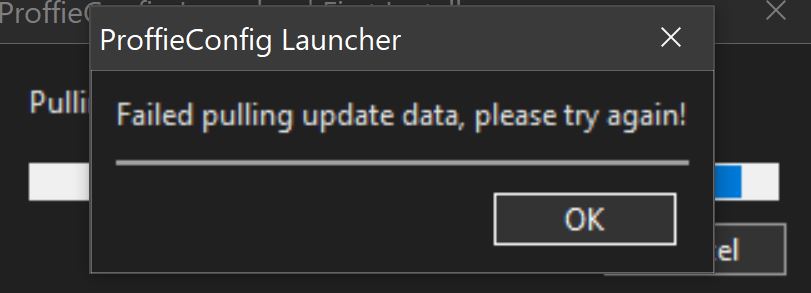
when trying to install, I get this error (on Windows10)

This is after modifying the state file? What does that file look like currently?

EDIT: I’m able to reproduce this… looks like it’s 403’ing… which is weird…

Hmm, ok. On my machine something about the PROPS section from v1.7 is messing with the pconf parser. If I had to guess it’s an oversight with Windows line endings.

If I remove the props section (since it’s no longer used anyways) and the add the manifest entry, things seem to work, however for some reason it simply won’t update. It recognizes the new version (I can see in logs) but it simply skips over it.

Weird that on other platforms it updated fine… that’s something I’ll take a look at tomorrow.

For now:

If you experience that, you can uninstall but keep user data, then reinstall with the new launcher and with the state file setup with the manifest entry.

Well, I did say to expect broken things :sweat_smile:

I first did uninstall previous version (was installed in March 2025) I kept user data.

I am getting the same error with the launcher from this page:

If you try to download
https://proffieconfig.kafrenetrading.com/assets/appsupport/update/manifest.pconf

(Or manifest-beta.pconf)

Are you able to?

Sounds like maybe something’s being weird for you server side…

The old launcher version shouldn’t have any reason to have that issue…

Unless I messed something up very bad.
I’ll get back to you on this tomorrow, it’s very possible I messed something up on the server.

EDIT: I’m not able to… it’s 403’ing. Something seems to have been broken on my end.

Stand by.

@olivierflying747-8 Try it now and see.

EDIT: Okay. I’m running through things on an actual windows machine and it seems there’s several critical things broken that didn’t present themselves before.

That’s disappointing, but for now I’d just hold off on messing with it.

I’ll try and get that fixed tomorrow and send out the new build.

I’ll let you know when I do.

I downloaded it but I have no idea what to do with a “.pconf” file ?

You can open it in a normal text editor.
You don’t need to though.

I was just curious if you could download it with a normal web browser, but it turned out I broke things server side and whether or not you could actually download the file was just fiddy so I didn’t realize. (I.e. it worked for me on the other computer, but not others or for you)

I managed to open it with Sublimetext. It’s bed time for me now. So I’ll try again when you post an update.

1 Like

Let’s Try this again

Yesterday I decided I wanted to try and put some more effort into this, so I did.

There’s a new beta out, and things seem to be working a lot better for me across the board. I trust y’all will be able to break it in due time, but I think it may stand a fighting chance :wink:

I’ve updated the links above, and the general format is the same.

Note for Updating from 1.7

If you’re updating from 1.7.x, you will need to make sure the first-time setup runs. (If it doesn’t because you’re updating, you can trigger it from the main menu Help->Re-Run Setup). This makes sure that the new versioned props and proffieOS is downloaded.

The migration stuff isn’t quite built out yet. That and the “reset” dialog on the versions manager don’t currently work. Everything else should, however.

Oh, and if you’re on Windows (as most of y’all are) you can say goodbye to the ugly CMD window. It’s gone away, and does not plan on coming back :slight_smile:

I’ve updated the Notable Items to reflect the resolved issues and a new known issue.

I’ll keep it updated as issues are found. Issues are best reported on GitHub though then I can link them here. I’m not opposed to bringing them up here for discussion, however.

1 Like

I’ve gotten testing for the versioning and for a few different configs, and after a few relatively minor bugfixes things seem to be working alright.

The last major thing to test is someone who’s got an M-series mac to test that build out.

And then of course just running a few more configs through it to get some more coverage. Especially with more complex blade configs/arrays.

1 Like

Usually people stay in their given OS lane (windows people stay on windows, etc.), but any thoughts on making a Linux version?

There actually is one! :laughing:

For UI ProffieConfig uses a cross-platform wrapper library (wxWidgets), and throughout ProffieConfig’s life I’ve maintained the UI and functionality on Linux to make sure it at least generally still works.

I haven’t (seriously, technically there are some released for 1.8 but I have no clue if they work, likely not) released binaries because I haven’t taken the time to research how to make things work well as far as system libraries. I’m not sure how much things vary between distro and version, and what the best way to (gracefully) deal with things missing and such

Currently the primary ProffieConfig binary on linux links in these libraries.

Most of them are linked by wxWidgets, and I’ve removed ProffieConfig’s own libraries from the list since it makes sure those are installed, obviously.

libstdc++.so.6
libm.so.6
libgcc_s.so.1
libc.so.6
libgobject-2.0.so.0
libglib-2.0.so.0
libgtk-3.so.0
libgdk-3.so.0
libpangocairo-1.0.so.0
libpango-1.0.so.0
libcairo-gobject.so.2
libcairo.so.2
libgdk_pixbuf-2.0.so.0
libgio-2.0.so.0
libX11.so.6
libSM.so.6
libxkbcommon.so.0
libXtst.so.6
libpangoft2-1.0.so.0
libfontconfig.so.1
libcurl-gnutls.so.4
libffi.so.8
libatomic.so.1
libpcre2-8.so.0
libgmodule-2.0.so.0
libharfbuzz.so.0
libfribidi.so.0
libatk-1.0.so.0
libepoxy.so.0
libXi.so.6
libatk-bridge-2.0.so.0
libcloudproviders.so.0
libXfixes.so.3
libwayland-client.so.0
libwayland-cursor.so.0
libwayland-egl.so.1
libXext.so.6
libXcursor.so.1
libXdamage.so.1
libXcomposite.so.1
libXrandr.so.2
libXinerama.so.1
libthai.so.0
libz.so.1
libpng16.so.16
libfreetype.so.6
libXrender.so.1
libxcb.so.1
libxcb-render.so.0
libxcb-shm.so.0
libpixman-1.so.0
libjpeg.so.62
libmount.so.1
libselinux.so.1
libICE.so.6
libuuid.so.1
libexpat.so.1
libnghttp3.so.9
libngtcp2_crypto_gnutls.so.8
libngtcp2.so.16
libnghttp2.so.14
libidn2.so.0
librtmp.so.1
libssh2.so.1
libpsl.so.5
libnettle.so.8
libgnutls.so.30
libgssapi_krb5.so.2
libldap.so.2
liblber.so.2
libzstd.so.1
libbrotlidec.so.1
libgraphite2.so.3
libatspi.so.0
libdbus-1.so.3
libdatrie.so.1
libbz2.so.1.0
libXau.so.6
libXdmcp.so.6
libblkid.so.1
libunistring.so.5
libhogweed.so.6
libgmp.so.10
libcrypto.so.3
libp11-kit.so.0
libtasn1.so.6
libkrb5.so.3
libk5crypto.so.3
libcom_err.so.2
libkrb5support.so.0
libsasl2.so.2
libssl.so.3
libbrotlicommon.so.1
libsystemd.so.0
libkeyutils.so.1
libresolv.so.2
libcap.so.2

Not as much care has been taken with making sure the launcher works, much less sets things up to be useful on Linux (e.g. no desktop entry is made, so the launcher just kind of hides itself away and doesn’t provide an easy way to find it).

However

It might work.

A linux build of the launcher is available at the same GitHub link as the other versions, and it installs itself to $HOME/.proffieconfig (if you wanted to create a desktop entry for it, or just run it directly), and it’ll only work if you switch the manifest to beta first (since no binaries are provided for 1.7.x). The instructions for switching the manifest are in the first post.

You’ll probably need to manually install some libraries with your package manager, and I’m not 100% certain if the paths are the same (and/or how many compatibility stubs/paths are provided) across distros, but it might work.

Also worth mentioning

If you’re willing to experiment a bit, you could build ProffieConfig from sources yourself. Since it relies on a custom build of wxWidgets, it takes a while to build, and my script to build wxWidgets is a little hacky.

You’d have to check the wxWidgets configure.log as it inevitably spits errors about needing to install libraries. Luckily your package manager almost certainly has them.

If things go right the build is fairly automated, but I make few promises that it’ll work on your distro/version. I build/have built on Debian Trixie and (a fairly recent version of) openSUSE Tumbleweed. The main instructions are here.

If you do feel like messing with it, feel free to ask questions. I’d be curious to know how it goes.

1 Like

Oh, I just remembered, Serial Monitor testing on Windows would be appreciated also, if anyone wants to check it out.

Well, I haven’t heard anything more, I guess this is something of a last call before I just push things out.

Would really want some macOS ARM/M-series Mac testing before that at least, but if there’s no one to test I’ll just push it out and see if I hear about it then :sweat_smile:

It’s out.

If you’re on the beta, you can go back to stable with the Update Channel interface under the File menu.

Not too much more to say. Not much changed from the beta besides a few tweaks for 1.7->1.8 migration and a couple minor fixes.

2 Likes