I am trying to add bladestyles with 2 kyberphonic fonts being party mode for the party saber sound font from the survivor 2 bundle and pull to the darkness/corruption for the osha sound font from the acolyte I am unsure of where to add the style code in the config and what is the necessary code and what is copyright fluff that I can just ignore when copying. I added the FETT263 SPECIAL ABILITIES define and I am running Proffie OS 8.10 with a Proffieboard V2.2. I am so new with coding so any help is appreciated. let me know if any of this doesn’t make sense and thanks in advance.
Did you watch the Recommended videos at the top of my library?
If you’re new to updating your Proffieboard I’d recommend starting with this page.
I got the code error to fix but I have one more question: Do I have to use your font folder for the party saber or can I just transfer the alt folders to Kyberphonics version of the party?
Here is the link to the pastebin just incase I am missing anything.
and yes I watched the video
You’ll need the altNNN folders set up in your “Battle2” font (since that’s the font for that preset).
If you’re unsure how to set up the altNNN folders go back to the “Phases and Alt Fonts” video at top of the library.
just watched the video but I am still confused about one thing what is altNNN and where do I put it in the sd card? sorry about this. I have alt000 through alt008 matching all the way through on the sd card but it still isn’t activating.
The altNNN folders go into the root of your font.
So your SD would have
Battle2/alt000/
Battle2/alt001/
Battle2/alt002/
…
All with same number of sound files.
More info here:
ok that is what I thought. so I did that and it still doesn’t work. I also moved the force folder into each alt to see if that fixed it and it didn’t. any other ideas?
Gonna need more specifics on what you “did” and what “doesn’t work”.
sorry! I did the alt000 through alt008 setup all with the same number of sound files and it still isn’t working. and I also moved the force folder from the root of the font to each alt folder and that still didn’t fix it.
And you uploaded the config you listed above and tested that specific preset? How did you trigger the Phase Change?
Yes I uploaded that config and was using the battle2 preset as for the phase change I was holding power and twisting while the blade was on
Let’s get a screenshot of the SD and the contents of Battle2.
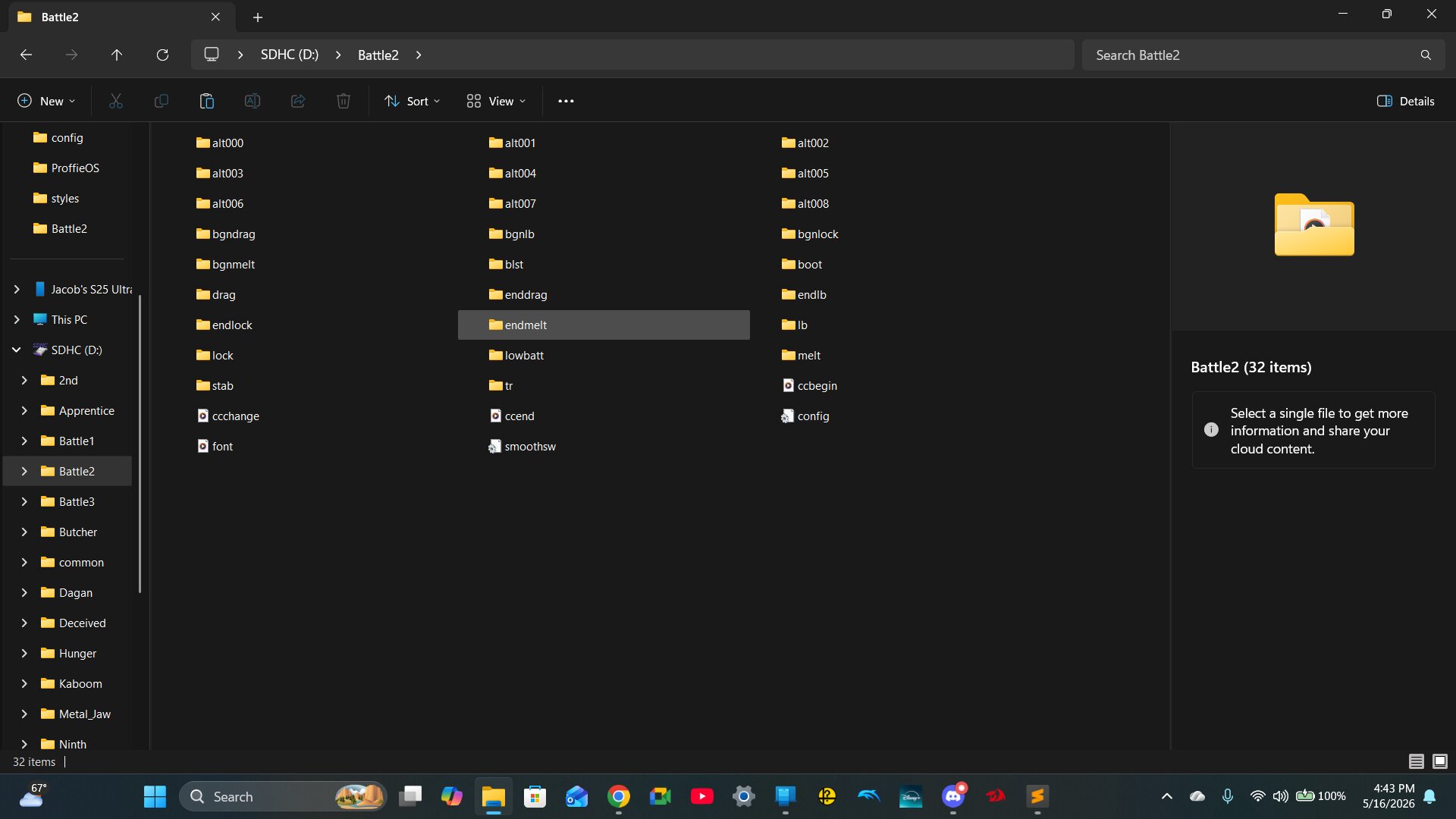
That all looks fine. Let’s make sure you’re actually uploading the config you think you are.
In your first preset remove the “S’” from “StylePtr<”, save and attempt to upload.
If you don’t get an error, you’re uploading a different config than you listed.
If you do get an error, put the “S” back, save, upload and post the final message from Arduino to confirm a successful upload.
Just to be clear you want me to take a screenshot of the arduino results after uploading correct?
Or just copy the message and paste it.
C:/Users/linkr/AppData/Local/Arduino15/packages/proffieboard/tools/arm-none-eabi-gcc/14-2-rel1-xpack/bin/../lib/gcc/arm-none-eabi/14.2.1/../../../../arm-none-eabi/bin/ld.exe:C:\Users\linkr\AppData\Local\Arduino15\packages\proffieboard\hardware\stm32l4\4.6\variants\STM32L433CC-ProffieboardV2/linker_scripts/STM32L433CC_FLASH.ld:224: warning: memory region `SRAM2’ not declared
lto-wrapper.exe: warning: using serial compilation of 7 LTRANS jobs
lto-wrapper.exe: note: see the ‘-flto’ option documentation for more information
C:/Users/linkr/AppData/Local/Arduino15/packages/proffieboard/tools/arm-none-eabi-gcc/14-2-rel1-xpack/bin/../lib/gcc/arm-none-eabi/14.2.1/../../../../arm-none-eabi/bin/ld.exe: warning: start of section .bss changed by 8
Sketch uses 238664 bytes (91%) of program storage space. Maximum is 262144 bytes.
Cannot open DFU device 0483:df11
1
Cannot open DFU device 0483:df11
2
Cannot open DFU device 0483:df11
3
Cannot open DFU device 0483:df11
4
Cannot open DFU device 0483:df11
5
Cannot open DFU device 0483:df11
6
Cannot open DFU device 0483:df11
7
Cannot open DFU device 0483:df11
8
Cannot open DFU device 0483:df11
9
Cannot open DFU device 0483:df11
10
Cannot open DFU device 0483:df11
That’s not the error that would come from removing the “S” in StylePtr<.
Did you get a different error first?
Run the DFU set up from Step 2 on this page.