Data line issue?

So I finished (kinda) my first saber build, at least the internals, but I got this issue which I’m pretty sure isn’t normal. It was fine when I tested it out but after I glued it together is when this issue came to light. I have

  1. Changed resistor to a new one (still the same kind)

  2. Soldered the data line directly to the board without the resistor in place.

My next step since I was able to take the chassis apart is to replace the whole data line that is from the top crystal LED. Weirdly enough when this issue started it was actually the bottom crystal LED that has this issue and it got flipped once I changed the resitor to a new one. Even so, the LEDs did not act this way when I tested it before I glued everything together. This is with the default config on the Proffie and is a 2.2v board.

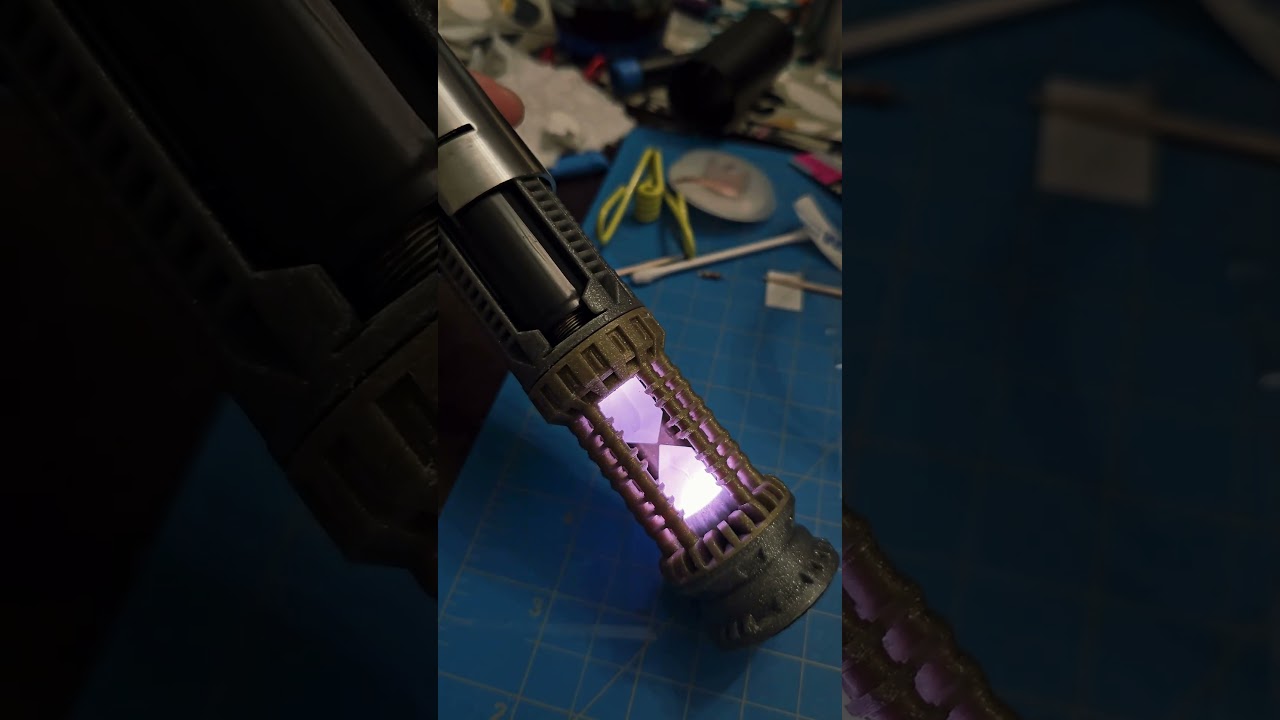
First video is showing the top crystal reacting in s different color. Can be data or power line issue?

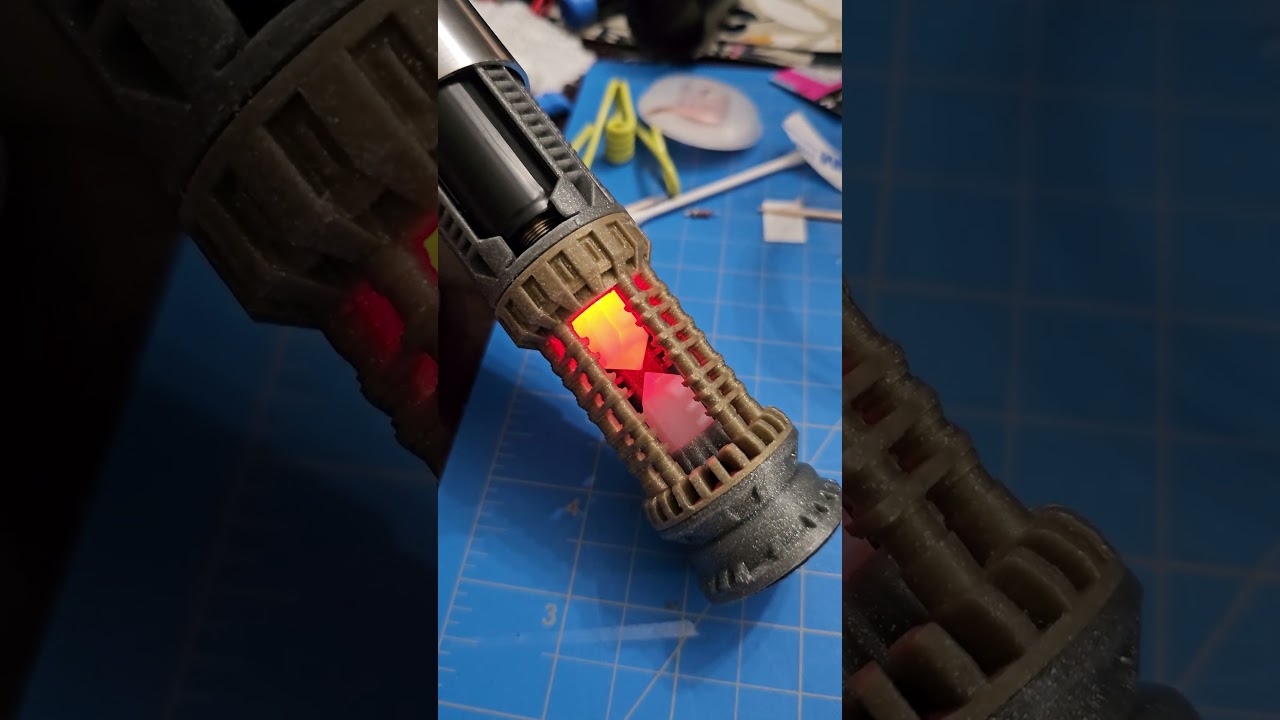
Second video is showing the second crystal on during idle and flickering while top one is on and residual power keeping the LED on.

Thanks in advance!

Usually a resistor on the data line fixes these sort of issues.
How many ohms is the resistor you used?

I used a 470ohm resistor. The same one that came with the kit I bought. I was guessing it might have failed so I bought another 470 resistor. Should it be cut a specific length? I have around 2mm on each end

The length is not important.
If you suspect a problem with the resistor, just measure it.
470 ohm should be good though, so I don’t quite understand why you’re seeing these problems.

Where are these LEDs getting power from? (What are + and - wired to?)
Are they wired in series or parallell?

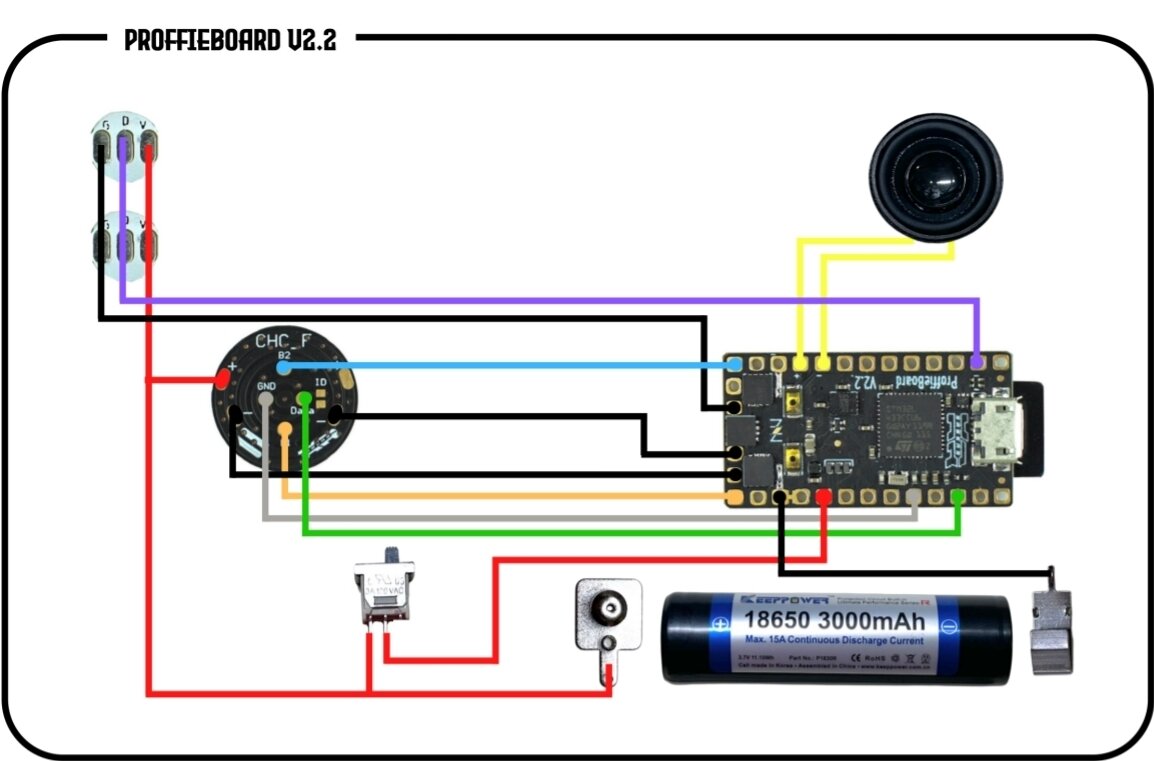
Well the LEDs are wired parallel to each other than after that they “split” off to other places. I followed this wiring diagram that was on the guide for the kit I bought

I might try and replace the wires for the kill switch because I had a difficult time routing through the chassis so maybe the wire got damaged in some way.

None of the problems you are having is with the kill switch off, right?
Have you measured everything for shorts and continuity?
Could be a bad solder, or a pulled cable.

If that doesn’t reveal anything, you should try to measure the power and data signals.

Here is to to check the power:

or this one:

and here is to check the data line:

hopefully this will at least reveal if data or power is the problem.

Well when I do switch off the kill switch there is, what it looks like, residual power going to one of the LEDs, sometimes even both, making it have a very dim effect that looks like it’s glowing. Sometimes it goes away but with one test I did it just stayed on with the glow affect.

I will try and resolder where the 28awg meets the 22awg because it was a mess and I just left it alone after I got them soldered together. Hopefully it was just a pulled wire. If none of those work I will do what it said on the ProffieOSDocs that you linked

I also forgot to mention that I was configuring the board, there was one time where it probably was a bad config or something corrupted that the board was not responding to anything. That includes power from the battery and USB. Audrino wasn’t even detecting the board. No boot sounds or LED lights. I managed to get it working again after hours of troubleshooting.

Before all that happened, the crystal LEDs were not powering at all. This was after I tested and the board was working properly so something along the line must have gone wrong. A ground wire did come off the board but that ground wire was wired to the female connecter of the neo pixel.

I guess this would also be a good time to mention that my chassis has a detachable lower that connects to the blade holder where it meets the male connector and the male connector is connected to the rotary neo pixel. Sorry I didn’t mention this at first.

Are you using Nano neopixels from the Saber Armory? The chassis looks like for the Graflex kit from the Saber Armory. Anyway those nano neopixels have resistors built in so no resistors are needed for data. Also if you are using those nano neopixels in the diagram you posted, I would recommend separate data, positive, and negative wires for each nano neopixel that you run to the board/ connector. I don’t think those small pads are good for chaining the data, positive, and negative wires like the diagram might lead you to do.

So when you put the 470 ohm resistor in there, you put it on the purple line, right?
(Just making sure since that’s not called out in the circuit diagram.)

It may be that something is broken, in which case you should try moving to a different LED pad (and update the config) and then move to a different data pad (and update the config).

The previous bad programming shouldn’t matter.

Yes it’s they are the ones from The SaberArmory. I don’t think I would be able to connect them separately if I wire them individually if that is what you are saying

Yes the resistor is on the data line

Okay, so I switched the position of the LEDs, changed the data on both and one of the positive wires that connects to the 22awg that goes and connects to the board, and non of those worked. I was still getting the same issue.

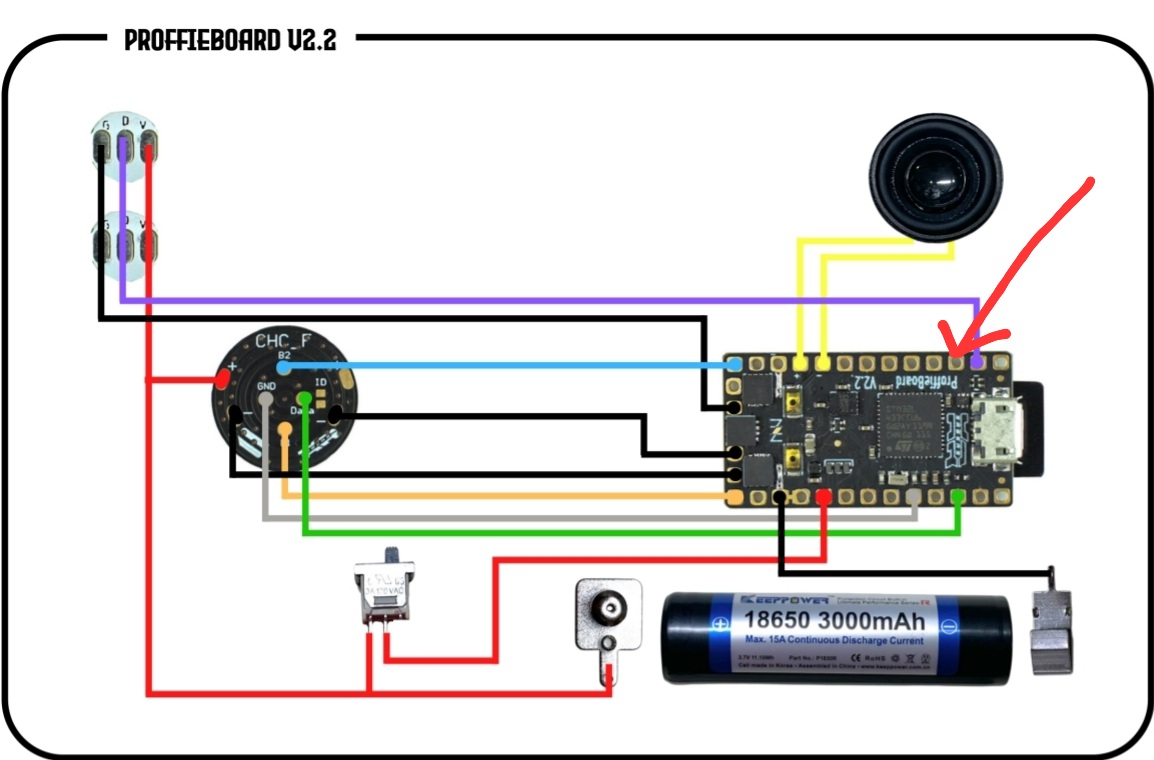
It was only then I realized after looking at the diagram again, that I wired the data cable into the wrong spot. It was the spot next to it :man_facepalming:. After I fixed that I put in the battery and flipped the kill switch and the LEDs did not turn on for idle. I ignited the saber and LEDs still aren’t responding. So I don’t know what else can cause this. I still haven’t tried checking the connections with the multimeter, those are just the results I got.

The pic shows the spot I accidently soldered it to in the first place. It wasn’t a data connector and I confirmed it looking at the V2.2 layout

So what does your config file look like?

So personally, I would use 28AWG wires for these crystal pixels and I think it gives plenty of room to do the soldering.

So using separated wires for each of the crystal pixels, I’d solder the two positive wires to a positive pad on the rotary chassis or to the back of the positive battery tab. The two negative wires, I’d bring them and solder each to separate led pads on the Proffie like LED4 and LED5. The two data wires I’d also solder them to two separate data like Data2 and Data3.

But if the soldering is good for you, then looking at your config like proffezorn says, will help us figure out the problem.

My config file is just the normal default apart from the top config having being fett263 buttons with just ignition being the only thing enable. I had troubles figuring out doing a custom preset so I reverted it back to default till I figure it out and watch more tutorials

I did use 28awg for the soldering apart from the battery tabs and anything else that required the 22awg wires. I will try that in the future probably. Right now I don’t have enough since I was messing up a few times and don’t have source for PTFE wires that is Stateside available without buying large spools.

Does it matter what data lead I solder into? It doesn’t have to be the specific one that is shown in the diagram just as long as it’s for data?

It matters to correctly declare in your config what data pad you solder into. ProffieOS doesn’t know where you soldered unless you “tell” it where.

That is not exactly helpful for us to help you. If you want to post your config please use the 3 back ticks method like this:

```
Your config here
```

Yeah, you’re right. This is the config I currently have on the board. Just the basics apart from top fett263 config

// ProffieOS7 Config File
#ifdef CONFIG_TOP
#include "proffieboard_v2_config.h"
#define NUM_BLADES 2
#define NUM_BUTTONS 2
const unsigned int maxLedsPerStrip = 144;
#define EXTRA_COLOR_BUFFER_SPACE 60
#define VOLUME 1000
#define CLASH_THRESHOLD_G 4
#define ENABLE_AUDIO
#define ENABLE_MOTION
#define ENABLE_WS2811
#define ENABLE_SD
#define MOTION_TIMEOUT 60 * 15 * 1000
#define IDLE_OFF_TIME 60 * 15 * 1000
#define DISABLE_BASIC_PARSER_STYLES
#define DISABLE_DIAGNOSTIC_COMMANDS
#define ENABLE_ALL_EDIT_OPTIONS
#define NO_REPEAT_RANDOM
#define COLOR_CHANGE_DIRECT
#define FETT263_LOCKUP_DELAY 200
#define FETT263_BM_CLASH_DETECT 6
#define FETT263_TWIST_ON
#define FETT263_TWIST_ON_NO_BM
#define FETT263_THRUST_ON
#define FETT263_THRUST_ON_NO_BM
#endif

#ifdef CONFIG_PROP
#include "../props/saber_fett263_buttons.h"
#endif

#ifdef CONFIG_PRESETS
Preset presets[] = {
  { "TeensySF", "tracks/venus.wav",
    StyleNormalPtr<CYAN, WHITE, 300, 800>(),
    StyleNormalPtr<CYAN, WHITE, 300, 800>(), "cyan"},
  { "SmthJedi", "tracks/mars.wav",
    StylePtr<InOutSparkTip<EASYBLADE(BLUE, WHITE), 300, 800> >(),
    StylePtr<InOutSparkTip<EASYBLADE(BLUE, WHITE), 300, 800> >(), "blue"},
  { "SmthGrey", "tracks/mercury.wav",
    StyleFirePtr<RED, YELLOW, 0>(),
    StyleFirePtr<RED, YELLOW, 1>(), "fire"},
  { "SmthFuzz", "tracks/uranus.wav",
    StyleNormalPtr<RED, WHITE, 300, 800>(),
    StyleNormalPtr<RED, WHITE, 300, 800>(), "red"},
  { "RgueCmdr", "tracks/venus.wav",
    StyleFirePtr<BLUE, CYAN, 0>(),
    StyleFirePtr<BLUE, CYAN, 1>(), "blue fire"},
  { "TthCrstl", "tracks/mars.wav",
    StylePtr<InOutHelper<EASYBLADE(OnSpark<GREEN>, WHITE), 300, 800> >(),
    StylePtr<InOutHelper<EASYBLADE(OnSpark<GREEN>, WHITE), 300, 800> >(), "green"},
};
BladeConfig blades[] = {
 { 0, WS2811BladePtr<97, WS2811_800kHz>(),
     SimpleBladePtr<CreeXPE2WhiteTemplate<550>,
                    CreeXPE2BlueTemplate<240>,
                    CreeXPE2BlueTemplate<240>, NoLED, bladePowerPin4, bladePowerPin5, bladePowerPin6, -1>(),
     CONFIGARRAY(presets) },
  };
#endif

#ifdef CONFIG_BUTTONS
Button PowerButton(BUTTON_POWER, powerButtonPin, "pow");
Button AuxButton(BUTTON_AUX, auxPin, "aux");
#endif
Ok, so the BladeConfig part definitely needs changing.

If you’re wiring exactly like the screenshot, the blade config should be like this:

BladeConfig blades[] = {
 { 0, WS281XBladePtr<144, bladePin, Color8::GRB, PowerPINS<bladePowerPin2, bladePowerPin3> >(),
    WS281XBladePtr<1, blade2Pin, Color8::GRB, PowerPINS<bladePowerPin4> >(),
     CONFIGARRAY(presets) },
  };
#endif
2 Likes