I recently got a Proffieboard v3.9, 2 LED strips (WS2812B LED strip SMD 5050 individual Addressable 144pixels/m 144pixels WS282b IC RGB) that I’ve stuck back to back, I have a kill switch, a speaker, a 18650 battery and a single momentary switch. Using the stock sound fonts (found at Free prop sounds) can someone write me a code and tell me where to wire what. I have been trying for a week and am at a complete loss.
Did you see this page?
Yes, I’ve done that, but when I go to upload that code it gives me, I get an error. I’ve only done really basic arduino coding before, so I am really new to this.
What instructions are you following?
Please post the error you are getting, and also the config file you’re trying to compile.
We have all be there for sure. I was more pointing out the wiring diagram aspect of it. I can also make a diagram for you if that helps.
The config on that page is kind of a starting point. As @profezzorn said, paste your config here and we can look at it. Have you started any wiring (soldering) yet?
I have everything wired to a breadboard, haven’t soldered anything yet. I have the battery going to BATT+ and GRND, the kill switch is between the battery and board on the positive side, the momentary button is wired to what looks to say RT4 (if you look at the board with the input jack on the left, its the bottom right port) and GRND, the speaker is wired to the speaker ports, and the data line of the LED is going to DATA1, the positive LED is going to BATT+, and the other line is going to the port that is just labeled 2 (it’s one down from the top right port)
Hopefully I didn’t miss anything. It would be cool to have all the sound fonts possible, but my end result just needs to be a Vader saber, so thats really the only sound font that matters.
Thank you for the help, my Config file is pasted below:
#ifdef CONFIG_TOP
#include “proffieboard_v3_config.h”
#define NUM_BLADES 1
#define NUM_BUTTONS 1
#define VOLUME 1000
const unsigned int maxLedsPerStrip = 144;
#define CLASH_THRESHOLD_G 1.0
#define ENABLE_AUDIO
#define ENABLE_MOTION
#define ENABLE_WS2811
#define ENABLE_SD
#endif
#ifdef CONFIG_PRESETS
Preset presets = {
{ “TeensySF”, “tracks/venus.wav”,
StyleNormalPtr<CYAN, WHITE, 300, 800>(), “cyan”},
{ “SmthJedi”, “tracks/mars.wav”,
StylePtr<InOutSparkTip<EASYBLADE(BLUE, WHITE), 300, 800> >(), “blue”},
{ “SmthGrey”, “tracks/mercury.wav”,
StyleFirePtr<RED, YELLOW>(), “fire”},
{ “SmthFuzz”, “tracks/uranus.wav”,
StyleNormalPtr<RED, WHITE, 300, 800>(), “red”},
{ “RgueCmdr”, “tracks/venus.wav”,
StyleFirePtr<BLUE, CYAN>(), “blue fire”},
{ “TthCrstl”, “tracks/mars.wav”,
StylePtr<InOutHelper<EASYBLADE(OnSpark, WHITE), 300, 800> >(), “green”},
{ “TeensySF”, “tracks/mercury.wav”,
StyleNormalPtr<WHITE, RED, 300, 800, RED>(), “white”},
{ “SmthJedi”, “tracks/uranus.wav”,
StyleNormalPtr<AudioFlicker<YELLOW, WHITE>, BLUE, 300, 800>(), “yellow”},
{ “SmthGrey”, “tracks/venus.wav”,
StylePtr<InOutSparkTip<EASYBLADE(MAGENTA, WHITE), 300, 800> >(), “magenta”},
{ “SmthFuzz”, “tracks/mars.wav”,
StyleNormalPtr<Gradient<RED, BLUE>, Gradient<CYAN, YELLOW>, 300, 800>(), “gradient”},
{ “RgueCmdr”, “tracks/mercury.wav”,
StyleRainbowPtr<300, 800>(), “rainbow”},
{ “TthCrstl”, “tracks/uranus.wav”,
StyleStrobePtr<WHITE, Rainbow, 15, 300, 800>(), “strobe”},
{ “TeensySF”, “tracks/venus.wav”,
&style_pov, “POV”},
{ “SmthJedi”, “tracks/mars.wav”,
&style_charging, “Battery\nLevel”}
};
BladeConfig blades = {
{ 0, WS281XBladePtr<144, bladePin, Color8::GRB, PowerPINS<bladePowerPin2, bladePowerPin3> >(), CONFIGARRAY(presets) },
};
#endif
#ifdef CONFIG_BUTTONS
Button PowerButton(BUTTON_POWER, powerButtonPin, “pow”);
#endif
From your description and config, it sounds like it is wired correctly.
Your second post here says you have a problem compiling and uploading in arduino? What is the error?
There is a couple of strange characters in your pasted config, but I assume that was from pasting it here…
Yes I’m sure those are from me pasting it here. I actually got it to work, the button will ignite the blade and the sound works, however I can’t get it to switch to any other colors/sounds. If I double press when I turn it on, it just ignites the blade without sound. Like I said before, all I really need is a red color and a Vader sound and I’ll call it good.
To make your config show as it is supposed to, you can edit your post with back ticks method, like this:
```
Config here (or Arduino error code)
```
This helps avoid weird characters, and helps us read your config (or error code).
Also, you may post (if you want) a photo of your breadboard setup.
So I realized my breadboard setup wasn’t working because the holes are just a bit bigger than the arduino I am using the pins from, so it wasn’t making enough contact with the board. I switched to just putting the breadboard pins straight into the board and it has worked. I can post a picture of that.
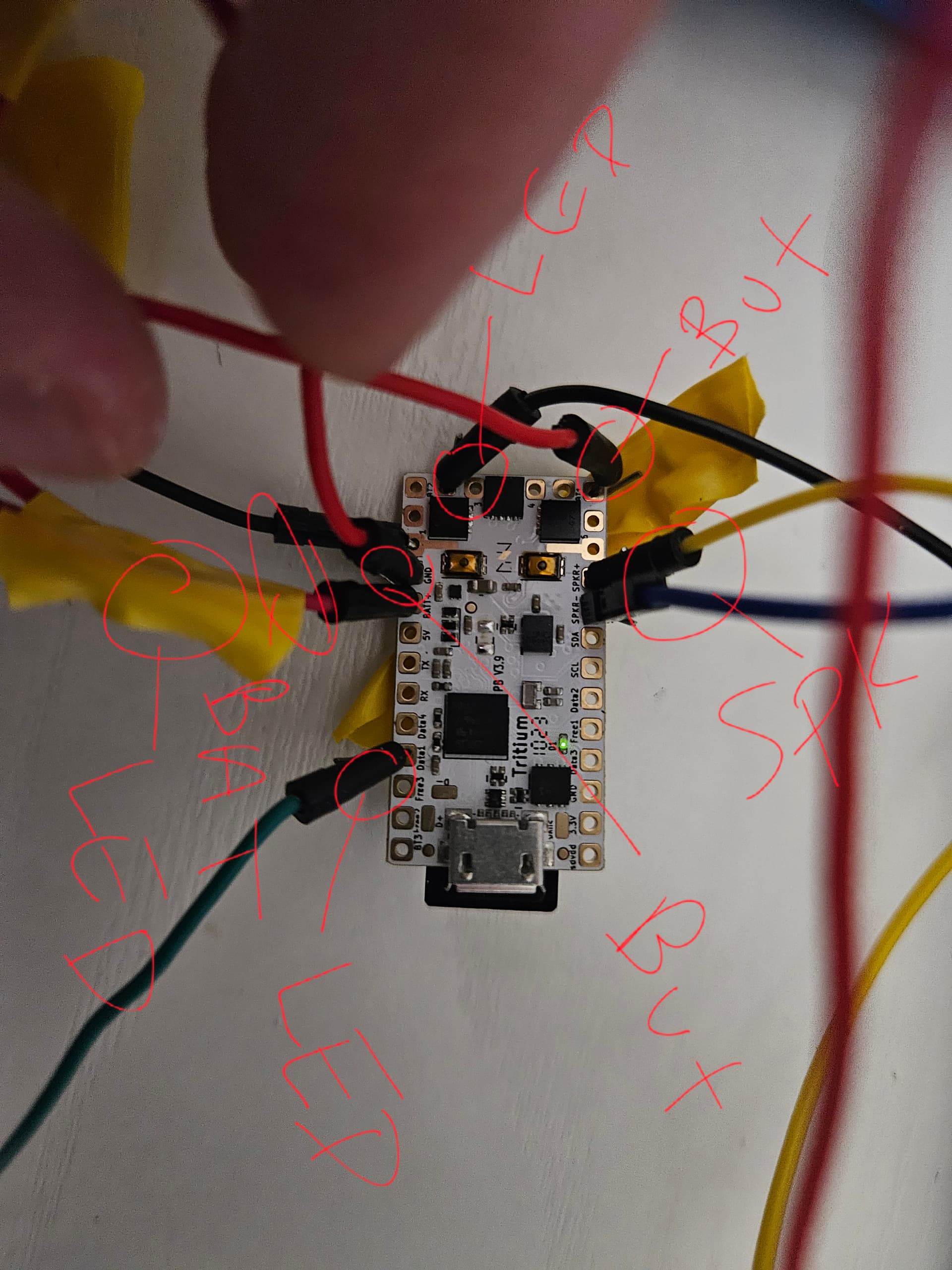
So you are using tiny square pins in bigger round holes with minimum contact.
I believe that you will need to either
- solder the wires to your Proffieboard
or
- create a testbed with round spear tips for proper connection, see
Proffie Test Bed
where I tried to make my own testbed (still working on it, but very slowly)
Proffieboard Test Rig
uxcell 100 Pcs Spring Load Spear Tip Test Probes Pins 1.3mm Diameter - Multi Testers - Amazon.com (not sponsored)
for proper connection.
Also, you mentioned:
What is the error ? (Please, post error between the 3 back ticks)
I’m no longer getting an error, it was able to upload successfully. Now it’s just a matter of how I use the saber. The only things I’m able to do is push the button and it ignites with a turquoise color with sound, push it again and it retracts. If I double push the button it ignites without sound and put it again and it retracts without sound. If I hold the button down for a few seconds and release, it plays an orchestral song. But thats all the functionality I can get it to do, no switching colors or sounds.
That is because you are using the default “basic” ProffieOS saber.h prop.
If you want to add more functionality for your saber, you will need to add a CONFIG_PROP section to your config, see:
You will need to choose which prop you want (alphabetical order):
- saber_BC_buttons.h by @NoSloppy (good amount of option and customization, intermediate to advanced user level, fully up-to-date with ProffieOS v8.x)
- saber_fett263_buttons.h by @Fett263 (maximum amount of option and customization, advanced to expert user level, most users on the crucible use this but there is a steep learning curve to master all the functionality, fully up-to-date with ProffieOS v8.x)
- saber_sa22c_buttons.h by @SA22C (minimum amount of option and customization, beginner user level, very old prop - not updated for many years, since ProffieOS v5.9)
- saber_sabersense_buttons.h by @Sabersense (good amount of option and customization, designed for beginners, suitable for intermediate users, newest addition in the prop section, fully up-to-date with ProffieOS v8.x, backward compatible with ProffieOS v7.x)
- saber_shtok_buttons.h by @ShtokyD (minimum amount of option and customization, beginner to intermediate user level, old prop - I had found an unofficial updated version at https://shtokcustomworx.com/pages/wiring-diagrams-and-user-manuals but the link is no longer functional, can function with a zero button setup)
Edit2: the user experience levels (beginner, advanced, expert) are my own opinion about each props!
In order to choose, I would suggest you open each file in your favorite text editor and read the top section text description for each.
Edit: you should be able to change preset (fonts & blade colors) open prop/saber.h to read about the button(s) controls:
Next preset -             Zero button saber = Point up and shake
                          1 or 2 button saber = Hold POW button and hit the blade while saber is off.
Previous Preset -         Hold AUX button and click the POW button while saber is off.
I think that first option seems like a good one, I’m not looking for every possible function, just a cool saber. Its going into a Vader hilt, so it will 99% of the time be set to just a red blade and Vader sound. How do I get the config file for saber_BC_buttons.h?
It’s already included in ProffieOS. You just have to use it following the documentation that Olivier linked: the CONFIG_PROP section.
You add that section into your config as shown with the prop file you want, and recompile.
Additionally you may add any options the config offers to the CONFIG_TOP section. They are #define just like the other options you see in that section.
FWIW, you can customize most of the features in my prop via defines, so it can be as simple or complex as you need. If you are using my style library, many of the new OS7 features will only run in my prop.
More information here for Set Up , Controls and Defines: Fett263 ProffieOS7 Prop File (Buttons and Controls)
I also have a Config Helper Tool that can walk you through customization and setup, just watch the videos at the top.
This feels very misleading (and fear inducing). By no means do you need to be “advanced or expert” to use my prop. I have many new users start with my prop and easily get underway with the functionality. My prop can be as simple as any of the others.
For some features there’s additional set up, but it just requires reading and simple steps (plus I have multiple tools and step-by-step instructions that anyone can use to walk through regardless of skill or experience).
Saying you need to be “advanced or an expert” feels like the “you need to be a programmer” misinformation about Proffieboard that was incorrectly being spread for a while.
No offense but your prop requires watching videos, quite a bit of reading, learning to use your tools. Most users will probably never learn to use it’s full potential.
Other “simpler” props can just be used with a bit of light reading without spending hours watching videos to learn how to use all your tools.
I personally spent hours trying to learn your prop when I was a newbie. All I really wanted initially was something quick and easy because I wanted to play with my saber rather than spend hours learning. I do believe that a beginner who wants to have something ready to play asap is better off with a simpler prop.
I tested all the props and eventually settled on saber_sabersense_buttons.h because I do not need more functionality and I would rather have more presets than use more memory for functions that I will probably never use.
That is my opinion and I do not expect for you to agree with it.
2 Likes
You’re more than entitled to your opinion but your reply seem to state everything as a “fact”.
Yes, using EVERYTHING in the prop requires reading, but just using the prop “out of the box” the only difference is the Voice Prompt set up. If a user doesn’t add defines for the advanced features, there’s nothing else besides the common folder set up that differs from any of the other props. Not to mention most of the other props use portions of my prop already.
It would have been more accurate to state that YOU found the prop harder, because in my experience most new users get along just fine once they get the Voice Prompts set up. I’m merely calling out what I find to be misinformation (stating an opinion as fact), I don’t care what prop a user chooses but scaring a new user off with your opinion isn’t helpful in my opinion  .
.
As long as the user gets what they want out of their saber I’m happy but your reply was a bit fear mongering for no reason IMHO, especially to new users who may come in later.