Well I think I fried my Proffie like an idiot. Forgot I had the battery in the hilt and unplugged from my pc and it just “died”. Now there’s no led indicators for anything, plugging into pc, battery, kill switch on/ff. Battery is fully charged, tried doing boot and reset buttons. Is it broke and I’m an amateur idiot? Lol. Thanks for this community for its help in advance.
Link to video : Imgur: The magic of the Internet
Were you in the middle of flashing the board when you unplugged it?
If so, plug it back into your computer and boot, reset the board while plugged in and then flash the config you want.
It won’t show up on any of the ports but the upload will go through.
1 Like
In spite of what seems to have happened here, having the battery in while unplugging should be harmless.
Have you tried plugging directly into the proffie? (Not the charge port.)
1 Like
I was finished uploading a config and believe accidentally unplugged it. The odd part is the white led wont turn on no matter what. And I’ve only had it plugged into the Proffie, not the battery
I’m not sure what “the white led” is. Your board looks like a V2, which does not have an onboard LED.
Not sure what this means. What is plugged into the Proffie? How do you “plug into the battery” ?
It is possible that your board is fried, but at this point it is also possible that the uploaded program is bad, in which case you need to plug the board in, hold BOOT, press and release RESET.
Once you do that, the board should show up as “STM32 BOTLOADER”, but no port will show up. (See here for details about how to see if the board is showing up as “STM32 BOOTLOADER”: ProffieOS Documentation: USB Connection Issues.
Once the board is connected as “STM32 BOOTLOADER”, you can click upload in arduino, and it should work, regardless of what port is selected.
If you press BOOT+RESET correctly (which can be difficult, I highly recommend using a piece of plastic, or an 8x2 flat lego), and it doesn’t show up as “STM32 BOOTLOADER” on your computer, then the board is fried.
1 Like
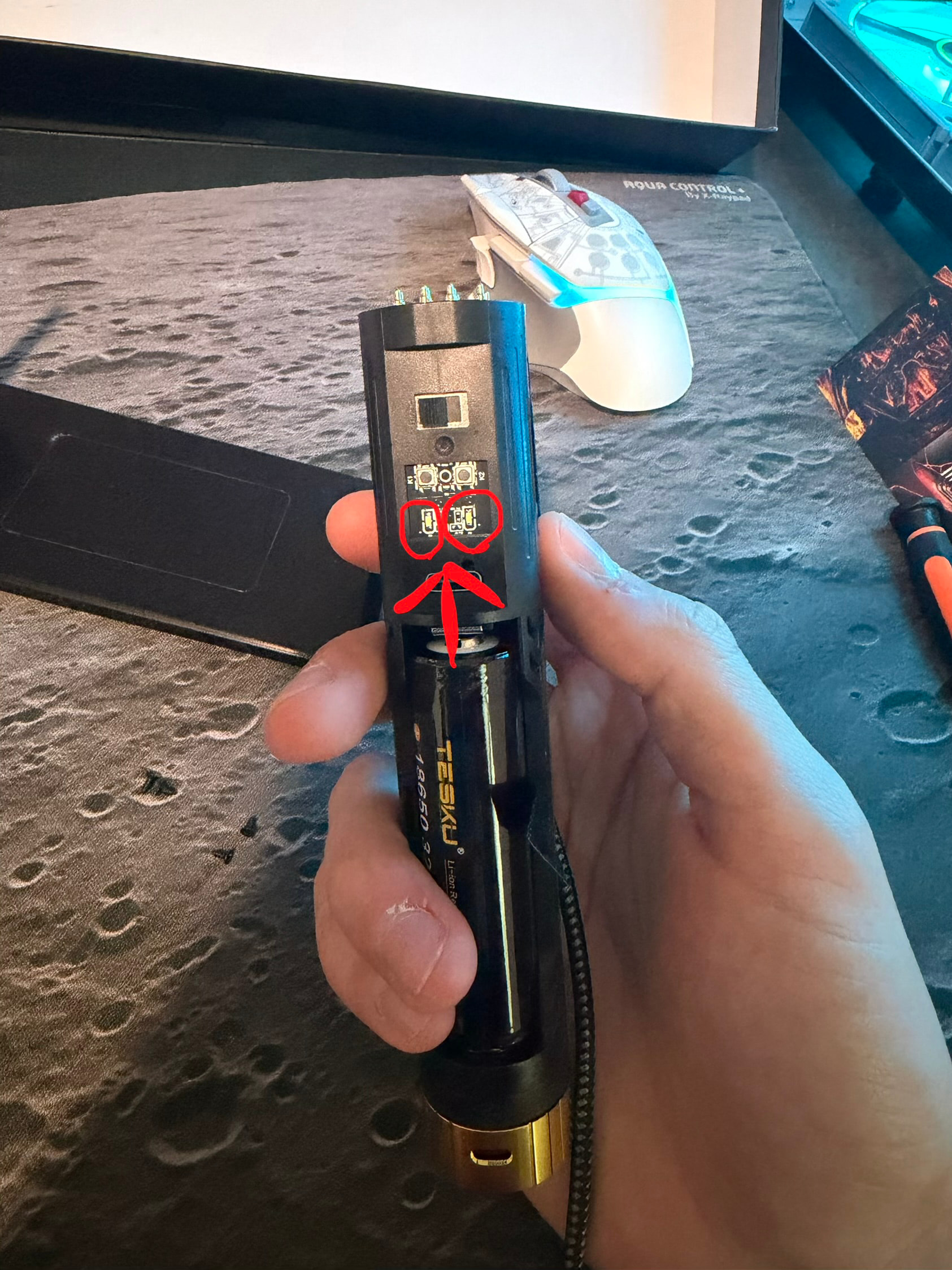
Thanks for reaching out. Do you mind resending that link as it gives me a 404 response. And yes I have a Proffie 2.2 board but on the back side of the saber next to the killswitch I have 2 white leds that would light up when plugged into the pc or when the killswitch was turned to make the saber get power from the battery. I circled where the leds would turn on prior to the issue.
I edited my reply above, the link should work now.
If you want to know why those LEDs don’t work, you’re going to have to ask the people who made or installed your saber, because they are separate part from the Proffieboard, and I have no knowledge of how they are supposed to work.
It’s possible that those LEDs are controlled by the proffieboard, but without knowing how they are wired and what the config file say, it’s hard for me to say anything about them.
My guess is that they are driven by the charging board, and maybe they just don’t light up because the battery is full?
I have a core with a similar layout with a 2 button 2 LEDs pcb they are also wired in parallel mimic the main bladestyle