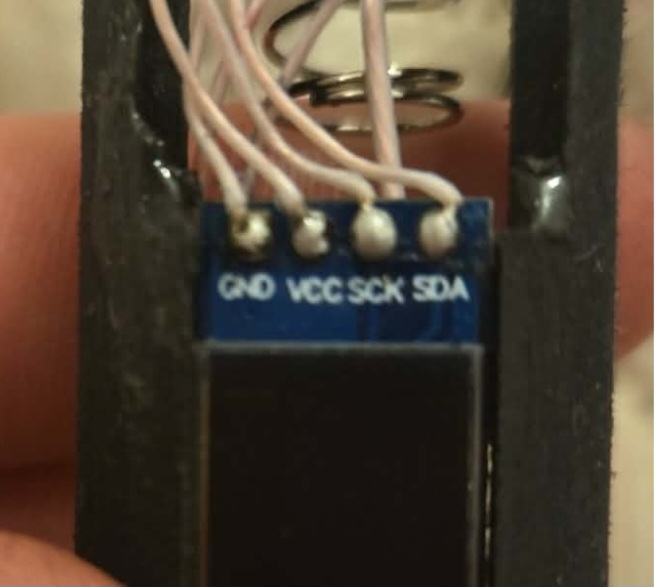
Only thing I can think of before I lose my mind is where the manual OLED shows " SCL " pad, my OLED shows " SCK ". I wired it to thr SCL pad on the proffie. Is there somewhere else this can go? Maybe even with a config edit??
In file included from C:\Users\Richard\Desktop\PROFFIE\ProffieOS7.14.ino\ProffieOS\ProffieOS.ino:1560:
sketch\config/Luke_Proffie_config.h:185:1: error: ‘BlasterDisplayController’ does not name a type; did you mean ‘StandardDisplayController’?
185 | BlasterDisplayController<128, uint32_t> display_controller;
| ^~~~~~~~~~~~~~~~~~~~~~~~
| StandardDisplayController
sketch\config/Luke_Proffie_config.h:186:41: error: ‘display_controller’ was not declared in this scope; did you mean ‘DisplayControllerBase’?
186 | SSD1306Template<128, uint32_t> display(&display_controller);
| ^~~~~~~~~~~~~~~~~~
| DisplayControllerBase
exit status 1
Error compiling for board Proffieboard V3.
This report would have more information with
“Show verbose output during compilation”
option enabled in File → Preferences.
In file included from C:\Users\Richard\Desktop\ProffieOS_7_15\ProffieOS\ProffieOS.ino:1560:
sketch\config/Luke_Proffie_config.h:185:1: error: ‘BlasterDisplayController’ does not name a type; did you mean ‘StandardDisplayController’?
185 | BlasterDisplayController<128, uint32_t> display_controller;
| ^~~~~~~~~~~~~~~~~~~~~~~~
| StandardDisplayController
sketch\config/Luke_Proffie_config.h:186:41: error: ‘display_controller’ was not declared in this scope; did you mean ‘DisplayControllerBase’?
186 | SSD1306Template<128, uint32_t> display(&display_controller);
| ^~~~~~~~~~~~~~~~~~
| DisplayControllerBase
exit status 1
Error compiling for board Proffieboard V3.
This report would have more information with
“Show verbose output during compilation”
option enabled in File → Preferences.
In file included from C:\Users\Richard\Desktop\ProffieOS-master8\ProffieOS\ProffieOS.ino:1722:
sketch\config/Luke_Proffie_config.h:185:1: error: ‘BlasterDisplayController’ does not name a type; did you mean ‘StandardDisplayController’?
185 | BlasterDisplayController<128, uint32_t> display_controller;
| ^~~~~~~~~~~~~~~~~~~~~~~~
| StandardDisplayController
sketch\config/Luke_Proffie_config.h:186:41: error: ‘display_controller’ was not declared in this scope; did you mean ‘DisplayControllerBase’?
186 | SSD1306Template<128, uint32_t> display(&display_controller);
| ^~~~~~~~~~~~~~~~~~
| DisplayControllerBase
exit status 1
Error compiling for board Proffieboard V3.
This report would have more information with
“Show verbose output during compilation”
option enabled in File → Preferences.
The code that you need, Richard, is (in your CONFIG_TOP): #define ENABLE_SSD1306
and that’s it.
The code in the messages above is somewhat needed only if you are not making a saber.
Edit: or if you are making a saber with a non-standard sized OLED or a color-OLED.
Yea a saber. And yes, I originally had it as " Enable "… Its gotta be a bad OLED or theres something to that " SCK " pad not being compatible w/ Proffie Board’s " SCL " pad
This won’t help if nothing is showing, and the code is for blasters, not sabers.
7.14 should be fine (unless you need the blaster code)
That is a semi-common problem, if you have another one you might want to try it.
That is possible, but unlikely, the markings on the board are usually correct.
Serial is different from I2C.
With I2C you connect SDA to SDA and SCL to SCL.
(Of course, it’s still possible to cross the wires, but that can be easily checked with a multimeter.)