One button setup, no sound

Hi guys !

I am a prop designer trying to build my first proffieboard setup.

I have to light up a staff with a neopixel strip, and various effects.
My build is pretty simple comparing to the amazing builds i can see here.
Buuut as it’s my first time using this stuff and software … I have some trouble :smiley:

Here is what i have :

  • Proffieboard V3.9
  • neopixel 144
  • Battery with charging port
  • Kill switch
  • momentary switch

Here is how I wired it up (without speaker) :
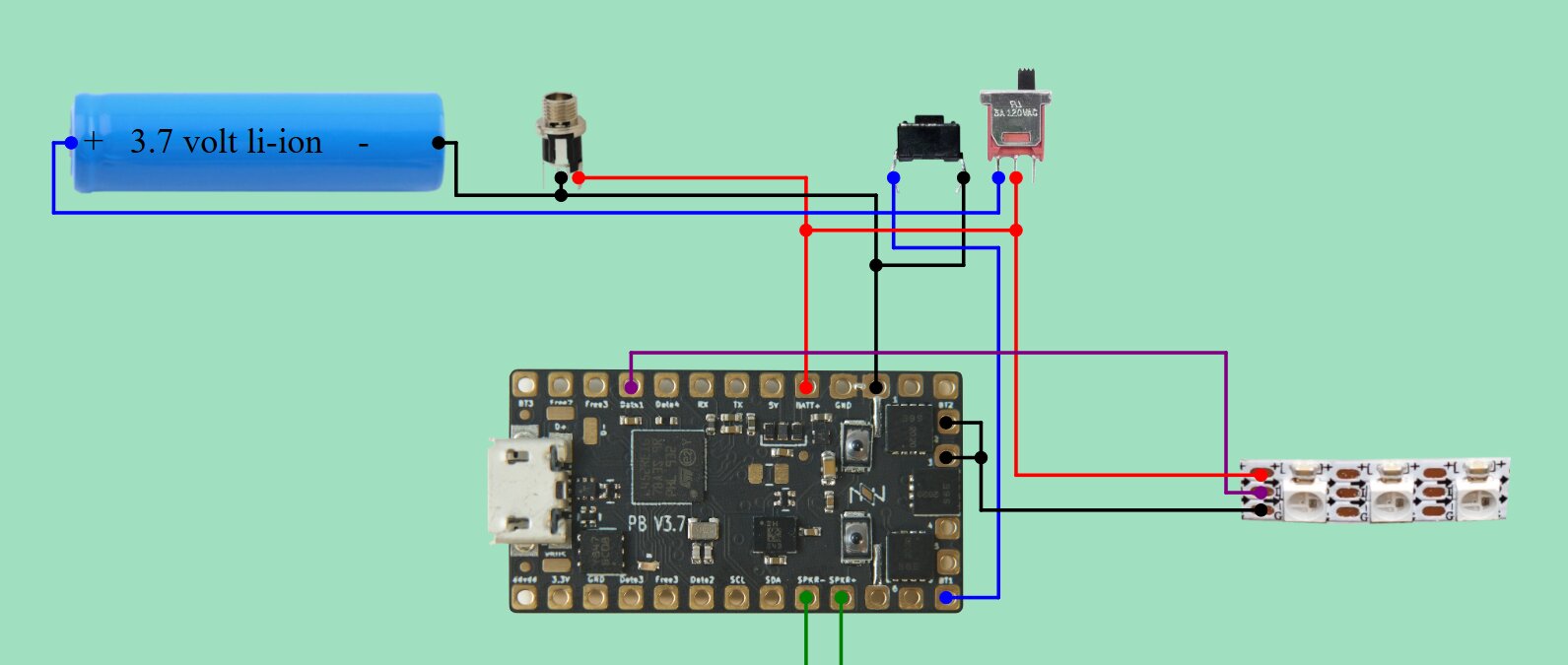
I did the setup on software and updates, created a config file (actually it is default V3 config with a 1 button setup)

When I turn on the kill switch, the little green led on the board start breathing, when I press the momentary switch the same led start breathing brighter, but nothing happens on the neopixel strip. Any idea ?

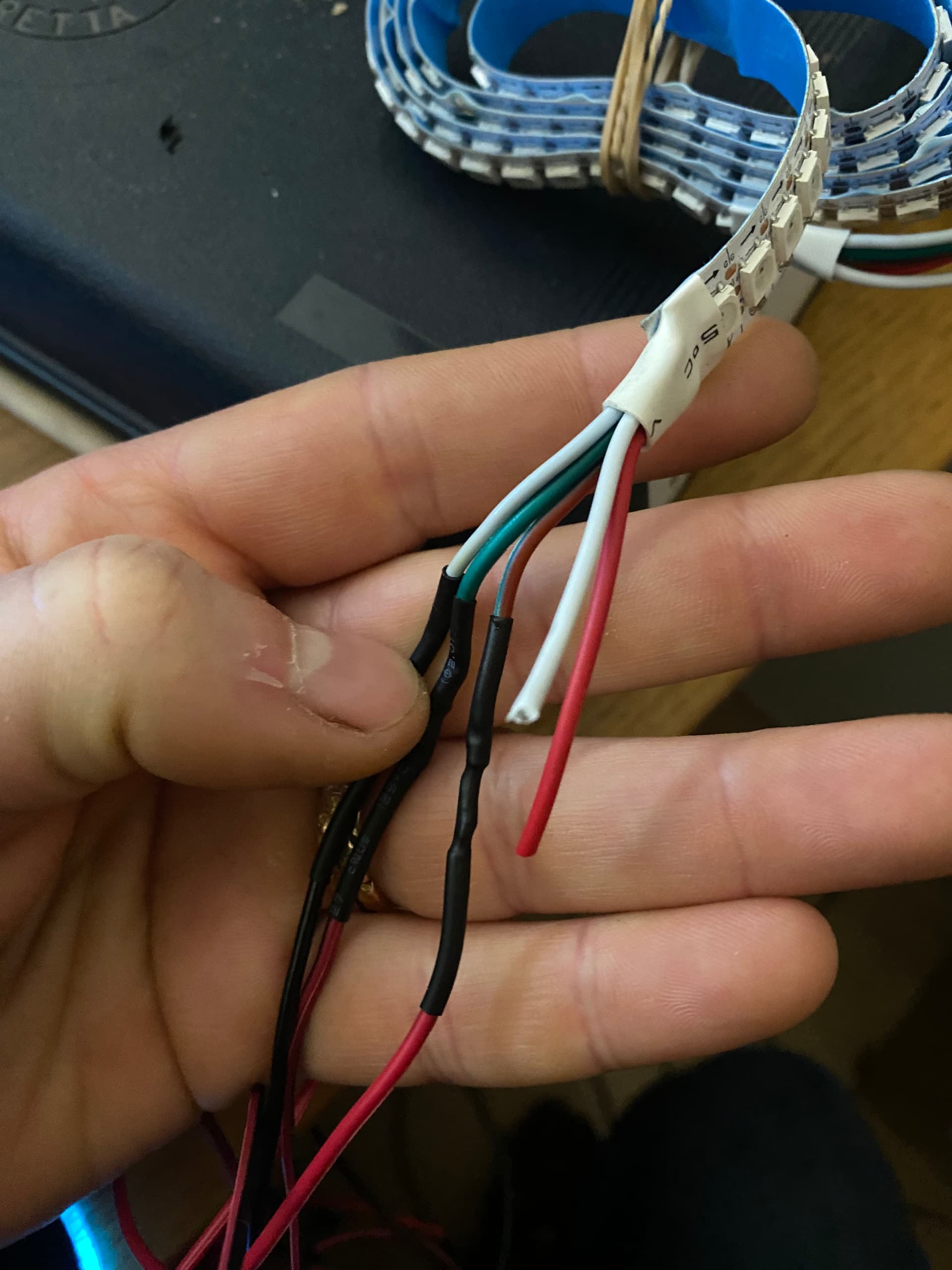
Also is it normal that I have two additional wires on the led stip (white and red) that are not plugged in ?
Welcome to the Crucible,

You can post your config. Please use the 3 back ticks method to make your config easily readable, like this:

```
Your config here
```

I am tempted to say “no, it’s not normal”, but can you post a photo so we can see what you are talking about.

Thank you for the quick reply.

Lets try :

// This is a sample configuration file.
// This saber has:
//   o TeensySaber V3 hardware.
//   o Two buttons
//   o An XP-E2 RGB LED star.
// If you have a saber similar to this one, make a copy and use the copy.
// This is also the default configuration file. Pre-programmed boards will
// use this configuration file.

#ifdef CONFIG_TOP
#include "proffieboard_v3_config.h"
#define NUM_BLADES 1
#define NUM_BUTTONS 1
#define VOLUME 1000
const unsigned int maxLedsPerStrip = 144;
#define CLASH_THRESHOLD_G 1.0
#define ENABLE_AUDIO
#define ENABLE_MOTION
#define ENABLE_WS2811
#define ENABLE_SD
#endif

#ifdef CONFIG_PRESETS
Preset presets[] = {
  { "TeensySF", "tracks/mars.wav",
    StyleNormalPtr<CYAN, WHITE, 300, 800>(), "cyan"},
  { "TeensySF", "tracks/mars.wav",
    StylePtr<InOutSparkTip<EASYBLADE(BLUE, WHITE), 300, 800> >(), "blue"},
  { "TeensySF", "tracks/mars.wav",
    StyleNormalPtr<RED, WHITE, 300, 800>(), "red"},
  { "TeensySF", "tracks/mars.wav",
    StylePtr<InOutHelper<EASYBLADE(OnSpark<GREEN>, WHITE), 300, 800> >(), "green"},
  { "TeensySF", "tracks/mars.wav",
    StyleNormalPtr<WHITE, RED, 300, 800, RED>(), "white"},
  { "TeensySF", "tracks/mars.wav",
    StyleNormalPtr<AudioFlicker<YELLOW, WHITE>, BLUE, 300, 800>(), "yellow"},
  { "TeensySF", "tracks/mars.wav",
    StylePtr<InOutSparkTip<EASYBLADE(MAGENTA, WHITE), 300, 800> >(), "magenta"},
  { "TeensySF", "tracks/mars.wav",
    StyleStrobePtr<WHITE, Rainbow, 15, 300, 800>(), "strobe"}
};
BladeConfig blades[] = {
  { 0, SimpleBladePtr<CreeXPE2Red, CreeXPE2Blue, CreeXPE2Green, NoLED>(), CONFIGARRAY(presets) },
};
#endif

#ifdef CONFIG_BUTTONS
Button PowerButton(BUTTON_POWER, powerButtonPin, "pow");
#endif

And here are the white and red cables left on the neopixel strip :

Since you don’t have a speaker, you probably want to change this to:
#define DISABLE_AUDIO (if you are using ProffieOS 8.x
or
delete that line completely if your are using ProffieOS 7.15 (or previous version)

What ProffieOS are you using ?

For the extra wires, I do not know.

Yes, that’s pretty standard. Usually when I get new strips I remove and replace all of the wires it comes with. You can also clip those wires.

The provide a junction for feeding power directly into the strips. You can also “backfeed” power into a circuit board, but not in the case of proffie :slight_smile:

I think the extra wires are for people who hook up multiple LED strips in series. The extra wires lets you connect up more power.

The config file you have isn’t set up for pixel strips though. At minimum you need to switch out the SimpleBladePtr<> for a WS281XBladePtr<>. I recommend using the configuration generator for this:

https://fredrik.hubbe.net/lightsaber/v6/configurator.html

I am using ProffieOS 7.15

I will delete this part.

Ok thanks so this is not part of my issue :smiley:

Thanks, I will take a look.

Hi all.

It works now !
Looks like I did not set up the right kind of led strip like profezzorn said.

Now lets custom these effects and have fun !

Thanks for the help

1 Like