npxl connector is not starting to light up. tried it last time and worked. this time made the connections stronger and the sound works but the leds dont.
What connector do you have and how is it wired? What did you do to make your connections stronger? Is the rest of the saber, including the blade, working?
shtok eco v4, and the blade isnt working. checked if eveything was working, and also replaced the connector to a new one
nothing works expect for sound and switch
How did you wire it?
Post your config so we can check if your wiring matches your blade array. You might need to change data pads, or what you have might not match what you expect.
Pics or a wiring diagram also help, as mentioned 
1 Like
// config/obi_config.h
#ifdef CONFIG_TOP
#include “proffieboard_v3_config.h”

#define NUM_BLADES 1
#define NUM_BUTTONS 2
#define VOLUME 1000
#define CLASH_THRESHOLD_G 1.0

#define ENABLE_AUDIO
#define ENABLE_MOTION
#define ENABLE_WS2811
#define ENABLE_SD
#define ENABLE_OVERDRIVE // 명시적으로 활성화하여 RGBA_nod 충돌 방지

const unsigned int maxLedsPerStrip = 144;
#define NUM_PRESETS 2
#endif

#ifdef CONFIG_STYLES
extern Preset presets[NUM_PRESETS];

// V3 보드용 핀 정의 (bladePin → 1, bladePowerPin1 → 2)
BladeConfig blades
 = {
{ 0, WS281XBladePtr<144, bladePin, Color8::GRB, PowerPINS >(), presets }
};
#endif

#ifdef CONFIG_PRESETS
Preset presets[NUM_PRESETS] = {
{ “Kenobi_Free”, “tracks/track01.wav”,
StylePtr<Layers<
Mix<Sin<Int<3>>,AudioFlicker<RotateColorsX<Variation,DodgerBlue>,Stripes<5000,-90,RotateColorsX<Variation,Rgb<0,55,165>>,RotateColorsX<Variation,Rgb<0,85,115>>,RotateColorsX<Variation,Rgb<0,65,145>>,RotateColorsX<Variation,Rgb<0,30,185>>>>,AudioFlicker<RotateColorsX<Variation,Rgb<0,155,255>>,Stripes<5000,-90,RotateColorsX<Variation,Rgb<0,95,170>>,RotateColorsX<Variation,Rgb<0,115,215>>,RotateColorsX<Variation,Rgb<0,145,145>>,RotateColorsX<Variation,Rgb<0,65,225>>>>>,
//Rotates   ^3 times per minute between DodgerBlue and DeepSkyBlue with subtle Cyan/Blue audioflicker
//AudioFlicker<RotateColorsX<Variation,DeepSkyBlue>,RotateColorsX<Variation,Rgb<0,95,195>>>,
//Alternate DeepSkyBlue with very subtle audioflicker
AlphaL<BrownNoiseFlicker<RotateColorsX<Variation,DeepSkyBlue>,Black,300>,SwingSpeed<400>>,
//Unstable swing
AlphaL<Stripes<1000,-2000,RandomPerLEDFlicker<RotateColorsX<Variation,DeepSkyBlue>,Black>,Black,RotateColorsX<Variation,DeepSkyBlue>,Black>,SwingSpeed<525>>,
//Unstable ripple swing
LockupTrL<Layers<
AlphaL<AudioFlickerL<Rgb<255,240,80>>,Bump<Scale<BladeAngle<>,Scale<BladeAngle<0,16000>,Int<4000>,Int<26000>>,Int<6000>>,Scale<SwingSpeed<100>,Int<14000>,Int<18000>>>>,
AlphaL<LemonChiffon,Bump<Scale<BladeAngle<>,Scale<BladeAngle<0,16000>,Int<4000>,Int<26000>>,Int<6000>>,Int<10000>>>>,TrConcat<TrInstant,White,TrFade<400>>,TrConcat<TrInstant,HumpFlickerL<AlphaL<White,Int<16000>>,30>,TrSmoothFade<875>>,SaberBase::LOCKUP_NORMAL>,
//Responsive lockup effect with screeching humpflicker endlock
//LockupTrL<Layers<
//AlphaL<AudioFlickerL,Bump<Scale<BladeAngle<>,Scale<BladeAngle<0,16000>,Int<4000>,Int<26000>>,Int<6000>>,Scale<SwingSpeed<100>,Int<14000>,Int<18000>>>>,
//AlphaL<White,Bump<Scale<BladeAngle<>,Scale<BladeAngle<0,16000>,Int<4000>,Int<26000>>,Int<6000>>,Int<10000>>>>,TrConcat<TrInstant,White,TrFade<400>>,TrConcat<TrInstant,White,TrFade<4000>>,SaberBase::LOCKUP_NORMAL>,
//Alternate standard lockup
ResponsiveLightningBlockL<Strobe<White,AudioFlicker<White,Blue>,50,1>,TrConcat<TrInstant,AlphaL<White,Bump<Int<12000>,Int<18000>>>,TrFade<200>>,TrConcat<TrInstant,HumpFlickerL<AlphaL<White,Int<16000>>,30>,TrSmoothFade<600>>>,
//Responsive lightning block
ResponsiveStabL<RotateColorsX<Variation,Yellow>>,
//Responsive stab
//ResponsiveStabL,
//Alternate responsive stab, no color change
EffectSequence<EFFECT_BLAST,ResponsiveBlastL<White,Int<400>,Scale<SwingSpeed<200>,Int<100>,Int<400>>,Int<400>>,LocalizedClashL<White,80,30,EFFECT_BLAST>,ResponsiveBlastWaveL<White,Scale<SwingSpeed<400>,Int<500>,Int<200>>,Scale<SwingSpeed<400>,Int<100>,Int<400>>>,BlastL<White,200,200>,ResponsiveBlastFadeL<White,Scale<SwingSpeed<400>,Int<6000>,Int<12000>>,Scale<SwingSpeed<400>,Int<400>,Int<100>>>,ResponsiveBlastL<White,Scale<SwingSpeed<400>,Int<400>,Int<100>>,Scale<SwingSpeed<400>,Int<200>,Int<100>>,Scale<SwingSpeed<400>,Int<400>,Int<200>>>>,
//Multi-blast, blaster reflect cycles through different responsive effects
//ResponsiveBlastL<White,Int<400>,Scale<SwingSpeed<200>,Int<100>,Int<400>>>,
//Alternate responsive blast
ResponsiveClashL<TransitionEffect<Rgb<255,240,80>,LemonChiffon,TrInstant,TrFade<100>,EFFECT_CLASH>,TrInstant,TrFade<400>,Scale<BladeAngle<0,16000>,Int<4000>,Int<26000>>,Int<6000>,Int<20000>>,
//Responsive Clash
//ResponsiveClashL<White,TrInstant,TrFade<400>,Scale<BladeAngle<0,16000>,Int<4000>,Int<26000>>,Int<6000>,Int<20000>>,
//Alternate white clash
TransitionEffectL<TrConcat<TrInstant,Stripes<3000,-3500,RotateColorsX<Variation,Rgb<90,180,255>>,RandomPerLEDFlicker<RotateColorsX<Variation,Rgb<0,26,60>>,Black>,BrownNoiseFlicker<RotateColorsX<Variation,Rgb<90,180,255>>,RotateColorsX<Variation,Rgb<0,26,60>>,200>,RandomPerLEDFlicker<RotateColorsX<Variation,Rgb<0,42,128>>,RotateColorsX<Variation,Rgb<0,26,60>>>>,TrFade<400>,Stripes<3000,-3500,RotateColorsX<Variation,Rgb<90,180,255>>,RandomPerLEDFlicker<RotateColorsX<Variation,Rgb<0,26,60>>,Black>,BrownNoiseFlicker<RotateColorsX<Variation,Rgb<90,180,255>>,RotateColorsX<Variation,Rgb<0,26,60>>,200>,RandomPerLEDFlicker<RotateColorsX<Variation,Rgb<0,42,128>>,RotateColorsX<Variation,Rgb<0,26,60>>>>,TrFade<450>,HumpFlickerL<AlphaL<RotateColorsX<Variation,Rgb<90,180,255>>,Int<19000>>,25>,TrFade<2875>>,EFFECT_IGNITION>,
//Stabilize ignition effect
TransitionEffectL<TrConcat<TrFade<1125>,RotateColorsX<Variation,Rgb<90,180,255>>,TrInstant>,EFFECT_RETRACTION>,
//Slow brighten retraction effect
LockupTrL<AlphaL<BrownNoiseFlickerL<White,Int<300>>,SmoothStep<Int<30000>,Int<5000>>>,TrWipeIn<400>,TrFade<300>,SaberBase::LOCKUP_DRAG>,
//Drag
LockupTrL<AlphaL<Mix<TwistAngle<>,Red,Orange>,SmoothStep<Int<28000>,Int<5000>>>,TrWipeIn<600>,TrFade<300>,SaberBase::LOCKUP_MELT>,
//Responsive melt
EffectSequence<EFFECT_POWERSAVE,AlphaL<Black,Int<8192>>,AlphaL<Black,Int<16384>>,AlphaL<Black,Int<24576>>,AlphaL<Black,Int<0>>>,
//Power save, if using fett263’s prop file hold Aux and click PWR while ON (pointing up) to dim blade in 25% increments.
InOutTrL<TrWipe<500>,TrWipeIn<1125>>,
//Standard ignition/retraction
//TransitionEffectL<TrConcat<TrDelay<1500>,Black,TrFade<1000>,AlphaL<Mix<BatteryLevel,Red,Green>,Bump<Int<0>,Int<6000>>>,TrFade<3000>>,EFFECT_BOOT>,
//TransitionEffectL<TrConcat<TrInstant,AlphaL<Mix<BatteryLevel,Red,Green>,Bump<Int<0>,Int<6000>>>,TrFade<3000>>,EFFECT_NEWFONT>,
//Optional/alternate passive battery monitor, on boot (1st line) or font change (2nd line) you will get a visual indicator at the emitter of your current battery level. This also works without a blade if you have a lit emitter or blade plug. Green is Full, Red is Low (the color will blend from Green to Red as the battery is depleted), the indicator will fade out after 3000 ms and not display again until powered down and back up or fonts change.
TransitionEffectL<TrConcat<TrInstant,AlphaL<Mix<BatteryLevel,Red,Green>,Bump<BatteryLevel,Int<10000>>>,TrDelay<2000>,AlphaL<Mix<BatteryLevel,Red,Green>,Bump<BatteryLevel,Int<10000>>>,TrFade<1000>>,EFFECT_BATTERY_LEVEL>,
//On demand battery level, if using fett263’s prop file Hold AUX and click PWR while OFF, the battery level is represented by the location on the blade; tip = full, hilt = low and color; green = full, yellow = half, red = low
TransitionEffectL<TrConcat<TrFade<450>,AlphaL<HumpFlickerL<RotateColorsX<Variation,DeepSkyBlue>,10>,Bump<Int<0>,Int<3000>>>,TrFade<350>,AlphaL<HumpFlickerL<RotateColorsX<Variation,DeepSkyBlue>,15>,Bump<Int<0>,Int<5000>>>,TrFade<450>,AlphaL<HumpFlickerL<RotateColorsX<Variation,DeepSkyBlue>,20>,Bump<Int<0>,Int<7000>>>,TrFade<500>,AlphaL<HumpFlickerL<RotateColorsX<Variation,DeepSkyBlue>,25>,Bump<Int<0>,Int<10500>>>,TrBoing<150,1>>,EFFECT_PREON>
//Overload preon effect

(), “coda”},

{ “Kenobi_free”, “tracks/boot.wav”,
StylePtr<Layers<
Red,
ResponsiveClashL<White, TrInstant, TrFade<200>>,
ResponsiveBlastL<White, Int<200>>,
InOutTrL<TrWipe<500>, TrWipeIn<500>>
>>(), “coda” }
};
#endif

#ifdef CONFIG_BUTTONS
Button PowerButton(BUTTON_POWER, powerButtonPin, “pow”);
Button AuxButton(BUTTON_AUX, auxPin, “aux”);
#endif
WIRING DIAGRAM:
Just switched the connector to an eco and matched the pins the same as the diagram below
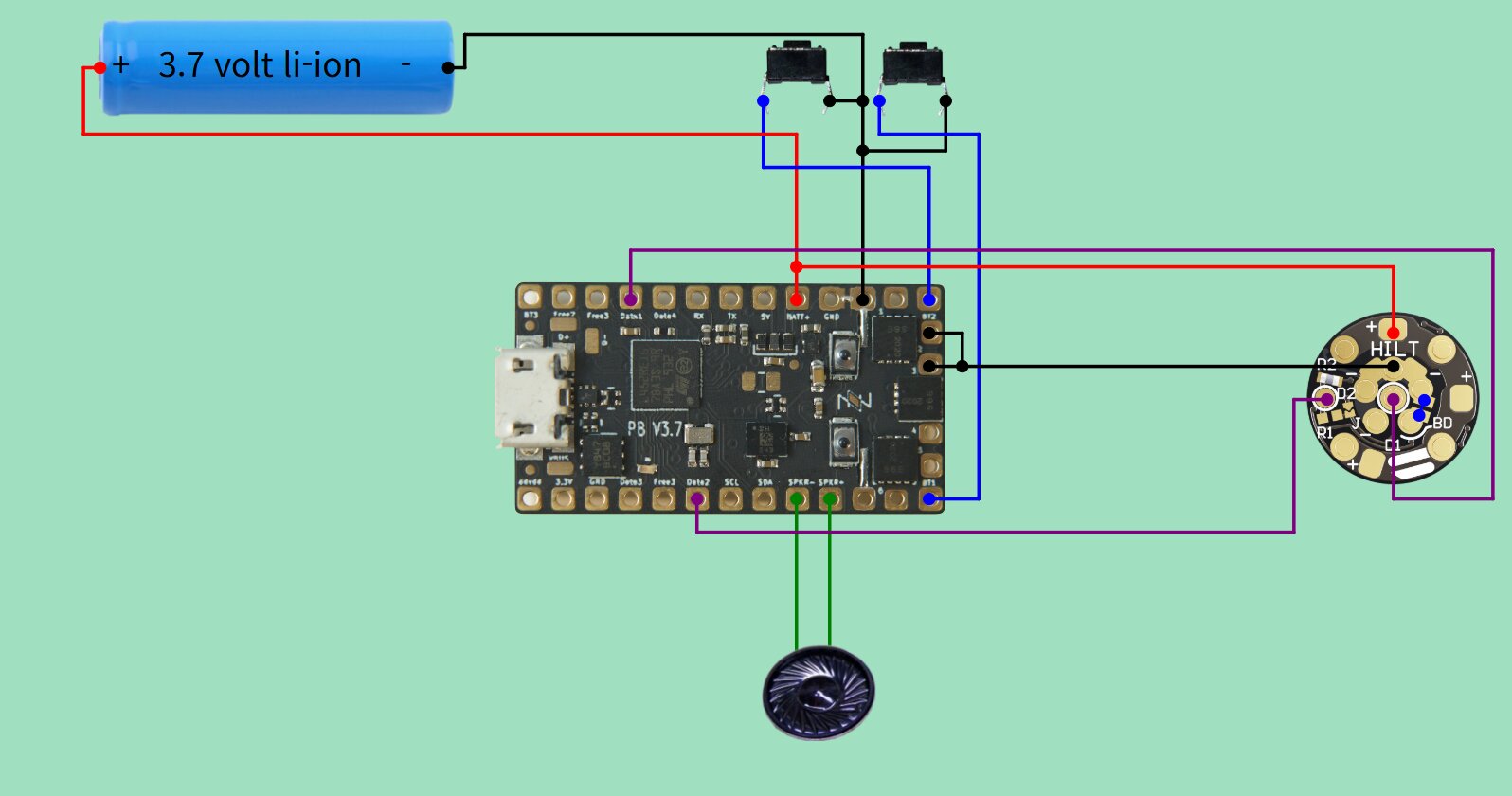
The NPXL Eco v4 I assume?
To which data pad on the board did you connect the ECO NPXL? Because the configurator image above shows 2 data lines, while de ECO has only one
In the config: the blade array is in the wrong place. There’s no selected prop file (set of controls), although it will default to the base saber prop.
More about props in your config here:
Defining the number of blades to 1 ok for an eco, but as @cryptic96 said your diagram from the configuration tool has 2.
This isn’t really a thing.
There’s a few ways to go to clean it up. I suggest using the basic config that comes from the generator to test it and make sure you’re uploading. What version of proffie OS are you using?
Don’t ask AI. Correcting proffie code slop is not worth the work.
im using proffieos v7.15 and the config was made by using the bladestyle below from greyscale fonts
{ "CODA_PROFFIE;common", "tracks/venus.wav",

StylePtr<Layers<

Mix<Sin<Int<3>>,AudioFlicker<RotateColorsX<Variation,DodgerBlue>,Stripes<5000,-90,RotateColorsX<Variation,Rgb<0,55,165>>,RotateColorsX<Variation,Rgb<0,85,115>>,RotateColorsX<Variation,Rgb<0,65,145>>,RotateColorsX<Variation,Rgb<0,30,185>>>>,AudioFlicker<RotateColorsX<Variation,Rgb<0,155,255>>,Stripes<5000,-90,RotateColorsX<Variation,Rgb<0,95,170>>,RotateColorsX<Variation,Rgb<0,115,215>>,RotateColorsX<Variation,Rgb<0,145,145>>,RotateColorsX<Variation,Rgb<0,65,225>>>>>,

//Rotates ^3 times per minute between DodgerBlue and DeepSkyBlue with subtle Cyan/Blue audioflicker

//AudioFlicker<RotateColorsX<Variation,DeepSkyBlue>,RotateColorsX<Variation,Rgb<0,95,195>>>,

//Alternate DeepSkyBlue with very subtle audioflicker

AlphaL<BrownNoiseFlicker<RotateColorsX<Variation,DeepSkyBlue>,Black,300>,SwingSpeed<400>>,

//Unstable swing

AlphaL<Stripes<1000,-2000,RandomPerLEDFlicker<RotateColorsX<Variation,DeepSkyBlue>,Black>,Black,RotateColorsX<Variation,DeepSkyBlue>,Black>,SwingSpeed<525>>,

//Unstable ripple swing

LockupTrL<Layers<

AlphaL<AudioFlickerL<Rgb<255,240,80>>,Bump<Scale<BladeAngle<>,Scale<BladeAngle<0,16000>,Int<4000>,Int<26000>>,Int<6000>>,Scale<SwingSpeed<100>,Int<14000>,Int<18000>>>>,

AlphaL<LemonChiffon,Bump<Scale<BladeAngle<>,Scale<BladeAngle<0,16000>,Int<4000>,Int<26000>>,Int<6000>>,Int<10000>>>>,TrConcat<TrInstant,White,TrFade<400>>,TrConcat<TrInstant,HumpFlickerL<AlphaL<White,Int<16000>>,30>,TrSmoothFade<875>>,SaberBase::LOCKUP_NORMAL>,

//Responsive lockup effect with screeching humpflicker endlock

//LockupTrL<Layers<

//AlphaL<AudioFlickerL<White>,Bump<Scale<BladeAngle<>,Scale<BladeAngle<0,16000>,Int<4000>,Int<26000>>,Int<6000>>,Scale<SwingSpeed<100>,Int<14000>,Int<18000>>>>,

//AlphaL<White,Bump<Scale<BladeAngle<>,Scale<BladeAngle<0,16000>,Int<4000>,Int<26000>>,Int<6000>>,Int<10000>>>>,TrConcat<TrInstant,White,TrFade<400>>,TrConcat<TrInstant,White,TrFade<4000>>,SaberBase::LOCKUP_NORMAL>,

//Alternate standard lockup

ResponsiveLightningBlockL<Strobe<White,AudioFlicker<White,Blue>,50,1>,TrConcat<TrInstant,AlphaL<White,Bump<Int<12000>,Int<18000>>>,TrFade<200>>,TrConcat<TrInstant,HumpFlickerL<AlphaL<White,Int<16000>>,30>,TrSmoothFade<600>>>,

//Responsive lightning block

ResponsiveStabL<RotateColorsX<Variation,Yellow>>,

//Responsive stab

//ResponsiveStabL<Red>,

//Alternate responsive stab, no color change

EffectSequence<EFFECT_BLAST,ResponsiveBlastL<White,Int<400>,Scale<SwingSpeed<200>,Int<100>,Int<400>>,Int<400>>,LocalizedClashL<White,80,30,EFFECT_BLAST>,ResponsiveBlastWaveL<White,Scale<SwingSpeed<400>,Int<500>,Int<200>>,Scale<SwingSpeed<400>,Int<100>,Int<400>>>,BlastL<White,200,200>,ResponsiveBlastFadeL<White,Scale<SwingSpeed<400>,Int<6000>,Int<12000>>,Scale<SwingSpeed<400>,Int<400>,Int<100>>>,ResponsiveBlastL<White,Scale<SwingSpeed<400>,Int<400>,Int<100>>,Scale<SwingSpeed<400>,Int<200>,Int<100>>,Scale<SwingSpeed<400>,Int<400>,Int<200>>>>,

//Multi-blast, blaster reflect cycles through different responsive effects

//ResponsiveBlastL<White,Int<400>,Scale<SwingSpeed<200>,Int<100>,Int<400>>>,

//Alternate responsive blast

ResponsiveClashL<TransitionEffect<Rgb<255,240,80>,LemonChiffon,TrInstant,TrFade<100>,EFFECT_CLASH>,TrInstant,TrFade<400>,Scale<BladeAngle<0,16000>,Int<4000>,Int<26000>>,Int<6000>,Int<20000>>,

//Responsive Clash

//ResponsiveClashL<White,TrInstant,TrFade<400>,Scale<BladeAngle<0,16000>,Int<4000>,Int<26000>>,Int<6000>,Int<20000>>,

//Alternate white clash

TransitionEffectL<TrConcat<TrInstant,Stripes<3000,-3500,RotateColorsX<Variation,Rgb<90,180,255>>,RandomPerLEDFlicker<RotateColorsX<Variation,Rgb<0,26,60>>,Black>,BrownNoiseFlicker<RotateColorsX<Variation,Rgb<90,180,255>>,RotateColorsX<Variation,Rgb<0,26,60>>,200>,RandomPerLEDFlicker<RotateColorsX<Variation,Rgb<0,42,128>>,RotateColorsX<Variation,Rgb<0,26,60>>>>,TrFade<400>,Stripes<3000,-3500,RotateColorsX<Variation,Rgb<90,180,255>>,RandomPerLEDFlicker<RotateColorsX<Variation,Rgb<0,26,60>>,Black>,BrownNoiseFlicker<RotateColorsX<Variation,Rgb<90,180,255>>,RotateColorsX<Variation,Rgb<0,26,60>>,200>,RandomPerLEDFlicker<RotateColorsX<Variation,Rgb<0,42,128>>,RotateColorsX<Variation,Rgb<0,26,60>>>>,TrFade<450>,HumpFlickerL<AlphaL<RotateColorsX<Variation,Rgb<90,180,255>>,Int<19000>>,25>,TrFade<2875>>,EFFECT_IGNITION>,

//Stabilize ignition effect

TransitionEffectL<TrConcat<TrFade<1125>,RotateColorsX<Variation,Rgb<90,180,255>>,TrInstant>,EFFECT_RETRACTION>,

//Slow brighten retraction effect

LockupTrL<AlphaL<BrownNoiseFlickerL<White,Int<300>>,SmoothStep<Int<30000>,Int<5000>>>,TrWipeIn<400>,TrFade<300>,SaberBase::LOCKUP_DRAG>,

//Drag

LockupTrL<AlphaL<Mix<TwistAngle<>,Red,Orange>,SmoothStep<Int<28000>,Int<5000>>>,TrWipeIn<600>,TrFade<300>,SaberBase::LOCKUP_MELT>,

//Responsive melt

EffectSequence<EFFECT_POWERSAVE,AlphaL<Black,Int<8192>>,AlphaL<Black,Int<16384>>,AlphaL<Black,Int<24576>>,AlphaL<Black,Int<0>>>,

//Power save, if using fett263's prop file hold Aux and click PWR while ON (pointing up) to dim blade in 25% increments.

InOutTrL<TrWipe<500>,TrWipeIn<1125>>,

//Standard ignition/retraction

//TransitionEffectL<TrConcat<TrDelay<1500>,Black,TrFade<1000>,AlphaL<Mix<BatteryLevel,Red,Green>,Bump<Int<0>,Int<6000>>>,TrFade<3000>>,EFFECT_BOOT>,

//TransitionEffectL<TrConcat<TrInstant,AlphaL<Mix<BatteryLevel,Red,Green>,Bump<Int<0>,Int<6000>>>,TrFade<3000>>,EFFECT_NEWFONT>,

//Optional/alternate passive battery monitor, on boot (1st line) or font change (2nd line) you will get a visual indicator at the emitter of your current battery level. This also works without a blade if you have a lit emitter or blade plug. Green is Full, Red is Low (the color will blend from Green to Red as the battery is depleted), the indicator will fade out after 3000 ms and not display again until powered down and back up or fonts change.

TransitionEffectL<TrConcat<TrInstant,AlphaL<Mix<BatteryLevel,Red,Green>,Bump<BatteryLevel,Int<10000>>>,TrDelay<2000>,AlphaL<Mix<BatteryLevel,Red,Green>,Bump<BatteryLevel,Int<10000>>>,TrFade<1000>>,EFFECT_BATTERY_LEVEL>,

//On demand battery level, if using fett263's prop file Hold AUX and click PWR while OFF, the battery level is represented by the location on the blade; tip = full, hilt = low and color; green = full, yellow = half, red = low

TransitionEffectL<TrConcat<TrFade<450>,AlphaL<HumpFlickerL<RotateColorsX<Variation,DeepSkyBlue>,10>,Bump<Int<0>,Int<3000>>>,TrFade<350>,AlphaL<HumpFlickerL<RotateColorsX<Variation,DeepSkyBlue>,15>,Bump<Int<0>,Int<5000>>>,TrFade<450>,AlphaL<HumpFlickerL<RotateColorsX<Variation,DeepSkyBlue>,20>,Bump<Int<0>,Int<7000>>>,TrFade<500>,AlphaL<HumpFlickerL<RotateColorsX<Variation,DeepSkyBlue>,25>,Bump<Int<0>,Int<10500>>>,TrBoing<150,1>>,EFFECT_PREON>

//Overload preon effect

>>(), "coda"},
so i used ai to make the config file
but doesnt using the generator made config file require to download some soundfonts that i dont have? like the
{ "SmthJedi", "tracks/mars.wav", &style_charging, StyleNormalPtr<BLACK, BLACK, 300, 800>(), StyleNormalPtr<BLACK, BLACK, 300, 800>(), "Battery\nLevel"}
i dont have the smthjedi font.
to add i connected it to data 1

These fonts can be downloaded for free, but this specific section in the config is not needed if you have other blade styles / sound fonts already.
You basically NEED everything the generator creates except for the content of the Preset presets[] = {} array IF you already have blade styles.
So like:
Preset presets[] = {
// full pasted Coda blade style you just posted above
{ "CODA_PROFFIE;common", "tracks/venus.wav",
...
>>(), "coda"},
}
Just make sure the “CODA_PROFFIE” string is exactly the same as the CD card directory
GitHub - profezzorn/SoundFonts: Free Sound Fonts for ProffieOS · GitHub
But to be sure everything works, I suggest downloading the soundfonts from the above link. Write to SD Card and use the generated config from the configurator to test if everything works.
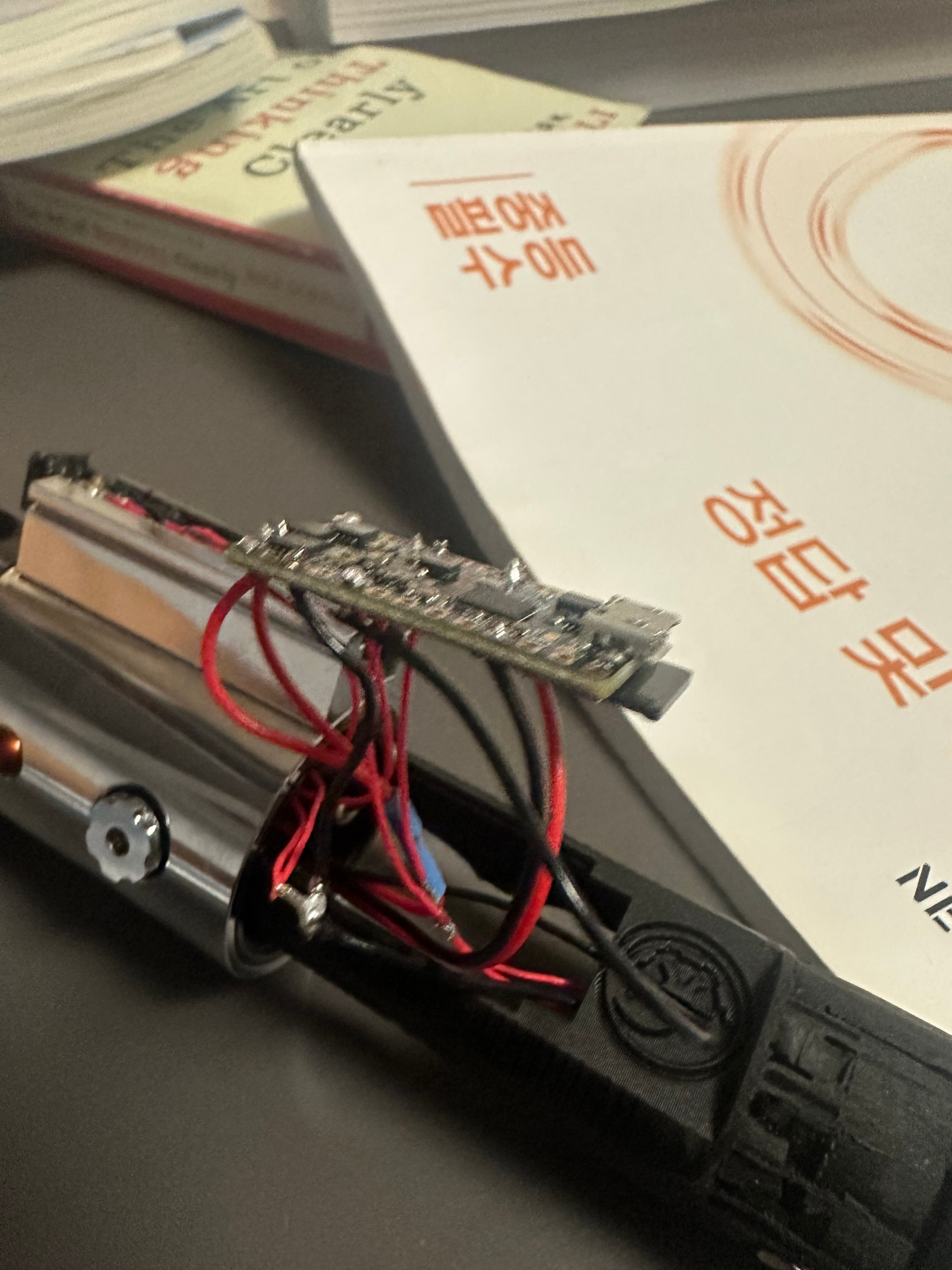
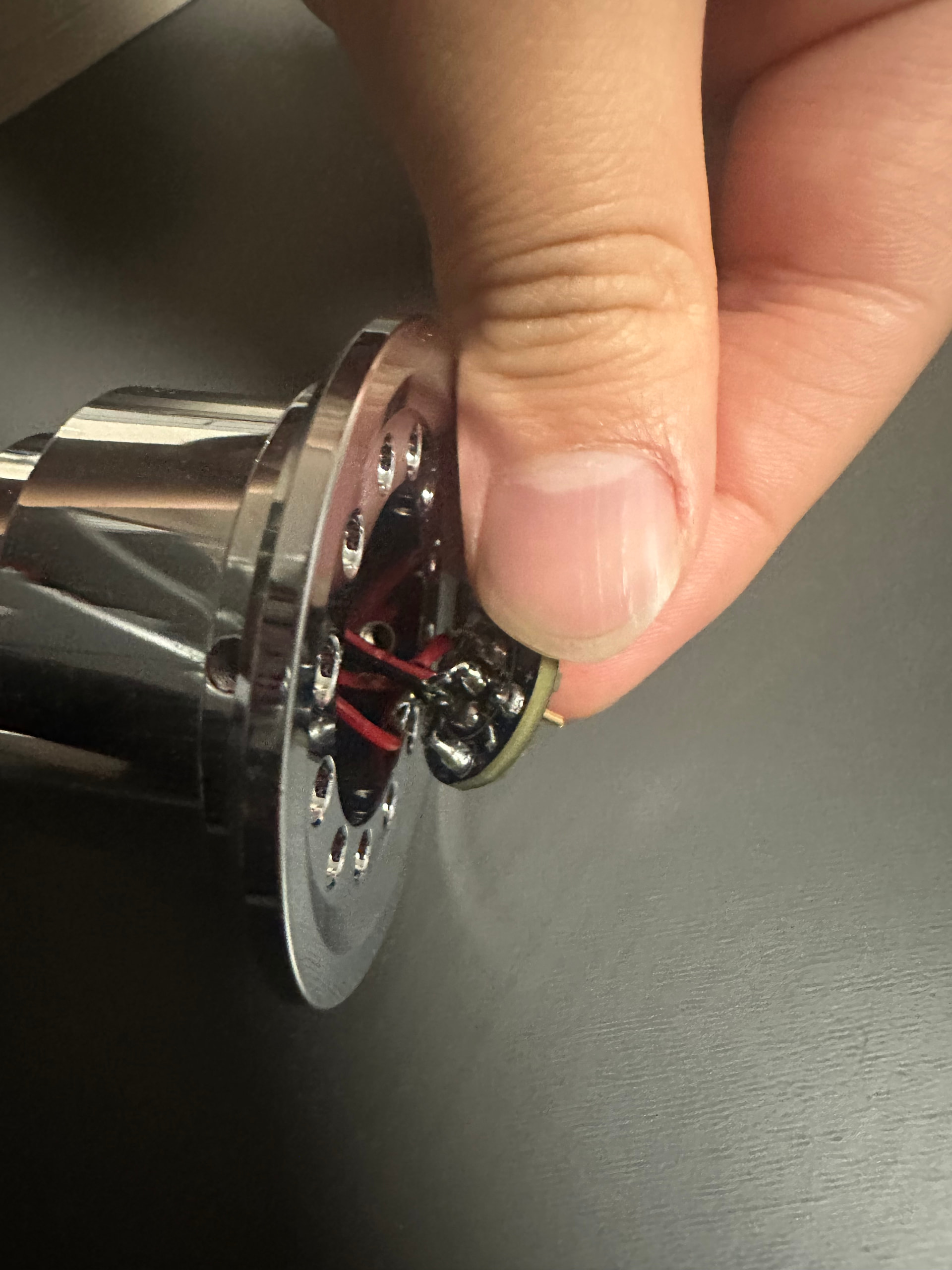
Can you take a picture of what you have physically wired?
Don’t use AI to generate the config for you, it will never do it right lol. Use the official Fredrik’s website and check the PDF User Manual.
4 Likes

Can also throw your config that you get from Fredrik’s website into ProffieConfig to do the editing, since it’s a tool specifically made for editing (and making it easier/clearer to do so) configs, rather than gambling (with rather poor odds) with AI.
1 Like
I would also utilize Fett’s config generator for the blade styles
i downloaded it but only a white pop up window appears and nothing happens
sorry for the late response
the physical pictures wont be clean because i was new to this and i didn’t know about think neck pcbs so i decided to do a unremovable chassis
here is the photo though
Hmm, well that’s strange.
It’ll be a little bit before I can look at it, but I’d appreciate if you could PM/DM me any/all log files from %LOCALAPPDATA%\ProffieConfig.
This is the second time I’ve heard of something like this, and I’m a little concerned since it seems to be a new issue.
Sorry about that.