Whats up everyone, so I purchased a pair of Ahsoka Tano CW era sabers from The Pach Store last year. I havent touched them in about 8 months and could HARDLY remember how to add new sound fonts. A friend of mine asked me if he could borrow my sabers for a gender reveal party. He shared with me an awesome video of this couple with this complicated and intricate gender reveal sound font. He jokingly asked if I could recreate that sound font, I told him no way in heck would I be able to do that especially since I’ve forgotten how to modify my sabers.
In the end he only asked me to set the sabers to turn red if it was a girl or blue if it was a boy. But of course me being a GREAT friend I thought I would dabble in trying to create a Proffie font style that would be more glamorous than just turning on red or blue… So I did some research on the “True Intentions” font and was in the process of adding the lines of codes to my SD card. I then opened Arduino and plugged my Proffie heart with my micro usb cable. It played this super loud muffled sound like it usually does. I lay it on my table as carefully as possible trying to not cause a disconnect. I then go to hit the upload button, totally forgetting to hit verify first… I then get this notifcation from my Mac OS saying to properly eject before disconnecting in the future. So I go to unplug my proffie heart and attempt to reinsert the micro USB and this time my Proffie heart did not play a single sound. I disconnected the micro usb again and attempted to plug in the battery and it played NO sounds. I reinerted my Proffie Heart into my saber and attempted to power her on, but it is dead.
So my question Is, is my Proffie Heart board fried/broken? Or is there any chance I can recover from this and power her back on once again? Pleaseeee I never planned on this to happen I was perfectly happy with my sabers with the fonts I’ve added in the past, I just tried to be a good friend and now one of my sabers no longer ignites :(.
First of all: you should always do the safe eject before disconnecting, removing the SD card or programming the board. The “sd setting” in OS8 will make this better.
Second, “pressing verify first” sounds like a waste of time. Verify will make sure that ProffieOS can be compiled, and nothing else. When you hit “Upload”, it also compiles ProffieOS, and if that fails, then it will not (cannot) make any modifications to the board. “pressing verify first” just does the compile step twice.
I think there are one of three things happening here:
Bad programming
corrupt sd card
both of the above
It can be hard to tell the difference between these cases, but here are a few ideas:
a) try removing the sd card and power the board up with a speaker connected. Do you get an “sd card not found” error? (or some beeps maybe?) if so, the programming is likely fine and the problem is most likely the SD card.
b) If you remove the SD card and connector to USB, does the serial monitor work? (again, this would mean the programming is probably fine.)
c) does the board show up as “Proffieboard” in system info?
If it’s a bad programming, you can use the BOOT+RESET buttons to get into bootloader mode and then program the card anyways. Proper instructions here:
If your SD card is corrupted, you should format it, or replace the SD card with a different one. Assuming you have a backup (which is highly recommended) then format the SD card (using the SD association formatter) and then put the files back from your backup and see if it works better.
Of course, it is possible something fried, but I would not give up hope just yet.
First I failed to declare in my initial post, but I did not purposely eject the heart from my laptop. SOMETHING forced it to disconnect, I’m just not sure what the heck caused it to self disconnect from my laptop. My cable was secure and I made sure to the heart down on the table with the utmost care at the time to avoid the possibilities it would cause a disconnect. And to add if it wasnt obvious, but it never reached 100% upload before being disconnected from my laptop. So I’m not sure if that would rule out the bad programming you suggested.
Second, I only mentioned that I forgot to hit verify before upload because I thought maybe because I skipped the verify step that it caused my heart to self disconnect, but now that you mentioned that it is a waste of time since hitting upload also compiles. It just seems that maybe I was not as careful as I thought with setting my heart down properly without triggering a self disconnect…
I also failed to include in my initial post, but I did in fact check to make sure the SD card was working just fine. I pulled the SD card out of the board and was able to plug it into a Micro SD card reader and accessed the files on my laptop without any issues. So would this mean that my SD card is not corrupted?
Please advise me further based on my added information. And if the BOOT + Reset option is still viable based on my update.
Could be an internally damaged cable, it might seem fine at first but just breathing wrong on it could make it move and cause a “break” in the connection.
But it had started to go up from 0%, right ? So this would cause a case of bad programming, so yes the Boot + Reset option is your best bet.
Here are my notes on Boot + Reset (I am on Windows):
It is possible to temporarily “brick” a Proffieboard with a bad config (or an interrupted programming).
It is possible to permanently brick a Proffieboard with a short (magical blue smoke, because it’s “notoriously hard to put back in” ) or a physical/mechanical damage (like scraping a component off, with a screw driver/pliers/rogue screw or similar)
It is impossible to permanently brick a Proffieboard with a bad config.
Boot Proffieboard:
Connect your Proffieboard to your computer via USB and DO NOT DISCONNECT until you see in Arduino:
Download [=========================] 100%       xxxxxx bytes
Download done.
File downloaded successfully
Transitioning to dfuMANIFEST state
Do the sequence properly (with the USB port pointing “away from you” and the buttons on the Proffieboard “facing up”):
Press and keep holding BOOT (the right button on the Proffieboard),
Press and release RESET (the left button on the Proffieboard),
Release BOOT (the right button on the Proffieboard).
Check that the computer sees an STM32BOOTLOADER device in Devices and Printers control panel (this is on Windows, I don’t know about Mac).
Just hit upload. (you wont see a Proffieboard connected to a com port in Arduino, but it will be there!)
As long as you can see STM32BOOTLOADER, everything is exactly as it should be.
STM32BOOTLOADER is the “hidden partition” of your Proffieboard that is responsible to upload a new config to the “main partition”.
I use two flat end wooden toothpicks/skewers to click the buttons on the board, @profezzorn uses a lego tile or plate 2x6 (I find it too slippery). DO NOT EVER USE metal tools!
You need to be gentle and you should be able to feel the click and “un-click” of the buttons.
If you don’t see the Arduino message from above:
try upload a second time, or
you did the sequence incorrectly, or
your cable is “not data” or broken (happens more often than you think), or
your board is broken (least likely, unless you had a short or a physical/mechanical damage on it)
That SOMETHING is pressing the upload button.
When you hit upload, the board is told to reboot into bootloader mode.
Naturally rebooting the board causes it to disconnect from USB momentarily.
This is a normal part of the programming process, but a disconnect is still a disconnect. Macs have a bad habit of indexing connected drives, and if it was doing that when the disconnect happened, it may have corrupted the SD card, however programming can still function normally if it progresses from 0 to 100. (Because that would occur after the board re-connects again.)
Did it reach 100% at all? (After the “disconnect”?)
If it got interrupted and never reached 100%, then that would strongly suggest bad programming.
Bad programming is still possible even if it did reach 100%, but less likely.
Did you check all the files and directories?
Try copying all files from the SD card to a directory on your computer. That should read all the files, and if that works it seems likely that the SD card is fine.
BOOT+RESET is always viable, unless:
a) the board is fried
or
b) you don’t have the config file for the board
BOOT+RESET will not damage the board any more than programming it does, so go ahead and try it.
yeah I remember when I was working on my sabers more confidently I would hold my breathe while connecting my sabers during the Arduino parts.
yeah when I hit upload I was letting it go for a little while It mighve gotten to around 60% when I noticed my Mac give me a notification that the connected device was ejected improperly without being ejected. Thats when I freaked out and paused the upload and attempted to unplug the micro usb and reconnecting the micro usb. I will follow your notes on how to Boot + Reset to the T in order to figure out if it is temporarily bricked or permanently bricked, but like you said a permanente brick would only be likely if any of the components were physically damaged, which never happend since I didnt even touch the board.
I do not have another data transfer micro usb cable. The data transfer cable I had was only used for the sabers. So I doubt it is broken or damaged.
If you read all the treads on The Crucible (like I did), you’ll see that a broken micro USB cable happens way too often. The wires in the cable are very thin and it was never build to last. One bad bend and that could be enough to cut a wire.
But when you retry and your Mac shows you (after you press Boot & Reset in the sequence I described above) a “STM32BOOTLOADER” is connected, then you should be good to go to try another upload. After you click upload, don’t touch your computer or your desk (and don’t breathe on the cable ) until upload completed.
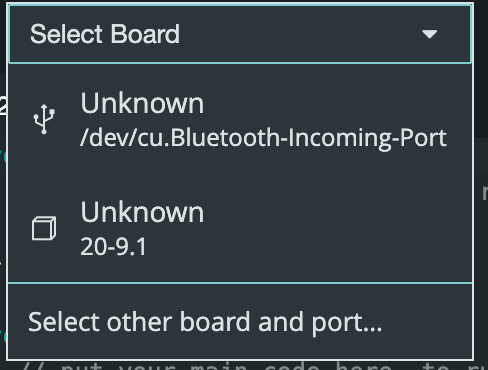
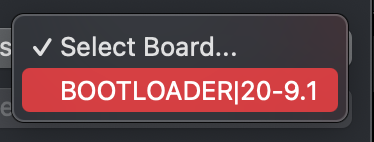
Also, I don’t know if a Mac can show it or where ? But if you do find out, please let me know, so I can update my notes for the next Mac user in need of help.
The device is listed in the usual Arduino port listing on macOS.
I don’t remember exactly what it looks like in the IDE (as in what it’s called) but its appearance does change based on the mode it’s in. The name is much shorter in bootloader mode compared to the usual dev.cu what have you.
Dealing with the bootloader mode is substantially more straightforward on macOS than it is on windows.
 ) or a physical/mechanical damage (like scraping a component off, with a screw driver/pliers/rogue screw or similar)
 ) until upload completed.