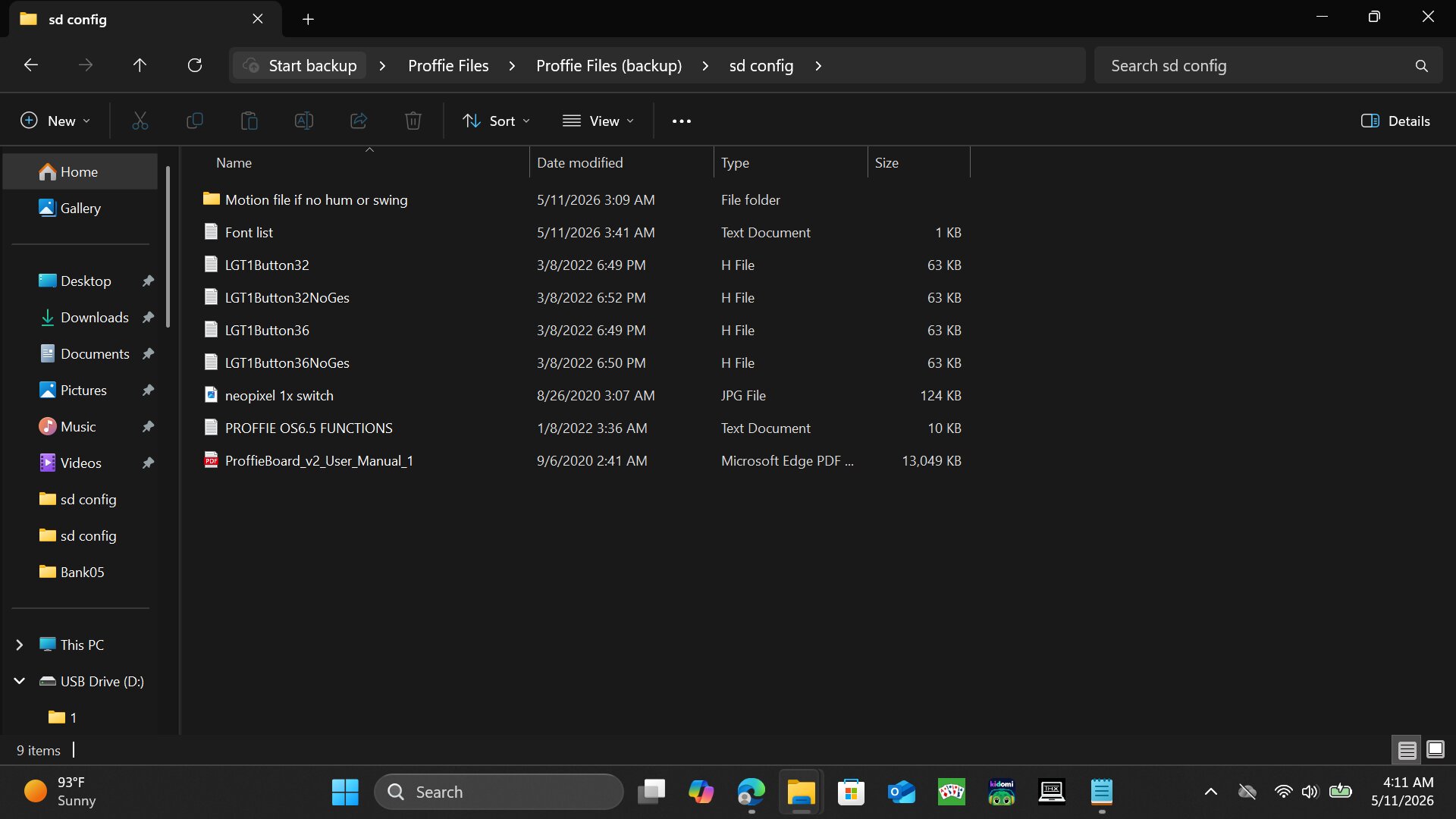
Im not really sure what else i should supply photos of to be honest after learning how to code the xenopixel (very easy compared to proffie) im kind of confused as to what is preventing me from using gesture on/off i can learn to add fonts through arduino and edit bladestyles there probably my only issue right now is my gesture on/off , every other gesture command is working, switching colors, playing force and sounds etc
Do you know which config is actually loaded? It seems there are files with and without gestures based on the filenaming so if you have the one without gestures enabled you’ll need to update to get them.
I’m not familiar with this vendor so I don’t know which prop they actually use.
It looks like they have a 32 or 36 inch blade option and a normal and “NoGes” option for each. Open one of the normal H files and use pastebin.com to share the config here.
Also no, i dont know which one is loaded i’ve looked at a few of them and these are the only ones that have code listed, i found a couple files that i can edit like the file with the gear next to it, i havent found any files i can like edit code like the xenopixel, its more organized, i got my xeno from allysabers and this maul saber from saberspro
the files i referring to i can edit are the font files tho thats it probably not worth mentioning since we’re trying to figure out my gesture control issue
#define BC_THRUST_ON
#define BC_TWIST_ON
#define BC_TWIST_OFF
#define BC_FORCE_PUSH
#define FEMALE_TALKIE_VOICE
#define VOLUME_MENU_CYCLE
#define IDLE_OFF_TIME 60 * 5 * 1000
#define SPEAK_BLADE_ID
#endif


#ifdef CONFIG_PROP
#include "../props/saber_BC_buttons.h"
#include "../sound/sound_library.h"
#endif
They use BCs prop, I’m not familiar with his options. If you’re trying to use features for my prop you’ll need to make a bunch of updates and probably move to OS8 as OS6 is pretty outdated at this point.
Start here, read through everything and go step-by-step:
Then see here for the Setup instructions, defines and controls for my Prop file.
Right now im kind of soaking up info, at the same time trying to figure out why my twist on and off arent working, i have two sabers, i got the maul saber but they’re two seperate sd cards and cores so i’ll have to update both of them? and if i do so i wont be using the same code anymore? if i update to your os8 i’ll what? essentially be on a better system? will my button controls change? since you said its a different prop what exactly does that mean if i update from BCS to yours? just asking questions and trying to learn
I’ll probably most likely update, i just want to know what that will mean for my saber, i just got it 2 days ago and its my first proffie, im content with leaving it how it is and sticking to customizing my xenopixel since im more familiar with that, but i have the confidence to learn new things
I don’t know BCs controls, if you want to keep the same controls (prop) you’ll need to see if @NoSloppy can assist. If you want to use the controls from my YT videos you’ll want to switch to my prop and read through the controls listed on the page I linked above.
Updating the OS will add some features and (potentially) fix some bugs from the older versions, but it will also add/change some controls (depending on the defines you add).
I’d say figure out what you’re wanting first, then determine if Updating the OS and/or changing the prop is what you’re after. To add features and capabilities you’ll most likely need to update if your installer didn’t include in the saber already.
If you have
#define BC_THRUST_ON
#define BC_TWIST_ON
#define BC_TWIST_OFF
#define BC_STAB_ON
Etc… those are the gesture defines and they’re active (on).
Are you sure you’re doing the gesture correctly?
Like twist is a 2 direction “revving a motorcycle” motion. Don’t do it too fast. It’s like opening a door knob.
I don’t see any reason it shouldn’t work
Side note, remove the line
#include "../sound/sound_library.h"
They incorrectly have that in their configs. It’s not harmful, just not needed there.
Yea I’m sure I’m using it correctly, I’ve even tried the stab on, my Xenopixel does these functions fine, but this proffie saber however does not for whatever reason, let’s spread the word not to buy from saberspro 
I find these lines in some of the files and text files however I don’t know where to put them to ensure they work, they’re there, but it doesn’t work? So I don’t know what the deal is I’m probably just gonna send the saber back and buy from somewhere else or stick to Xenopixels they’re easier to program
Those would go into CONFIG_TOP. You’ve gotta go through the upload process though to compile ProffieOS w/ your config and upload to the board. Those files don’t do anything sitting on the SD card.
If you’re struggling with wrapping your head around all the options and how to do things, would maybe ProffieConfig be helpful to make sure all the compilation and Arduino stuff is handled right? Or even just to toggle the options (the gesture controls would be on the “Prop File” page in the ProffieConfig Editor), export the config, and see what ProffieConfig generates?
I’ve also got a (poorly-paced, I apologize) short video that tries to generally explain how proffie configuration works, if you’re already using Arduino maybe you understand, but maybe it could help clarify things.
Twist and stab gestures (stab requires a clash, btw. If you’re not hitting a wall or something then it’s “thrust” you’re looking for) can be a little tricky to trigger if you’re not familiar. Swing-On is pretty forgiving (just gotta wave the saber around real hard) for a gesture just to check that your changes are actually taking effect.
In any case, it sounds like there’s some level of misunderstanding or disconnect here…
Hold on.
Did you actually UPLOAD the LGT1button36.h config ?
If you’re just guessing what was uploaded that’s not helpful.
If those twist on and twist off defines are in place, then they’ll work.
If you have the board programmed with the “NoGes” version, then they are not inactive.
If you don’t know, then uploading the right config is the first step, so again, did you do that?
Idk tbh this is my first time getting a proffie and out of the box the gesture controls didn’t work so idk bro you tell me what’s wrong with it oh mighty saber master 
1 Like
That’s just one of the files on the saber it has the lines but like I said bro it’s not working, it should be working but it’s not idk what I neee to do to fix it I shouldn’t have to do anything to be quite honest
You’re just not aware of how it works.
Those config files on your SD card are just sitting there. They’re just in storage. The board doesn’t use them from there. That’s just how the company sends out all their SD cards. One of those config files is uploaded to your saber, programmed to the Proffieboard. You need to upload programming to the board through Arduino for it to take effect. Config files on the SD card aren’t read by the board when it’s running.
So before they sent you the saber, they programmed it with (so it seems) a config file that doesn’t use gestures .
So simply uploading the correct one is all you need to do .
I suggest reading this documentation site, specifically the Getting Started section and the links under it.
I’ll check it out, thanks feller
1 Like
Hi @Fear_Galaxi did the documentation work? @profezzorn is the zadig video still relevant?
if you’re a visual learner consider looking at this

Zadig is generally not recommended anymore. It still works, but proffie-setup.exe is easier to use. This video is specifically made for people who are having problems caused by using zadig wrong. For people who need to learn how to upload, there are better videos.
1 Like