I am brand new to owning a proffie board lightsaber. I have a starkiller proffie v2.2 and I have absolutely no idea how to setup the sd card or the firmware on the board. It was working when I got it but I did not like the fonts it shipped with so I deleted the fonts and tried using fallen order ones. I did not make a backup of my sd card so I have none of the necessary files to get it to work, essentially leaving me with a paper weight. if anyone can help me get this thing setup with fonts from jedi fallen order I would greatly appreciate it
If you didn’t want any of the fonts that the saber shipped with, then the only meaningful “casualty” would be the config file that was (maybe… sometimes it’s not even put on there) on the sd card.
If your saber has accent LEDs (for a crystal on a starkiller, for example), then you probably want to try and reach out to the seller and ask for the configuration file. If they can give you the exact one, that’s easier than trying to make your own from scratch, usually.
Once you have the base of a config (the physical/wiring parts of it sorted), then to worry about your presets, the easiest way to do config things is by using ProffieConfig. It’ll set everything up so you don’t have to worry about using Arduino or installing drivers, and then there’s a set of guides that try to be as short and to the point as possible to explain how proffie works and how to add that stuff, and we can go from there.
First step though is to get the original config for the wiring bits, or if that falls through we can help you to construct an appropriate one from scratch, but that’ll require knowing how the saber is wired. Usually knowing what pads on the board are used/soldered to is enough to figure that out.
1 Like
I was able to recover this file from using a data recovery app
Proffie V2.2 board config.txt (104.8 KB)
I would include some photos of the wiring but it seems I am unable to as a new user
Ah, yeah… you should be able to share w/ iCloud, Google Photos, or similar. (But if that config is right–see below–then there’s no need anyways)
Jeez, well that’s an ugly config I’ve seen before 
Does the chassis have strips of accent LEDs on it? Is the crystal (Unless this is one of the other starkillers w/o an exposed crystal) illuminated? Want to double check the config matches what would be expected of your saber.
If so, then that’ll work.


I was able to recover the original files thanks to the seller who sent me a zip file and now have a working saber again, still would like to change these garbage fonts though lmao,
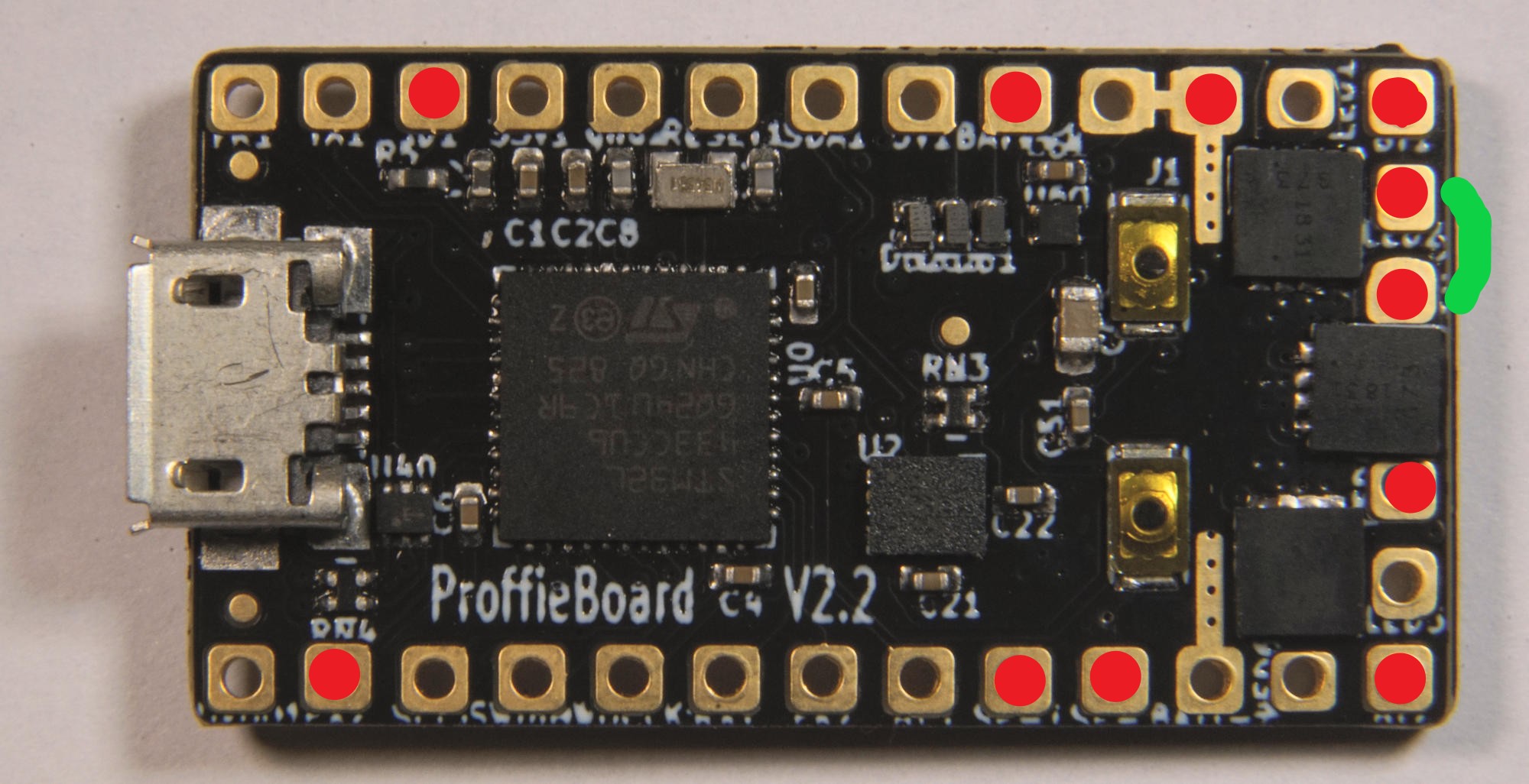
the green line is a single wire thats connected between 2 points
Alright. This is fairly typical.
FYI:
Your main blade is likely on Data1, using LED pads 2 and 3, and an accent is on Data 2, using LED pad 4. Two buttons and nothing else (a speaker, obviously)
If you’ve got the config file now, changing the fonts is pretty easy. Pretty much you can remove all the presets you don’t want from the config, remove the folders from the sd card (or not, it doesn’t really matter), and then add a new preset and add the folder to the sd card.
I’ll refer you to those guides I linked earlier, they cover this pretty cleanly. They’re only a couple minutes each, and of course I recommend going through all of them, but the one you’re probably most interested in (seeing as you’ve managed to put a config back on already), is the one that goes over modifying presets:
You’ll want to download the sound font you want, as it sounds like you’ve got one in mind (if not there’s makers that have good cal ones linked on that page), but otherwise that should give you a good idea of what to do.
Lmk if you’ve more questions on any of it. It’s not too difficult but there’s at least a couple moving parts.
So I’ve been trying to edit the included config to have just one blade preset to test it before I go in and add more, I keep getting this error on Arduino. Also I tired using Proffie Config but I get stuck at the presets and blade arrays section because all the boxes are blank and I’m not sure what to put down.
Heres my modified .h file along with a screenshot of the error I am getting
Kestis.h (7.2 KB)
[ EDIT by Moderator: Screenshot deleted ]
Honestly if there’s someone who’d be willing to set this thing up for me I would happily compensate them
It sounds like maybe you created a new (and therefore blank) configuration instead of importing one.
In the future, with Arduino errors, please use the “Copy Error Messages” button and just paste them here to avoid screenshots of text.
In any case, that error isn’t config-related. Looks like there’s something odd with your arduino-proffieboard plugin installation. I would try removing it and reinstalling (just the plugin, not Arduino as a whole, to be clear)
FWIW, your config does look fine, but this looks to be the one you got from the data recovery off the SD card. It doesn’t match how your saber is wired. The main blade will probably look okay, but your accent won’t be doing what you expect. (It’s a lucky property of the way the config is setup that it will light up though)
I decided to try and create a config with the proffieconfig ui using the info you offered regarding my layout, right now I am attempting to setup the main blade, what option do I pick for color order?
Also does this app require any sort of dependencies? I was getting an unknown error when attempting to upload a config based on the one I found on the sd card
I saw your message, but I’ll respond to what you brought up here for completeness
You can leave it w/ the default “GRB.” Pretty much all blades use that order. FYI, there’s actually a tooltip on this drop down (or there should be) that explains that (there’s tooltips on lots of stuff to try and give little explanations) 
None that it doesn’t install, but if Arduino is giving you issues, ProffieConfig uses the same backend, so it’ll probably be giving you similar ones.
Easiest thing to do is just nuke the %LOCALAPPDATA%\Arduino15 folder (with Arduino and ProffieConfig closed), and then re-run the ProffieConfig setup.
You can also see exactly what errors ProffieConfig is coming up against by viewing the log file (on the main window the “File->Show Logs” option will pop it up), in this case though it’ll probably just say the same thing you saw in Arduino.
The shared config file is coded for 2 accent strips, both with 26 pixels. Data 2 and LED1, Data 3 and LED4; however, the board appears to only have Data 2 and LED 4 soldered, as identified by Ryrog25–just flagging this as a mismatch. The config would need to be corrected.
I’ve since used fetts proffie 2.2 config creator to make one and it seems to work fine. I managed to figure out how to make custom fonts and blade styles (admittedly using chatgpt to change the color of an existing blade style but it suits my purposes well) I won’t know if the blade works correctly as I bought this hilt without one, I plan to get a 36 inch blade