Help making manual blade array switching code cleaner

Hi everyone,

I’ve been working on using manual blade array switching and locking some arrays for use when blade is not detected and some different arrays for when a blade is inserted.

I modified Fett263 button prop to do this and it works for the very specific config I’m using but if I change things it’ll probably break. If someone wants to have a go at generalizing this/ making things easier to change, I’d be very grateful.

When there’s no blade, it locks to the first 2 arrays like I want. When I want to insert a blade, I need to flip the killswitch on and off again to sort of reset it and then the blade detect will change to the correct array. When I try to switch the blade array when a blade is inserted, it’s not locking to the correct array.

If anybody would like to have a go at improving/formalizing my cobbled together code, I’ve included it here.

My test config:
Bladeswitch.h
Bladeswitch.h (2.4 KB)
(in case the link doesn’t work)

Here is the part of the code I modified in Fett263’s button prop.

#ifdef FETT263_MANUAL_BLADE_ARRAY
  void NextBladeArray() {
    if (!use_fake_id_) best_config_before_faking_ = current_config - blades;
    size_t next_array = (current_config - blades + 1) % NELEM(blades);
     if ( blade_detected_ = false) next_array=next_array;
    else if (blade_detected_ = true && next_array >1)     next_array = 0;
    else next_array=next_array;
    fake_id_ = blades[next_array].ohm;
    use_fake_id_ = true;

    FindBladeAgain();
    PlayArraySound();

I don’t know about your modified fett263’ s code but you may want to try to change your blade array from this:

BladeConfig blades[] = {
{ 1, 
//BLADE
WS281XBladePtr<132, bladePin, Color8::GRB, PowerPINS<bladePowerPin2, bladePowerPin3> >(), 
//MOTOR
SimpleBladePtr<CH1LED, NoLED, NoLED, NoLED, bladePowerPin1, -1, -1, -1>(), 
CONFIGARRAY(presets) },

{ 2, 
//BLADE
WS281XBladePtr<132, bladePin, Color8::GRB, PowerPINS<bladePowerPin2, bladePowerPin3> >(), 
//MOTOR
SimpleBladePtr<CH1LED, NoLED, NoLED, NoLED, bladePowerPin1, -1, -1, -1>(),
CONFIGARRAY(presets1) },

{ 3, 
//BLADE
WS281XBladePtr<132, bladePin, Color8::GRB, PowerPINS<bladePowerPin2, bladePowerPin3> >(), 
//MOTOR
SimpleBladePtr<CH1LED, NoLED, NoLED, NoLED, bladePowerPin1, -1, -1, -1>(), 
CONFIGARRAY(presets2), "nb_save" },

};

to this:

BladeConfig blades[] = {
{ NO_BLADE, 
//BLADE
WS281XBladePtr<132, bladePin, Color8::GRB, PowerPINS<bladePowerPin2, bladePowerPin3> >(), 
//MOTOR
SimpleBladePtr<CH1LED, NoLED, NoLED, NoLED, bladePowerPin1, -1, -1, -1>(), 
CONFIGARRAY(presets), "nb_save" },

{ NO_BLADE+1, 
//BLADE
WS281XBladePtr<132, bladePin, Color8::GRB, PowerPINS<bladePowerPin2, bladePowerPin3> >(), 
//MOTOR
SimpleBladePtr<CH1LED, NoLED, NoLED, NoLED, bladePowerPin1, -1, -1, -1>(),
CONFIGARRAY(presets1), "nb_save" },

{ 0, 
//BLADE
WS281XBladePtr<132, bladePin, Color8::GRB, PowerPINS<bladePowerPin2, bladePowerPin3> >(), 
//MOTOR
SimpleBladePtr<CH1LED, NoLED, NoLED, NoLED, bladePowerPin1, -1, -1, -1>(), 
CONFIGARRAY(presets2) },

};

This should work with fett263’s original code. :crossed_fingers:

With “nb_save” in both your first and second blades arrays (NO_BLADE & NO_BLADE+1), as long as you keep the same number of presets in your “presets” & “presets1”, then when you change from NO_BLADE to NO_BLADE+1, I believe you should land on the same preset “number”. But if you want to land on the last preset used with that array, then you need to change one of the “nb_save” to something else (you can choose “nb-save1” or “array2” or anything else that you fancy, this is the name of the sub-directory that ProffieOS will create and use on your SD-card to save the state of that blade array.

1 Like

Thank you for your suggestions. I tried implementing them in two sabers where I have NPXL v4 and blade detect.

From my experiments, the NO_BLADE+1 gave mixed results where it would not manually switch to other arrays so I had to set it to a number to get manual array switching to work again. Not really sure why. Adding “nb_save” definitely did give the desired results of having connected presets.

For my final config, I would recommend something like this to anybody trying to do this:

BladeConfig blades[] = {
{ NO_BLADE, 
//Your Blades
CONFIGARRAY(presets), "nb_save" },
{ 0, 
//Your Blades
CONFIGARRAY(presets1), "nb_save" },
{ 1, 
//Your Blades
CONFIGARRAY(presets2) },
{ 2, 
//Your Blades
CONFIGARRAY(presets3) },

//etc...

};

The other thing I was interested in configuring: the allowing of only certain arrays to be switched to when no blade is detected and allowing other sets of arrays for when blade is inserted.
I throwing in the towel and concluding that I don’t really understand how the proffieboard knows when a blade is inserted and what variables is changed and able to be called upon.
The code I’ve settled upon, allow you to lock to some arrays when there’s no blade. When you want to insert the blade, to get it to switch correctly, the killswitch has to be turned off and on again. Haven’t really figured out a way to lock arrays for when blade is inserted.

in case anyone’s interested:

#ifdef FETT263_MANUAL_BLADE_ARRAY
  void NextBladeArray() {
    if (!use_fake_id_) best_config_before_faking_ = current_config - blades;
    size_t next_array = (current_config - blades + 1) % NELEM(blades);
  //code added to fett263 prop
  if (next_array >1)     next_array = 0;
    else next_array=next_array;
  //end of code added
  fake_id_ = blades[next_array].ohm;
    use_fake_id_ = true;
    FindBladeAgain();
    PlayArraySound();

Note that if presets and presets1 don’t have the same number of presets, or if the styles in those presets aren’t mostly the same, then they shouldn’t share a save directory. Edit mode or similar could very easily wipe out settings, as some settings that exists in presets doesn’t exist in presets1 or vice versa.

Same for presets2 & presets3.

The rule of thumb is to only use the same save directory when you have the same preset array. It is possible to do it if the preset arrays are mostly the same, or if you never use edit mode, but describing when that is ok and when it isn’t is a bit more difficult.

1 Like

Had time to experiment, I’m happy to report my results here for future reference and anybody searching up the same topics as I was: such as using blade id to switch between blade arrays set up for Cal Kestis Single blade fonts and switching to Crossguard fonts and blade arrays using blade id.

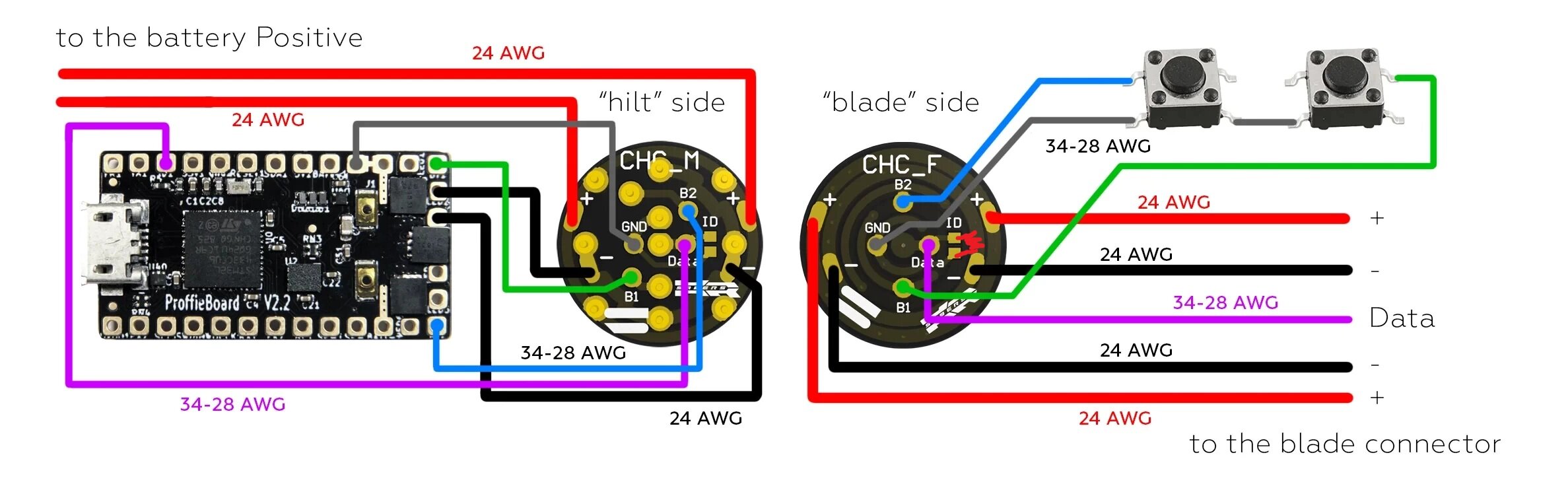
For my physical setup, I was using a chassis with Shtok Rotary NeoPixel & 2 Button PCB Connector Set.

I can confirm that the method of getting blade id to work using this connector set is to connect the two id pads with the resistor of your choice and that resistor will allow blade id to switch to the array you chose in your config.
For me, I used a 2000 ohm resistor, the resistor would be in the part of the chassis that is in the hilt and the removable part of the chassis would not need any resistor,
and in my code:

//ADDED TO TOP SECTION
#define ENABLE_POWER_FOR_ID PowerPINS<bladePowerPin2,bladePowerPin3>
#define BLADE_ID_SCAN_MILLIS 1000
#define BLADE_ID_TIMES 15

//BLADE CONFIG SECTION ABBREVIATED
        { 20000, 
//BLADES  
   CONFIGARRAY(presets),"nb_save" },

     { 10000, 
//BLADES
   CONFIGARRAY(presets1), "nb_save" },


 {2000, //THIS IS THE ARRAY IT SWITCHES TO WHEN CHASSIS IS INSERTED
//BLADES
   CONFIGARRAY(presets2) },

//

This provided me with the correct results. Experimentation was needed for me to set the bootup array when the chassis was out of the hilt. I had to play around with the number used so a warning for anyone trying to get it to work, you’ll probably have to play around with that.

Manual blade array switching also worked with blade id so I wasn’t stuck with just the 2000 ohm blade array when the chassis was inserted.

Image of shtok connector with resistor for illustration:

Bonus thing I learned from a Sabersense post:
if you wanted to use positive as your ground for switches and free up the ground pad for other uses, you’d use this code:

PullDownButton PowerButton(BUTTON_POWER, powerButtonPin, "pow");
PullDownButton AuxButton(BUTTON_AUX, auxPin, "aux");

Thank you Chris of SaberSense

1 Like