Hi! This is my first Proffie build (actually retrofitting an Electrum Sabercrafts saber of mine). I can’t seem to get past a problem where the board keeps telling me “Font Directory Not Found”. I know the spelling and letter cases need to match, so that doesn’t appear to be the issue. I’ve got a Proffieboard v3.9 connected to my laptop with a USB cable through which I was able to program the board. It was loaded with ProffieOS 8.10. I am using Arduino IDE 2.3.10 on Windows 11.
My config file:
#ifdef CONFIG_TOP
#include "proffieboard_v3_config.h"
#define NUM_BLADES 4
#define NUM_BUTTONS 2
#define VOLUME 1000
const unsigned int maxLedsPerStrip = 144;
#define CLASH_THRESHOLD_G 1.0
#define ENABLE_AUDIO
#define ENABLE_MOTION
#define ENABLE_WS2811
#define ENABLE_SD
#define SHARED_POWER_PINS
#define BLADE_DETECT_PIN blade5Pin
#endif

#ifdef CONFIG_PRESETS
Preset presets[] = {


   { "TeensySF", "tracks/venus.wav",
    StyleNormalPtr<CYAN, WHITE, 300, 800>(),
    StyleNormalPtr<CYAN, WHITE, 300, 800>(),
    StyleNormalPtr<CYAN, WHITE, 300, 800>(),
    StyleNormalPtr<CYAN, WHITE, 300, 800>(), "cyan"},
   { "SmthJedi", "tracks/mars.wav",
    StylePtr<InOutSparkTip<EASYBLADE(BLUE, WHITE), 300, 800> >(),
    StylePtr<InOutSparkTip<EASYBLADE(BLUE, WHITE), 300, 800> >(),
    StylePtr<InOutSparkTip<EASYBLADE(BLUE, WHITE), 300, 800> >(),
    StylePtr<InOutSparkTip<EASYBLADE(BLUE, WHITE), 300, 800> >(), "blue"},
   { "SmthGrey", "tracks/mercury.wav",
    StyleFirePtr<RED, YELLOW, 0>(),
    StyleFirePtr<RED, YELLOW, 1>(),
    StyleFirePtr<RED, YELLOW, 2>(),
    StyleFirePtr<RED, YELLOW, 3>(), "fire"},
   { "SmthFuzz", "tracks/uranus.wav",
    StyleNormalPtr<RED, WHITE, 300, 800>(),
    StyleNormalPtr<RED, WHITE, 300, 800>(),
    StyleNormalPtr<RED, WHITE, 300, 800>(),
    StyleNormalPtr<RED, WHITE, 300, 800>(), "red"},
   { "RgueCmdr", "tracks/venus.wav",
    StyleFirePtr<BLUE, CYAN, 0>(),
    StyleFirePtr<BLUE, CYAN, 1>(),
    StyleFirePtr<BLUE, CYAN, 2>(),
    StyleFirePtr<BLUE, CYAN, 3>(), "blue fire"},
   { "TthCrstl", "tracks/mars.wav",
    StylePtr<InOutHelper<EASYBLADE(OnSpark<GREEN>, WHITE), 300, 800> >(),
    StylePtr<InOutHelper<EASYBLADE(OnSpark<GREEN>, WHITE), 300, 800> >(),
    StylePtr<InOutHelper<EASYBLADE(OnSpark<GREEN>, WHITE), 300, 800> >(),
    StylePtr<InOutHelper<EASYBLADE(OnSpark<GREEN>, WHITE), 300, 800> >(), "green"},
   { "TeensySF", "tracks/mercury.wav",
    StyleNormalPtr<WHITE, RED, 300, 800, RED>(),
    StyleNormalPtr<WHITE, RED, 300, 800, RED>(),
    StyleNormalPtr<WHITE, RED, 300, 800, RED>(),
    StyleNormalPtr<WHITE, RED, 300, 800, RED>(), "white"},
   { "SmthJedi", "tracks/uranus.wav",
    StyleNormalPtr<AudioFlicker<YELLOW, WHITE>, BLUE, 300, 800>(),
    StyleNormalPtr<AudioFlicker<YELLOW, WHITE>, BLUE, 300, 800>(),
    StyleNormalPtr<AudioFlicker<YELLOW, WHITE>, BLUE, 300, 800>(),
    StyleNormalPtr<AudioFlicker<YELLOW, WHITE>, BLUE, 300, 800>(), "yellow"},
   { "SmthGrey", "tracks/venus.wav",
    StylePtr<InOutSparkTip<EASYBLADE(MAGENTA, WHITE), 300, 800> >(),
    StylePtr<InOutSparkTip<EASYBLADE(MAGENTA, WHITE), 300, 800> >(),
    StylePtr<InOutSparkTip<EASYBLADE(MAGENTA, WHITE), 300, 800> >(),
    StylePtr<InOutSparkTip<EASYBLADE(MAGENTA, WHITE), 300, 800> >(), "magenta"},
   { "SmthFuzz", "tracks/mars.wav",
    StyleNormalPtr<Gradient<RED, BLUE>, Gradient<CYAN, YELLOW>, 300, 800>(),
    StyleNormalPtr<Gradient<RED, BLUE>, Gradient<CYAN, YELLOW>, 300, 800>(),
    StyleNormalPtr<Gradient<RED, BLUE>, Gradient<CYAN, YELLOW>, 300, 800>(),
    StyleNormalPtr<Gradient<RED, BLUE>, Gradient<CYAN, YELLOW>, 300, 800>(), "gradient"},
   { "RgueCmdr", "tracks/mercury.wav",
    StyleRainbowPtr<300, 800>(),
    StyleRainbowPtr<300, 800>(),
    StyleRainbowPtr<300, 800>(),
    StyleRainbowPtr<300, 800>(), "rainbow"},
   { "TthCrstl", "tracks/uranus.wav",
    StyleStrobePtr<WHITE, Rainbow, 15, 300, 800>(),
    StyleStrobePtr<WHITE, Rainbow, 15, 300, 800>(),
    StyleStrobePtr<WHITE, Rainbow, 15, 300, 800>(),
    StyleStrobePtr<WHITE, Rainbow, 15, 300, 800>(), "strobe"},
   { "TeensySF", "tracks/venus.wav",
    &style_pov,
    StyleNormalPtr<BLACK, BLACK, 300, 800>(),
    StyleNormalPtr<BLACK, BLACK, 300, 800>(),
    StyleNormalPtr<BLACK, BLACK, 300, 800>(), "POV"},
   { "SmthJedi", "tracks/mars.wav",
    &style_charging,
    StyleNormalPtr<BLACK, BLACK, 300, 800>(),
    StyleNormalPtr<BLACK, BLACK, 300, 800>(),
    StyleNormalPtr<BLACK, BLACK, 300, 800>(), "Battery\nLevel"}
};
Preset no_blade_presets[] = {
  { "TeensySF", "tracks/mars.wav",
   StyleFirePtr<RED, YELLOW, 0>(),
   StyleFirePtr<RED, YELLOW, 0>(),
   StyleFirePtr<RED, YELLOW, 0>(),
   StyleFirePtr<RED, YELLOW, 0>(),
  "no blade" },

};
BladeConfig blades[] = {
 { 0, WS281XBladePtr<132, bladePin, Color8::GRB, PowerPINS<bladePowerPin2, bladePowerPin3> >(),
    SubBladeWithStride(0, 15, 2, WS281XBladePtr<16, blade2Pin, Color8::GRB, PowerPINS<bladePowerPin2, bladePowerPin3> >()),
    SubBladeWithStride(1, 15, 2, NULL),
    WS281XBladePtr<1, blade3Pin, Color8::GRBw, PowerPINS<bladePowerPin4, bladePowerPin5> >()
  , CONFIGARRAY(presets) },
 { NO_BLADE, WS281XBladePtr<132, bladePin, Color8::GRB, PowerPINS<bladePowerPin2, bladePowerPin3> >(),
    SubBladeWithStride(0, 15, 2, WS281XBladePtr<16, blade2Pin, Color8::GRB, PowerPINS<bladePowerPin2, bladePowerPin3> >()),
    SubBladeWithStride(1, 15, 2, NULL),
    WS281XBladePtr<1, blade3Pin, Color8::GRBw, PowerPINS<bladePowerPin4, bladePowerPin5> >()
  , CONFIGARRAY(no_blade_presets), "nb_save" }
,
};
#endif

#ifdef CONFIG_BUTTONS
Button PowerButton(BUTTON_POWER, powerButtonPin, "pow");
Button AuxButton(BUTTON_AUX, auxPin, "aux");
#endif
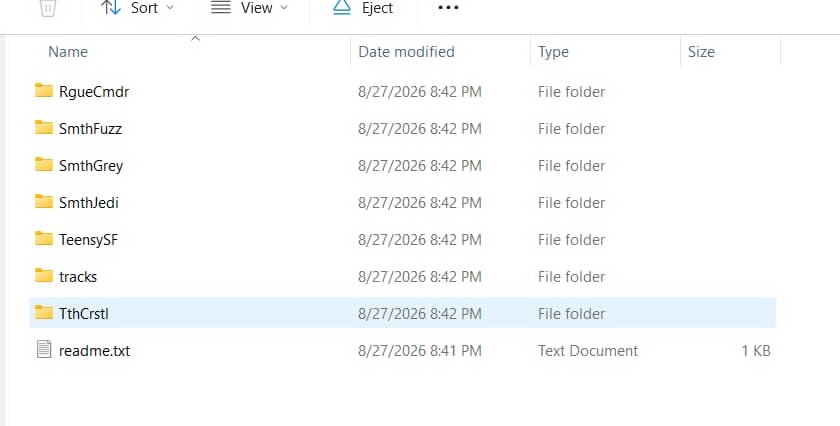
My SD card contents:
I don’t see what the problem is. Can someone please guide me, here? Thanks!!