Hello all hope your well. I’m having trouble trying to edit the crystal chamber on my new saber. Unfortunately, the SD card did not come with the flashed config, but I was able to track down someone who had it. Sadly, when I flashed it after making my edits the crystal chamber comes up only white. I have no idea if it is the style or the pins. I’ve attached the config to the post and a picture of the board. Thank you for the help!
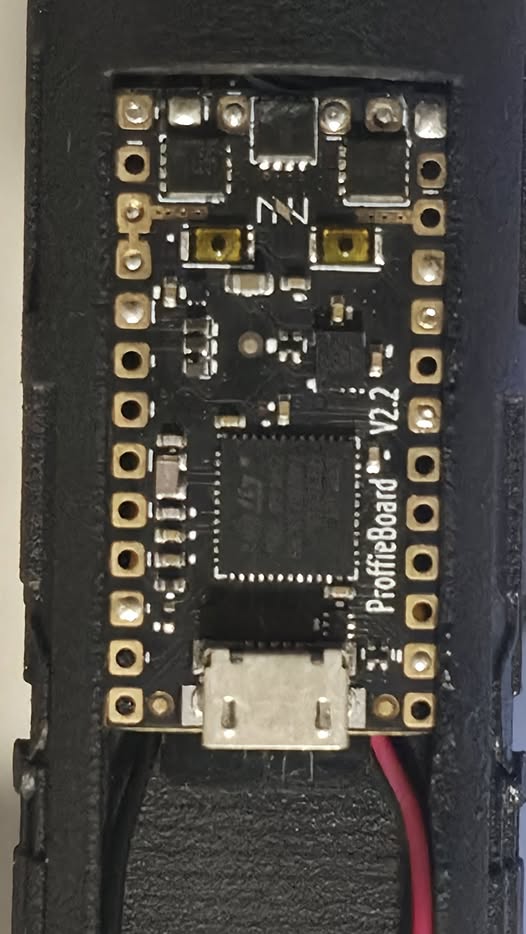
BTW I didn’t change the styles from how they came to me, I just changed some of the defines like the volume and gestures. Also when the hilt first came to me the chamber had the right colors and effects so it wasn’t DOA.
Is it white on all presets or just the first one?
Also you have
#define DISABLE_BASIC_PARSER_STYLES
active, which may mess up the StyleNormalPtr styles on the first preset.
Have you checked the SD card for any save files that might be messing things up? Look for the following filenames on the SD card and if any are on there, delete them:
curstate.ini
curstate.tmp
presets.ini
presets.tmp
global.ini
global.tmp
When you next boot up, the system will create new ones if it needs them.
It’s on all presets. Let me do those real quick.
DISABLE_BASIC_PARSER_STYLES will not mess up StyleNormalPtr()
Only way it can mess something up is if you use the workbench to set presets that use the basic styles, and then update and keep your presets.ini savefile (which is not recommended.)
1 Like
I wonder if maybe the CC Leds are RGBW?
If you change RGB to RGBw for those to blades, does it work better?
Deleted those files and uploaded without the define. No luck unfortunately. Thank you though!
Uh sorry how do I change that? Is that in the blade config?
Yes, you change this:
WS281XBladePtr<1, blade2Pin, Color8::GRB, PowerPINS<bladePowerPin4> >(),
to
WS281XBladePtr<1, blade2Pin, Color8::GRBw, PowerPINS<bladePowerPin4> >(),
Got it. Give me a sec.
No luck. Just flashed it with updated setting and its still white.
I noticed that your first preset uses a yellow-white mix for the CC chamber.
If you change that to Red and Green, does the color of the CC chamber change?
Which part of the style do I change? So sorry I have a very basic understanding of editing configs.
Change this:
StyleNormalPtr<AudioFlicker<Yellow,White>,Blue,300,800>(),
to
StyleNormalPtr<AudioFlicker<Red,Green>,Blue,300,800>(),
Thanks prof.
I knew it was something to do with basic styles, but I thought this:
StyleNormalPtr<AudioFlicker<Yellow,White>,Blue,300,800>(),
would count as one such style, hence DISABLE_BASIC_PARSER_STYLES would…well, disable it.
So is that not what a basic parser style is? I’ve never really used them so forgive my ignorance on it, but curious to know, now that we’re talking about it.
The basic parser styles were “Named” styles that would be preloaded to the board whether they were in the config or not, taking up memory.
DISABLE_BASIC_PARSER_STYLES just leaves them out, but if you include in your config they would still work.
The NamedStyles are found here:
1 Like
I looked at the style you’re talking about and that seems to be just the template not an actual style that’s used on the saber. I did try something else though. I made a crystal chamber from the OS7 library, and I changed the base color to red, changed the upper chamber to that style, uploaded it and when it was done the color isn’t white just yellow. Unfortunately, once I turn it on it goes back to white.
It’s line 44 and 46 in your config file.
line 44 and 46 are just a template from the installer its not actually used I’m pretty sure
Right, I see that they are in a comment now.
This seems to indicate that the lights can change color.
Unless it was just running low on voltage or something.
If you use a very simple style, like StyleNormalPtr<Red, Blue>() does that change anything?