Creepy Uncle V4 Single Color Control Box LEDs (Work on certain blade colors but not others

Hi all,

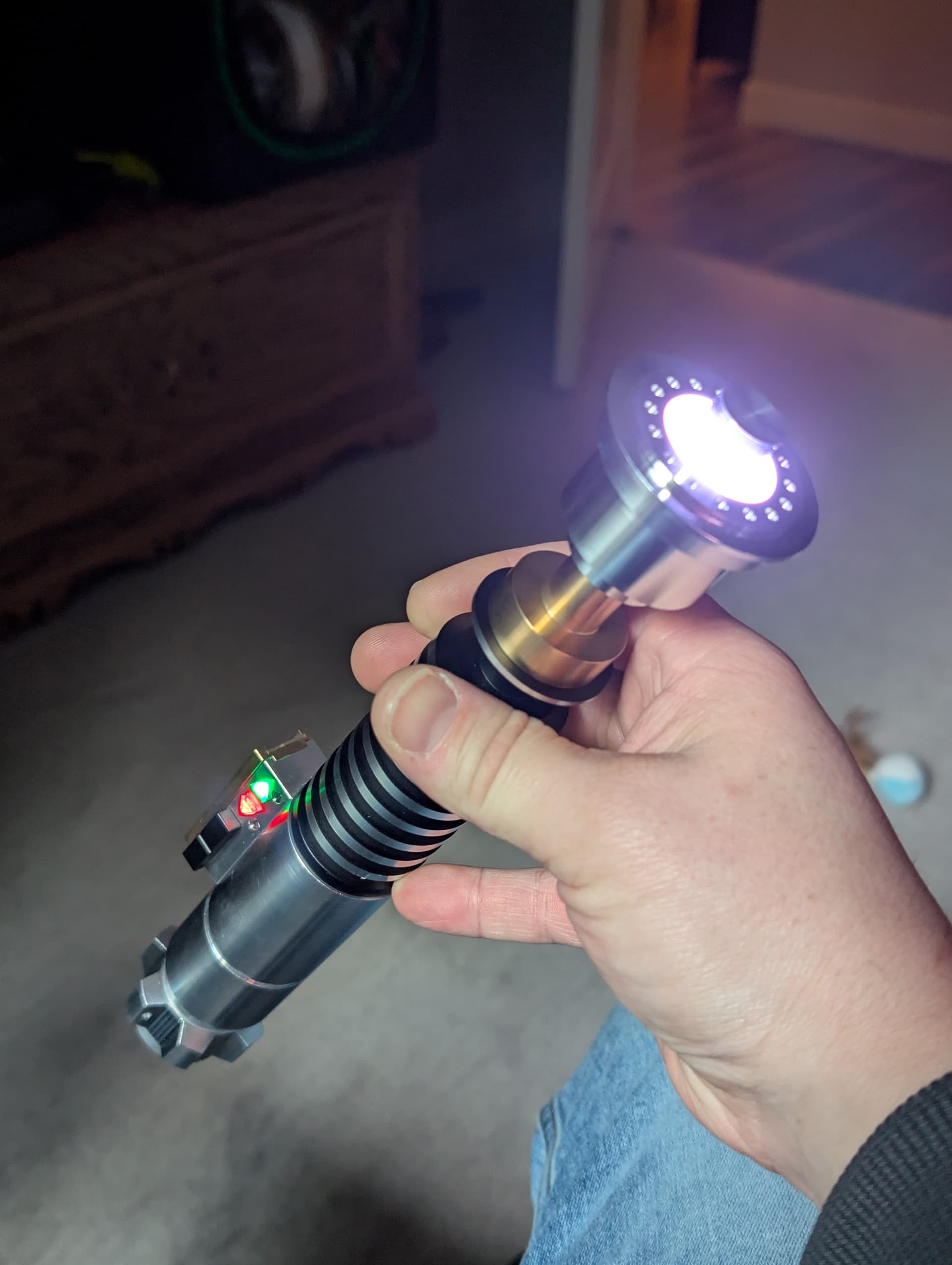
This is my first post and I hope you are all doing well. I just built the Creepy Uncle V4 purchased from Saberbay, first, I love this hilt and the level of difficulty made me feel pretty darn good when I ignited the blade for the first time however; I have a small issue with my control box single color LEDs. I used the Hubbe.net wiring diagram/initial config helper and do think something is missing either from a wiring or config standpoint, maybe both. The control box LEDs are single color and a 68ohm resistor was included and used on the red diode. Below are pictures of the finished install and the wiring diagram i worked off of for the LEDs. I didn’t include all the rotary connectors as all that works perfectly. I am hoping someone is able to help me figure out why the accent LEDs only work with fonts that I have assigned lighter color blade styles set. I used fett263’s config helper per usual on this and I know something is off, whether it be because I wired the single color LEDs in parallel or the blade config. Below is the wiring diagram I slightly modified because I could not find anything to point me in the right direction.
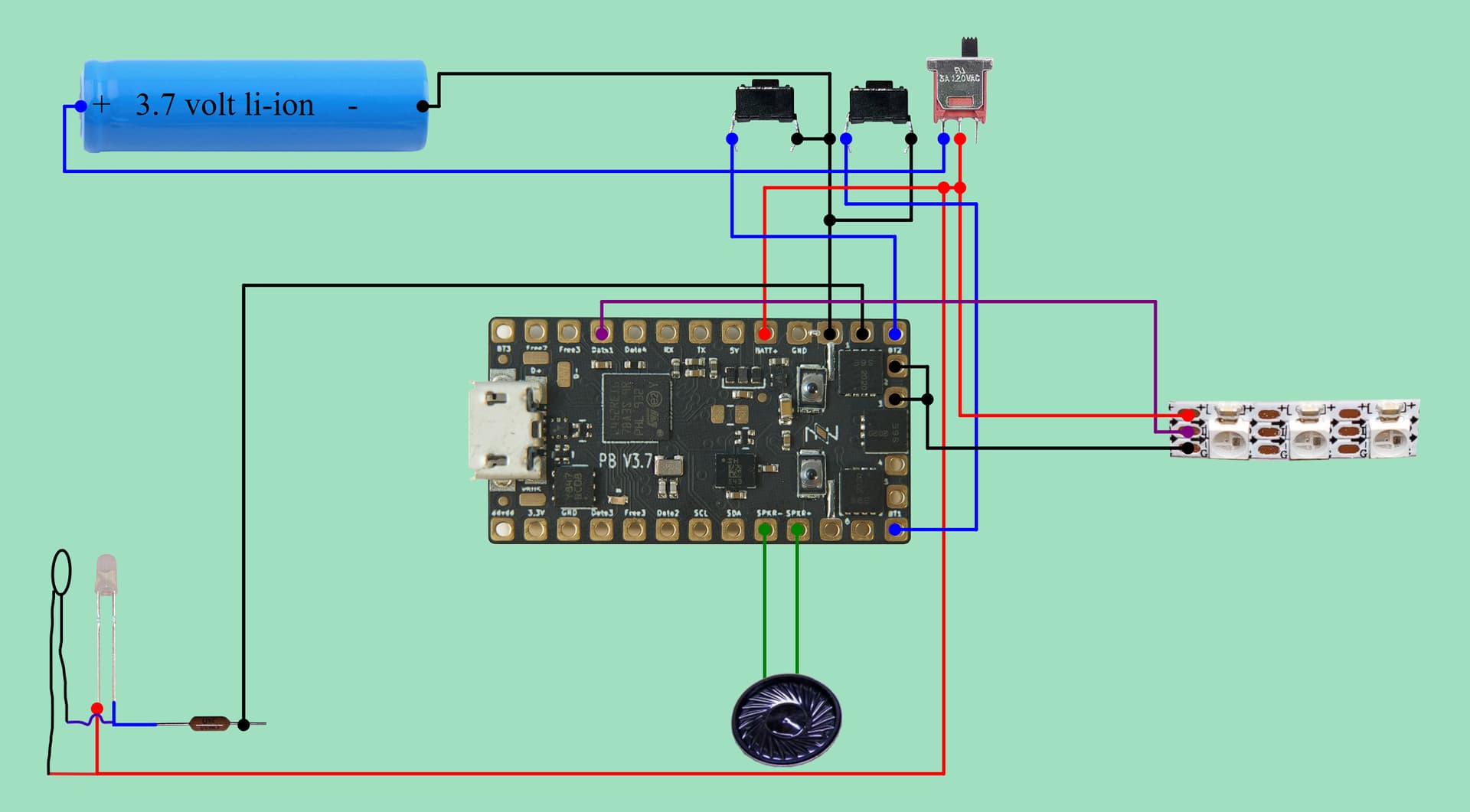
Here is the original blade config: 2 blades (one WS2811/Neopixel at 144 and one single accent using some tricree template)

BladeConfig blades[] = {
 { 0, WS281XBladePtr<144, bladePin, Color8::GRB, PowerPINS<bladePowerPin2, bladePowerPin3> >(),
    SimpleBladePtr<CreeXPE2WhiteTemplate<550>, NoLED, NoLED, NoLED, bladePowerPin1, -1, -1, -1>()
  , CONFIGARRAY(presets) },
};

When I am running a font with IceBlue or White, the accents work, when I run a green, red, or blue assigned bladestyle my accents don’t light up but the blade works fine, I am sure there is a better way. This is only my fifth build and all of the others I have done work great (Simple WS2811/Neopixel with Single LED Neopixel Crystal Chamber,)

I think this is the blade config I need to use and I need some advice on the wiring as I have tried several variations at Hubbe.net and can’t find anything other than the diagram I posted here.

BladeConfig blades[] = {
 { 0, WS281XBladePtr<144, bladePin, Color8::GRB, PowerPINS<bladePowerPin2, bladePowerPin3> >(),
      SimpleBladePtr<CH1LED, NoLED, NoLED, NoLED, bladePowerPin4, -1, -1, -1>(),
      SimpleBladePtr<CH2LED, NoLED, NoLED, NoLED, bladePowerPin5, -1, -1, -1>(),
      CONFIGARRAY(presets) },
};

Here is the saber - I do have the blade style for the Accents set to a single in hilt and that style is applied as the second blade to all 40 fonts I am using.

Your help will be greatly appreciated, I spent hours cruising the Proffieboard manual and I think I have just hit a brick wall. Hopefully I posted all this properly, if not, please let me know where I should be posting this type of help request. Also, being that I am new to the Crucible, I can’t post anymore pictures other than the wiring diagram. Maybe it will let me when the discussion starts.

Kind Regards,

Shane Wymore
Probably best to post your entire config so we can can see the blade styles and other settings.
Use Pastebin here.

Or paste it in full here. Use 3 back ticks before and after like this:

```
your config here
```

It makes your code much easier to read.

Edit: on second read, since you have 40 presets, maybe better to post it to Pastebin. Or trim it down to one or two presets and paste it here.

You can send a message to “@” “discobot” (without the quotes and the space), ask it to “start new user tutorial” followed by “start advanced tutorial”. Completing will upgrade your privileges like post more photos, edit your past post (please add the 3 back ticks before and after your posted blades array), …

Sorry, me again,

Because your two leds are wired in parallel, they count for one blade only. They would also count as one blade if the were wired in series. I believe that you need to wire the neg of the second one to a different pad on your board.

2 Likes

I hope this is the right way to use paste bin and I am pretty sure you are right in your last comment regarding the diodes in parallel, I am so used to using Hubbe.net for wiring diagrams that I could use a little advice on where to land the green diode. Here is my config in Pastebin, I hope that it is public, please let me know if I didn’t use Pastebin properly.

I am actually trying to verify the new blade config and which pads to land the two single color 2-post LEDs. I have become to reliant on the config helper for wiring diagrams.

This would be my new blade config to separate the single leds

BladeConfig blades[] = {
 { 0, WS281XBladePtr<144, bladePin, Color8::GRB, PowerPINS<bladePowerPin2, bladePowerPin3> >(),
      SimpleBladePtr<CH1LED, NoLED, NoLED, NoLED, bladePowerPin4, -1, -1, -1>(),
      SimpleBladePtr<CH2LED, NoLED, NoLED, NoLED, bladePowerPin5, -1, -1, -1>(),
      CONFIGARRAY(presets) },
};

My current blade config is:

BladeConfig blades[] = {
 { 0, WS281XBladePtr<144, bladePin, Color8::GRB, PowerPINS<bladePowerPin2, bladePowerPin3> >(),
    SimpleBladePtr<CreeXPE2WhiteTemplate<550>, NoLED, NoLED, NoLED, bladePowerPin1, -1, -1, -1>()
  , CONFIGARRAY(presets) },
};

Yes your config is accessible on Pastebin.

If you want to have 3 blades like this (I used the 3 back ticks so it displays better on The Crucible)

BladeConfig blades = {
{ 0, WS281XBladePtr<144, bladePin, Color8::GRB, PowerPINS<bladePowerPin2, bladePowerPin3> >(),
SimpleBladePtr<CH1LED, NoLED, NoLED, NoLED, bladePowerPin4, -1, -1, -1>(),
SimpleBladePtr<CH2LED, NoLED, NoLED, NoLED, bladePowerPin5, -1, -1, -1>(),
CONFIGARRAY(presets) },
};

You will also need to change in your config:
#define NUM_BLADES 3
and you will need 3 blade styles in each preset in the same order as your BladeConfig, for example:

{ "Ahsoka;common",  "Ahsoka/font.wav",
StylePtr<ControlHyperResponsiveCuttingEdgeWhite>(), // <- you need to remove the "" from inside ("") in all your presets
StylePtr<InHiltLEDRed>(),
StylePtr<InHiltLEDGreen>(), // <- you need to create this one and add it to your styles at the bottom.
"preset0"
},

Now a question for you: what is the color of those 2 LED ? Is one red and the other green or are they both white but the 2 “windows” in front of them are red and green ? If it is the second case, you might want to create a “InHiltLEDWhite1” and “InHiltLEDWhite2” so they can both flash at a different “rhythm”.

1 Like

This is exactly what I have for an updated config, the LEDs are one Red and one Green. Saberbay included the resistor for the red one but according to the proffie manual I will likely have to add one to the green LED. IDK, I usually use Pixel LEDs and they work great. your config looks identical to the one I updated last night, I created a third style single accent in green. I can see where the pads are in looking at the proffie manual and I think this will take care of the intermittent accent leds. hopefully after I make this change they will work on all of my fonts and not just half. Thank you so much!

I will keep you posted as soon as I finish, then I suppose this could get closed out as a solution has been found but, I will confirm first. I kinda figured it was something along these lines and I just didn’t want to bother anyone. Everyone kept saying join the Crucible and eventually you’ll get it sorted. Thanks again!!!

Here is a pic of everything working on font = Ben

2 Likes

We don’t close threads, but you can mark the most helpful message as a solution for others to find.

You will need a resistance for the green led, but I don’t know how much.

Nice people never bother. There is always someone here to help. I am just trying to give back for all the help I received in the past year since I joined, and most likely more help that I will need in the future.

You’re welcome. Please do not hesitate to come again.

Hey Bud!

I just wanted to say thank you, and one little add here, no resistor is needed for green, don’t know 100% why other than the Proffieboard v2 manual stated no resistor needed and that explains why saberbay only included the 68ohm resistor for the red diode. You really helped me out here, I did have some silly syntax errors that were glaring right at me but, all is well. I was even able to get the cave scene to work on power up and down (I really don’t care for it). Most importantly, I learned a lot about accent LEDs today. You sure helped a guy out, next build is the LS6 Gullwing that Korbanth was selling back in 2018 and 2019 (absolutely love that hilt and I am printing the core for it now. I do have to wait for the updated Control Box Helper Board with 1.3mm charge port in order to get it completed, but thanks to you and the Proffie Manual, I am feeling really comfortable. Have a really good evening and an even better rest of the week!

2 Likes