Good afternoon!
I built myself a KR sabers Regiis with the Eco CC chassis and Proffie v3.9 board.
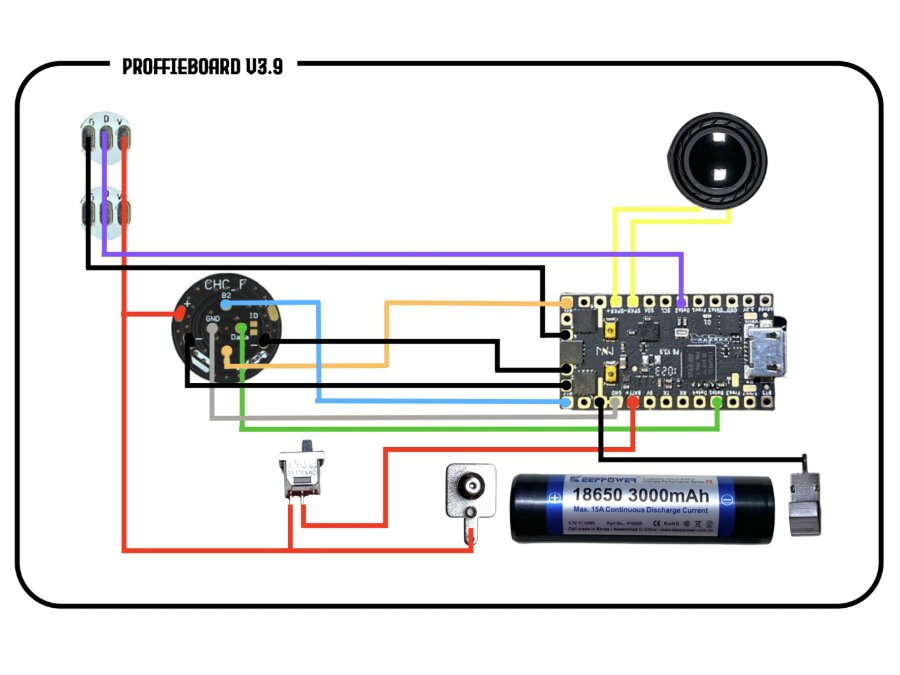
I followed the wire diagrams from The Saber Armory and wired the Crystal chamber LEDS separately onto the Board.
I’m not great with code, and I did download the Ardunio IDE and recommended driver for my Mac laptop (i have a windows PC as well to try to go into the config files and adjust things. I don’t want to brick my board so some help would be appreciated.
Welcome to The Crucible,
It might be easier for us to help you if you would post a copy of the wiring diagram that you followed. I am definitely not familiar with every saber from every sellers and all the possible wiring diagrams.
Which pads did you use ?
It is possible to temporarily “brick” a Proffieboard with a bad config.
It is possible to permanently brick a Proffieboard with a short (magical blue smoke, because it’s “notoriously hard to put back in”  ) or a physical/mechanical damage (like scraping a component off, with a screw driver/pliers/rogue screw or similar)
It is impossible to permanently brick a Proffieboard with a bad config.
To recover from a bad config:
So if you don’t short anything or mechanically damage a component, then you should not be able to permanently brick your board.
Do you have a question for us ? Other than “some help” ! It’s a bit vague. There are many knowledgeable people here but without a specific question, it will be very hard to give you a specific answer.
1 Like
Soldered the data wires to Data2 on the proffie board.
You might probably want to create your first generic config here:
Then you can post your config here using the 3 back ticks method, like this:
```
your config here
```
then we can see if your config matches your wiring
I tried adding and am getting the errors below. Also, I know nothing of programming or really coding.
/Users/backup/Downloads/ProffieOS/ProffieOS.ino:39:2: error: #error Please set CONFIG_FILE as shown above.
39 | #error Please set CONFIG_FILE as shown above.
| ^~~~~
/Users/backup/Downloads/ProffieOS/ProffieOS.ino:45:10: error: #include expects “FILENAME” or
45 | #include CONFIG_FILE
| ^~~~~~~~~~~
/Users/backup/Downloads/ProffieOS/ProffieOS.ino:669:10: error: #include expects “FILENAME” or
669 | #include CONFIG_FILE
| ^~~~~~~~~~~
/Users/backup/Downloads/ProffieOS/ProffieOS.ino:673:10: error: #include expects “FILENAME” or
673 | #include CONFIG_FILE
| ^~~~~~~~~~~
/Users/backup/Downloads/ProffieOS/ProffieOS.ino:677:10: error: #include expects “FILENAME” or
677 | #include CONFIG_FILE
| ^~~~~~~~~~~
/Users/backup/Downloads/ProffieOS/ProffieOS.ino:793:10: error: #include expects “FILENAME” or
793 | #include CONFIG_FILE
| ^~~~~~~~~~~
/Users/backup/Downloads/ProffieOS/ProffieOS.ino:1725:10: error: #include expects “FILENAME” or
1725 | #include CONFIG_FILE
| ^~~~~~~~~~~
/Users/backup/Downloads/ProffieOS/ProffieOS.ino:1730:10: error: #include expects “FILENAME” or
1730 | #include CONFIG_FILE
| ^~~~~~~~~~~
exit status 1
Compilation error: #error Please set CONFIG_FILE as shown above.
I figured out the error. I needed to delete // at #define CONFIG_FILE
1 Like
It is called “read the instructions at the top of the file”. FYI most props have text at the top. That text is instruction on how to use said prop file, for example: button commands, sound files supported, sometimes how to add said prop file in your config.
As a beginner in ProffieOS, there is quite a bit of “reading instructions” involved, if you want to learn. A good place to start is the POD (ProffieOS Documentation):
2 Likes
If that’s the case, ProffieConfig might be an easier way for you to configure things.
Like Olivier said, there’s no substitute for taking some time to learn, but ProffieConfig can take care of a lot of the fiddly setup and syntax things. E.g. things like the error you’re seeing right now, which is because you haven’t set your config in ProffieOS.ino
1 Like
Thank you for providing this, I’ll have to give it a good read so I can truly modify my saber.
The error I had was because the ino for Audrino did not default to the configure code due to having “//” at the start of the string.
Once I removed those I was able to push a basic config through and get the lightsaber blade count updated and the crystal chamber LED’s to work.