I just tried that and I’m not getting anything about fonts. Instead apparently motion setup failed. Motion chip timeout , reboot motion chip.
That’s not good. Is it temporary and resolves eventually, or does it keep doing that forever? (If so, I recommend inspecting your SDA/SCL pads for shorts.)
So it seems like I might have burnt something while soldering. I ordered a new board should hopefully be here in time. In the meantime any suggestions about the font directory not being found? Is the issue the way the the files could be laied out on the sd card compared to the config file or is the the issue elsewhere?
That is exactly what is is.
Whatever you have in your presets is exactly what it’s going to look for, in the place you specify in the font search path.
In my case I used the config file that was provided from the manufacturer with the SD which originally didn’t have the second blade could that be the issue because adding the second blade was the only change I did to each preset?
Adding a blade style won’t do anything in regards to your font situation.
It’s pretty straightforward to just open your config in one window, open your SD contents in another. Then just compare exactly what’s on the SD card to what your presets are looking for. Something isn’t there exactly the same way.
Hello, I have been trying to attach a servo to a lightsabe for a project similar to the ones above. I am using a proffieboard 3.9 and using proffie version 8.4. My config file is below:
#ifdef CONFIG_TOP
#include "proffieboard_v3_config.h"
#define NUM_BLADES 4
#define NUM_BUTTONS 2
#define VOLUME 1000
const unsigned int maxLedsPerStrip = 144;
#define CLASH_THRESHOLD_G 1.0
#define ENABLE_AUDIO
#define ENABLE_MOTION
#define ENABLE_WS2811
#define ENABLE_SD
#define SHARED_POWER_PINS
#define BLADE_DETECT_PIN blade5Pin
#endif

#ifdef CONFIG_PRESETS
Preset presets[] = {
   { "KyloRenTLJ", "tracks/KyloRenTLJ.wav",
   StyleFirePtr<RED, YELLOW, 0>(),
   StyleFirePtr<RED, YELLOW, 0>(),
   StyleFirePtr<RED, YELLOW, 0>(),
   StylePtr<Layers<Rgb<240, 240, 240>, InOutTrL<TrInstant, TrInstant, Rgb<20, 20, 20>>>>(),
    "cyan"},
};
Preset no_blade_presets[] = {
  { "KyloRenTLJ", "tracks/KyloRenTLJ.wav",
   StyleFirePtr<RED, YELLOW, 0>(),
   StyleFirePtr<RED, YELLOW, 0>(),
   StyleFirePtr<RED, YELLOW, 0>(),
   StylePtr<Layers<Rgb<240, 240, 240>, InOutTrL<TrInstant, TrInstant, Rgb<20, 20, 20>>>>(),
  "no blade" },

};
BladeConfig blades[] = {
 { 0, WS281XBladePtr<144, bladePin, Color8::GRB, PowerPINS<bladePowerPin2, bladePowerPin3> >(),
    SubBladeWithStride(0, 15, 2, WS281XBladePtr<16, blade2Pin, Color8::GRB, PowerPINS<bladePowerPin2, bladePowerPin3> >()),
    SubBladeWithStride(1, 15, 2, NULL),
    ServoBladePtr<bladePowerPin1>()
  , CONFIGARRAY(presets) },

 { NO_BLADE, WS281XBladePtr<144, bladePin, Color8::GRB, PowerPINS<bladePowerPin2, bladePowerPin3> >(),
    SubBladeWithStride(0, 15, 2, WS281XBladePtr<16, blade2Pin, Color8::GRB, PowerPINS<bladePowerPin2, bladePowerPin3> >()),
    SubBladeWithStride(1, 15, 2, NULL),
    ServoBladePtr<bladePowerPin1>()
  , CONFIGARRAY(no_blade_presets), "nb_save" }
,
};
#endif

#ifdef CONFIG_BUTTONS
Button PowerButton(BUTTON_POWER, powerButtonPin, "pow");
Button AuxButton(BUTTON_AUX, auxPin, "aux");
#endif
Not really sure what I’m doing wrong. the serial monitor is showing no errors, the blade is working fine, and yet I am seeing no movement from the servo. sometimes it I move the servo manually it will jolt around a little bit? there is no pattern to it. I have the servo power connected to BATT, the ground connected to ground, and the signal connected to LED1.
Any idea where my error is?
You probably want to use one of the Free* pins for the servo, not the power pins.
Thank you! this Was hugely helpful, and while the servo now mostly acts how I want it to, it still jitters around a lot. any idea why this could be? video attached
All code besides changing to the free pin is identical
No, I’m not sure why that would be.
It could be something odd about the output signal from the board. (The code is fairly new after all.) Or it could be a problem with the servo, or maybe with the power provided to the servo.
Voltages seem to be pretty stable. One thing I noticed while testing things out is that as soon as the lightsaber goes into Motion Disable mode, the servo stops twitching. does that give you any hints? is there any way that my current blade profile has some sort of flicker built in on accident?
anything else I should look into?
This is probably when it turns the servo blade off and stops sending a signal to the servo.
You could try fiddling with the values here and see if that helps:
Ok, I have tried a LOT of things:
-
known good servo
-
Individual battery just for servo
-
Capacitor
-
Updating Timing in leds.h
-
testing servos in separate Arduino code on other device
-
disconnecting everything but the servo
And I have had functionally no success. updating the Timings in LEDs.h seems to just modify the avg pulse length, therefore adjusting the “zero point” on my servo. it doesn’t have any affect on the pulse variability, which I suspect is the problem. this seems to be a well known issue on Arduino, as per this forum post:
TLDR: caused by voltage instability, timing interruptions, or cheap servos.
I believe I have eliminated the other two, which raises the likely solution:
the code has uninterruptable actions going on that delay the servo’s pulses, making them not exactly the same length, resulting in the servo receiving pulses of varying width, leading to the jitter. based on how much the servo moves, it’s probably on the magnitude of microseconds.
I don’t really understand how your code works, does this assessment make sense at all?
it seems like something that would NOT be easy (or maybe even possible) to fix.
This is not the reason.
It’s possible that the PWM signal is janky somehow, but I don’t use the standard servo library, the signal is generated by hardware (timer in PWM mode) not software. Hardware interrupts should make no difference, because the PWM timer keeps running even when interrupts occur. Also, my logic analyzer seems to think the signal is very accurate.
That said, this is new code, and there may be that some other piece of code is interfering with how this is supposed to work. Please post your exact config file, I will load it on my board and see what the logic analyzer says.
If nothing else, maybe I can make a mode which only sends servo signals when the output value changes. No signal, no jitter, right?
My apoligies.
Here’s my full config:
#ifdef CONFIG_TOP
#include "proffieboard_v3_config.h"
#define NUM_BLADES 4
#define NUM_BUTTONS 2
#define VOLUME 500
const unsigned int maxLedsPerStrip = 144;
#define CLASH_THRESHOLD_G 1.0
#define ENABLE_AUDIO
#define ENABLE_MOTION
#define ENABLE_WS2811
#define ENABLE_SD
#define SHARED_POWER_PINS
#define BLADE_DETECT_PIN blade5Pin
#endif

#ifdef CONFIG_PRESETS
Preset presets[] = {
   { "Fire", "tracks/KyloRenTLJ.wav",
   StyleFirePtr<RED, YELLOW, 0>(),
   StyleFirePtr<RED, YELLOW, 0>(),
   StyleFirePtr<RED, YELLOW, 0>(),
   StylePtr<Layers<Rgb<240, 240, 240>, InOutTrL<TrInstant, TrInstant, Rgb<20, 20, 20>>>>(),

    "cyan"},
};
Preset no_blade_presets[] = {
  { "Fire", "tracks/KyloRenTLJ.wav",
   StyleFirePtr<RED, YELLOW, 0>(),
   StyleFirePtr<RED, YELLOW, 0>(),
   StyleFirePtr<RED, YELLOW, 0>(),
   StylePtr<Layers<Rgb<249, 240, 240>, InOutTrL<TrInstant, TrInstant, Rgb<10, 10, 10>>>>(),

  "no blade" },

};
BladeConfig blades[] = {
 { 0, WS281XBladePtr<144, bladePin, Color8::GRB, PowerPINS<bladePowerPin2, bladePowerPin3> >(),
    SubBladeWithStride(0, 15, 2, WS281XBladePtr<16, blade2Pin, Color8::GRB, PowerPINS<bladePowerPin2, bladePowerPin3> >()),
    SubBladeWithStride(1, 15, 2, NULL),
    ServoBladePtr<blade7Pin>()
  , CONFIGARRAY(presets) },

 { NO_BLADE, WS281XBladePtr<144, bladePin, Color8::GRB, PowerPINS<bladePowerPin2, bladePowerPin3> >(),
    SubBladeWithStride(0, 15, 2, WS281XBladePtr<16, blade2Pin, Color8::GRB, PowerPINS<bladePowerPin2, bladePowerPin3> >()),
    SubBladeWithStride(1, 15, 2, NULL),
    ServoBladePtr<blade7Pin>()
  , CONFIGARRAY(no_blade_presets), "nb_save" }
,
};
#endif

#ifdef CONFIG_BUTTONS
Button PowerButton(BUTTON_POWER, powerButtonPin, "pow");
Button AuxButton(BUTTON_AUX, auxPin, "aux");
#endif
and yes, if you don’t find any issues with this, not sending a signal when not moving would work perfectly for my use-case
I tried this configuration, and the PWM signal looks very clean to me, motion or no motion. As far as I can tell, the PWM signal never actually stops with this config, so that’s not why it stops jittering. I’m not sure if that also means that making a mode which only sends signals on change wouldn’t help or not.
Reading back I see that you tried servos with Arduino code on other devices, how did that actually turn out?
Also, I’m watching the video again, there seems to be a green led on your thumb that is flickering, kind of like the servo. What is that?
this does confuse me. I do still think stopping the PWM signal would work, but it might not be the most optimal solution.
I actually burnt out my first servo from overheating, and had to switch to a new one.
I tried both the new and the old servo on an esp32-s3 reverse tft feather, running a simple sweep/pause/sweep code. this seemed to work perfectly with no jitter, but I guess since I was using delay, I wasn’t sending multiple pwm signals at the same position.
the green light is just the green light on the proffieboard, and from the naked eye, (and again I can only look at the new servo maybe the old one was different?) it doesn’t seem to be flickering more than the normal pulsing of that LED when I don’t have a servo attached.
New servo is having the same jitter
Where is + and - on the servo wired to?
Currently, I have it attached to main gnd and the 5v pad. I’ve also tried putting it on the batt+ pad on top of my main neopixel power and that didn’t seem to change anything
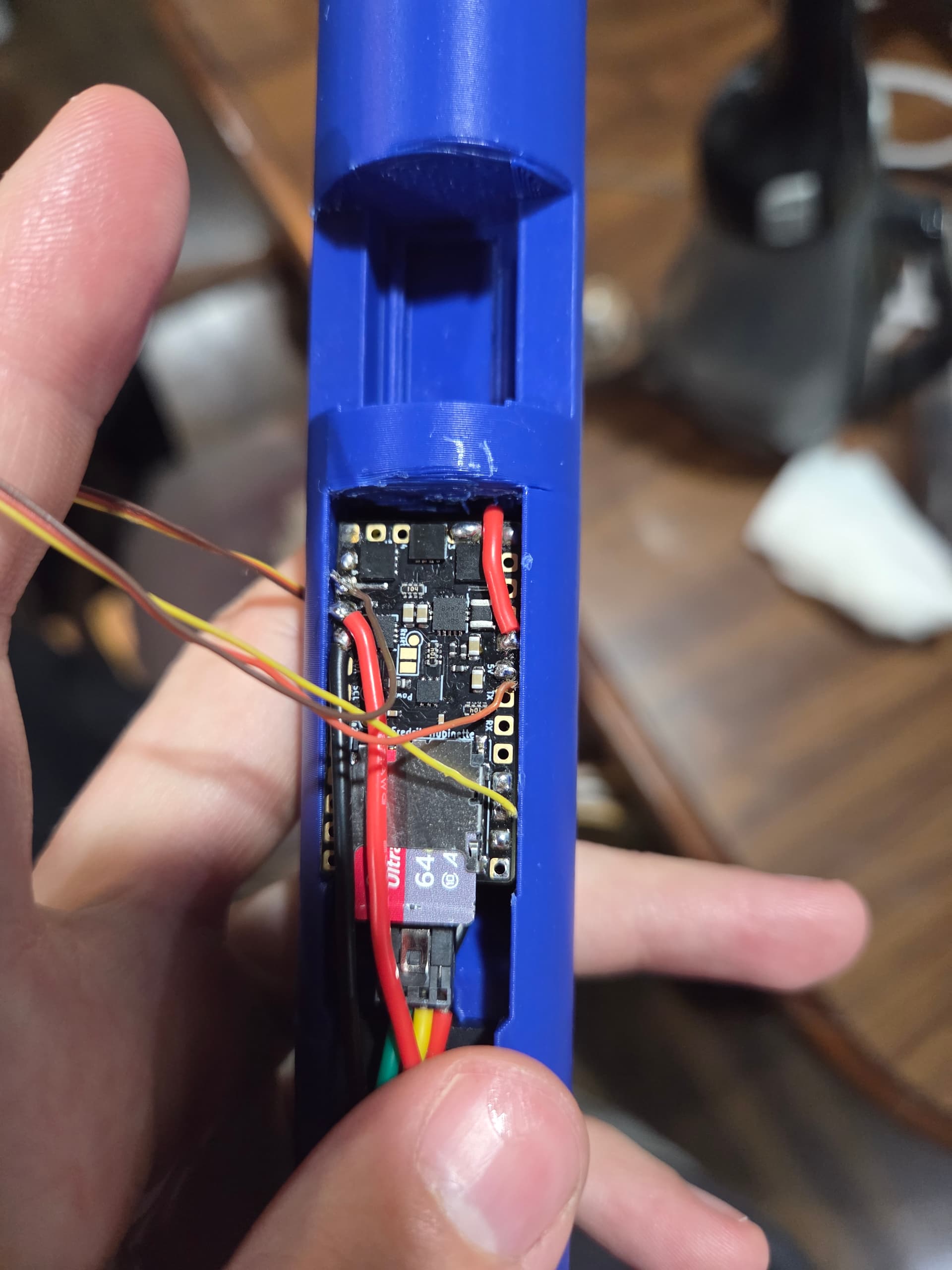
Not sure if using the 5v pad is a good idea, but I think it should work.
Batt+ should be better as long as the servo is ok with the lower voltage.
I tried your code with a servo, and it seems to work for me: