Third Button - I know it works, but should I do it...?

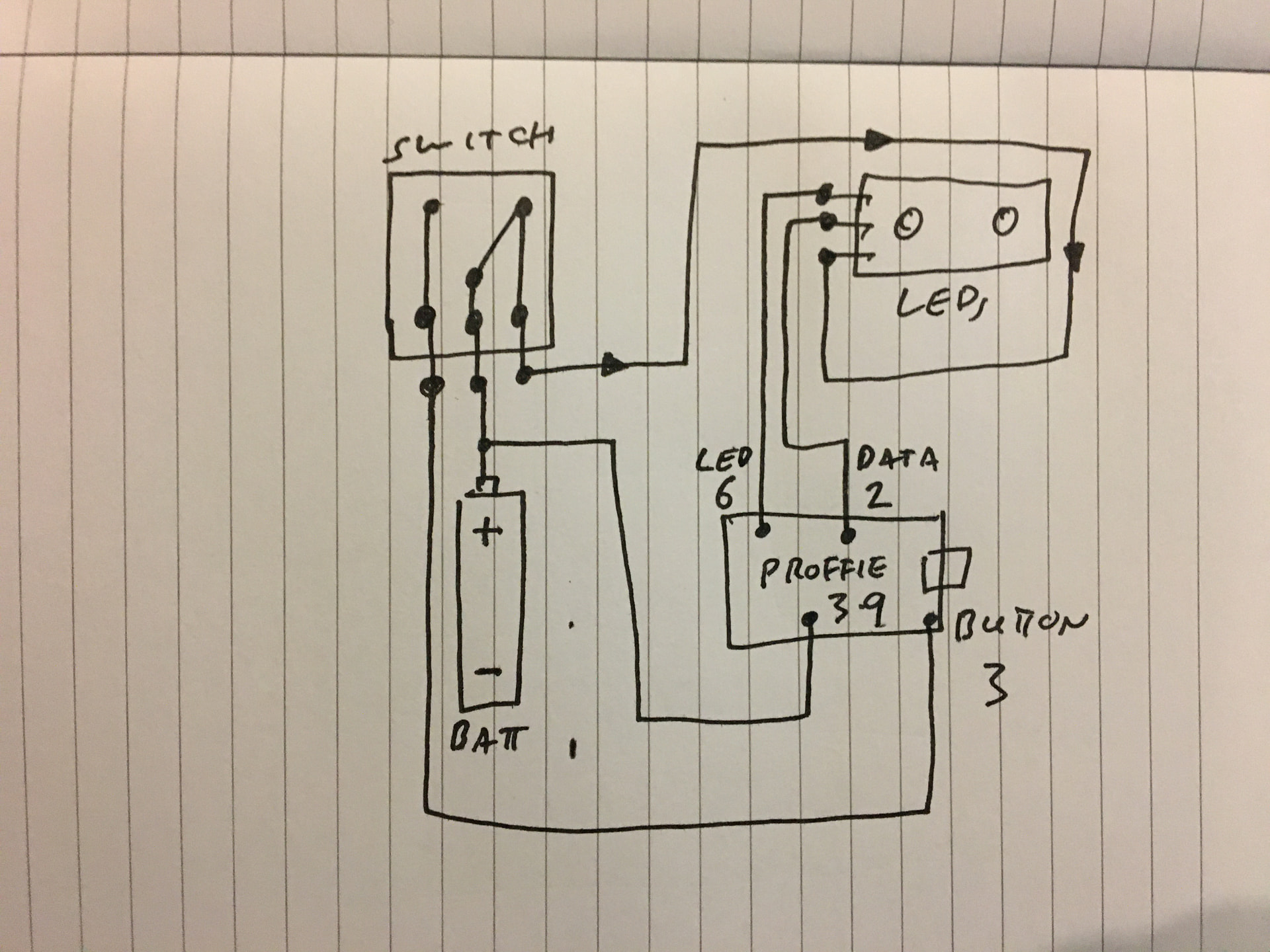
So the project is a Luke Cave Hero hilt, and I want to add a third switch, latching, to the switchbox. With the switch OFF, the switchbox LEDs are OFF, but when you flick the switch ON, it lights the LEDs and also plays the cave scene sound effect.

And I think I’ve found an unconventional way of doing it, which is:

  • Latching switch common to Batt+
  • Latching switch OFF terminal to Button 3
  • Latching Switch ON terminal to Switchbox LEDs positive

(There’s a simple schematic below).

Then I add this near the top of the prop file:

EFFECT(cave);     // for custom 'Cave Scene' effect

And this lower down the prop file:

#if NUM_BUTTONS == 3  // Third button custom cave scene function.
    case EVENTID(BUTTON_AUX2, EVENT_RELEASED, MODE_ANY_BUTTON | BUTTON_AUX2):
      if (SFX_cave) {  // Play Cave Scene sound effect.
        hybrid_font.PlayCommon(&SFX_cave);
      }
      break;
#endif

Then set the config to 3 buttons and add this to the bottom of it:

#ifdef CONFIG_BUTTONS
Button PowerButton(BUTTON_POWER, powerButtonPin, "pow");
Button AuxButton(BUTTON_AUX, auxPin, "aux");
PullDownButton  Aux2Button(BUTTON_AUX2, aux2Pin, "aux2");
#endif

So when saber has the switch in the OFF position, button 3 is effectively pressed and also ‘breaks’ battery positive to the switch LEDs. When you flick the switch, you ‘make’ power to the switch LEDs which also releases button 3 triggering the effect.

I’ve tested it on my Proffie 2.2 test rig and it works - will try a Proffie 3.9 tomorrow, but I assume it should be identical.

My question, given that this is quite an unusual, but very simple, way of achieving this, is there any reason I shouldn’t do it?

Also what happens if at some point in the future, someone reprogrammes the Proffie back to a standard 2 button setup? Will it matter that button 3 is shorted to Batt+ when the switch is OFF?

As always thoughts welcome. :slight_smile:
Thanks in advance. :folded_hands:

Generally, for a latching button, you should use LatchingButton instead of Button or PullDownButton.

LatchingButton only generates different events (LATCH_ON/LATCH_OFF if I remember correctly).

The way you have it wired is a little odd, but it should work just fine.

Yeh, I’ve basically conned ProffieOS into thinking the latching button is momentary but just held down (closed) most of the time. Then the sound effect is tied to that button’s release event (opening). It was just simple way to make the one switch do two things with just a few lines of code. I looked at latching button code but there didn’t seem to be a pull down option, and I needed it to short to positive not negative.

Anyway since all buttons are designed to cope with pull up or pull down voltage, I figured if button 3 was taken out of a future config and basically rendered redundant, ProffieOS wouldn’t care whether it was physically connected to positive, ground or nothing at all. It’s one thing making something work, but I like to make things tamper resistant as well, so that future tinkerers can’t inadvertently damage anything. :slight_smile:

Of course it’s just occurred to me that I could have achieved the same thing using blade detect - as I believe that works shortingt to batt+ just as well as blade neg. Which is actually good to know as it means users can change prop file if they want and still maintain the same functionality.

However the one benefit of my third button method is it makes customization for the casual user easier by permitting logical shuffling of SD card files with no specialist knowledge or re-programming needed. The blade detect solution means you need to know that bladeout.wav is the file that plays the cave scene beeps - my solution has a much clearer cave.wav file that plays the effect.

I guess there’s plenty of ways to skin the same cat in ProffieOS. :slight_smile:

Uuurrgghh!
The best laid plans! LOL!
So it seems it’s not quite as it… er… seems.

With the switchbox LEDs lit, everything works great, but with the switchbox LEDs off, POWER and AUX buttons are unresponsive. Both have the correct voltage at their pads, and the wiring is correct so that the contact closures appear at the board.

I can only assume that because my hack relies on button 3 (the latching switch) being held down with the switchbox LEDs off, that ProffieOS registers that as a button press and is waiting for either another button combination to go with it to do something, or waiting to do something associated with holding button 3 down, but since no event is specified for either of those it just sits waiting and not letting me do anything else.

Effectively I need to go through and edit every button press event to work with and without Button 3 held down. I don’t mind doing it, but I don’t know the exact syntax.

Plan B is to use Blade detect, however this runs into a limitation of my prop which is that it only works with one NO_BLADE array, but since I’m using the array selector to give access to multiple blade lengths, I need that feature with both blade in (switchbox LEDs off) and blade out (switchbox LEDs on) modes.

Update:
Think I’ve fixed it by adding this line shortly after Event 2:

modifiers &= ~BUTTON_AUX2;  // Ignore Aux2 as a modifier.

So far seems to be working. :slight_smile:

1 Like

OK, last question on this one:

It works great, the only issue is that once Idle Off Time kicks in, only POWER and AUX wake the accent LEDs up again - Aux2 for some reason doesn’t.

How can I fix this?

I’m at work as I write this so I can’t test it until later, but I removed the line below from the prop file - would reinstating it sort it? And if not, is there another line I can add to the prop that will do it or would it require a deeper dive into the OS?

case EVENTID(BUTTON_AUX2, EVENT_PRESSED, MODE_OFF):
  SaberBase::RequestMotion();
  return true;

OK, I tried reinstating the RequestMotion lines above, but it still doesn’t power up the FETs again. I can’t see anything in the prop that does power them up with the other buttons, so I’m assuming that cancelling IDLE_OFF_TIME is handled deeper in the system. Which probably means I don’t really wanna go there. :confused:

I have a hilt that does something like this–I wired a 12mm latching switch as a kill switch. When the button is latched, the proffieboard is powered, when it is off, no power. I find it extremely convenient. It’s an illuminated switch, so I can always tell if the saber is powered or not, and I don’t have to open it up to flip a kill switch.

1 Like

This is why you want to use LatchingButton instead of Button.
Latching buttons cannot be modifiers.